

MyHyundai with Bluelink
Screenshots

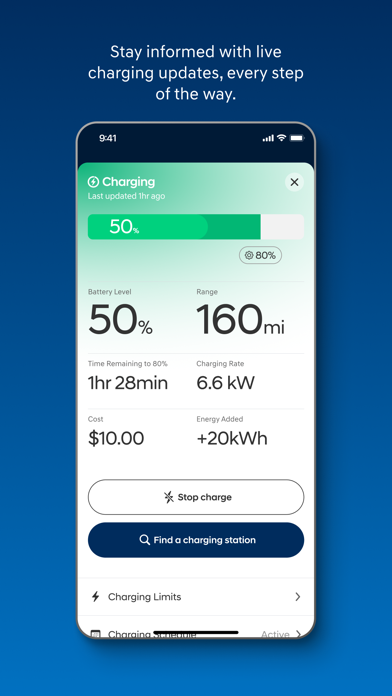


Description
The MyHyundai app makes getting information about your Hyundai vehicle easier than ever. The MyHyundai app allows you to access owner resources, schedule service or connect to your Bluelink enabled vehicle from your phone. Bluelink technology enables and empowers you while you are on the go, giving you access to your Bluelink features from your office, at home, or just about anywhere. Access the app with your MyHyundai.com ID, password and PIN to take advantage of Bluelink’s Remote features. Log in and send commands conveniently using Touch ID and Face ID. An active Bluelink subscription is required to use Bluelink features in the app. To renew or upgrade to either Remote or Guidance, please visit MyHyundai.com. An active Bluelink Remote Package (R) or Guidance Package (G) subscription is required to access select features. Feature support varies by vehicle model. Please visit HyundaiBluelink.com to check what Bluelink features your vehicle supports. With the MyHyundai app you can: • Remotely start your vehicle (R) • Remotely unlock or lock the door (R) • Start your vehicle with saved presets you customize (R) • View charging status, manage charging schedules and settings (EV and PHEV vehicles only) (R) • Learn more about key features with user tutorials • Remotely activate the horn and lights (R) • Search and send Points of Interest to your vehicle (G) • Access saved POI History (G) • Make a Car Care service appointment • Access Bluelink Customer Care • Find your car (R) • Access maintenance information and other convenient features. • Check Vehicle Status (supported on select 2015MY+ vehicles) • Access vehicle features with four phone widgets for Remote Features, Parking Meter, POI search and Ioniq EV vehicle MyHyundai app also supports Apple Watch. Use voice commands or the smartwatch app menu to access select features. With MyHyundai for Apple Watch you can: • Remotely start your vehicle (R) • Remotely unlock or lock the door (R) • Remotely activate the horn and lights (R) • Find your car (R) *Note: Active Bluelink subscription and Bluelink equipped vehicle with capabilities required. The MyHyundai app asks for the following device permissions as needed: • Camera: For adding driver and profile pictures • Contacts: To select from phone contacts when sending secondary driver invites • Location: For map and location functionality throughout the app • Phone: For placing calls when tapping on buttons or links to call • Files: For saving PDFs or other downloaded documents to the device • Notifications: To allow push notification messages from the app • Touch ID/Face ID: For enabling fingerprint and/or face recognition functionality For technical assistance, please contact us at AppsTeam@hmausa.com. Disclaimer: Feature support varies by vehicle model. Please visit HyundaiBluelink.com to check what Bluelink features your vehicle supports.
What's New
• Bug fixes and other improvements
Details
- Developer
- Hyundai Motor America
- Main Category
- Productivity
- Version
- 5.4.2
- Version Release
- 2026-07-07
- Initial Release
- 2014-07-06
- Size
- 306 MB
- Age Rating
- 4+
- Price
- Free
- Languages
- EN
- Bundle ID
- com.hyundaiusa.bluelink2
- Version Rating
- ★ 4.78 (489,290)
- First Seen
- 2026-05-28
Metadata updated 2026-07-19
Rank History
Free · Max 90 days · Top 5 categories shown (Y-axis: rank, lower is better)
Free Rankings
Paid Rankings
No rankings
Competitive Benchmark — Productivity Top 10
What it takes to beat this app — comparison with the category's top apps. The orange row is the current app.
| # | App | Price | Rating | Ratings | Langs | Last Update |
|---|---|---|---|---|---|---|
| 1 | ChatGPT | Free | ★ 4.83 | 8,691,130 | 60 | 2026-07-14 |
| 2 | Claude by Anthropic | Free | ★ 4.72 | 203,603 | 10 | 2026-07-18 |
| 3 | Google Gemini | Free | ★ 4.72 | 2,000,721 | 70 | 2026-07-14 |
| 4 | Gmail - Email by Google | Free | ★ 4.71 | 2,423,439 | 57 | 2026-07-13 |
| 5 | Meta AI | Free | ★ 4.66 | 165,268 | 39 | 2026-07-17 |
| 6 | Grok AI | Free | ★ 4.88 | 1,303,972 | 38 | 2026-07-18 |
| 7 | Google Drive | Free | ★ 4.78 | 7,668,349 | 66 | 2026-07-13 |
| 8 | Microsoft Authenticator | Free | ★ 4.72 | 670,859 | 42 | 2026-06-30 |
| 9 | Microsoft Outlook | Free | ★ 4.80 | 9,075,553 | 47 | 2026-07-13 |
| 10 | VPN - Super Unlimited Proxy | Free | ★ 4.63 | 2,071,251 | 15 | 2026-07-13 |
| 58 | MyHyundai with Bluelink | Free | ★ 4.78 | 489,290 | 1 | 2026-07-07 |
User Reviews
Great smooth ride, roomy- our first electric car- over 300 miles on a full charge. Life is good!
When I first got the car the app worked great. Now it’s slow and often freezes. I cleared the cache one all the other reasons I thought it might be my phone, but nope. It’s the app. I wish it could go back to how it was.
That would be nice if you could get the Climate to start to work. It’s been about a year and it is the most frustrating thing.
The app used to be quick and quite reliable. For the past 5+ months that changed, it crashes very regularly for no apparent reason. I have a 24 Ioniq 5 and I used to be able to use the app for remote climate control in the past summer successfully, turn to this year, not so much. App is very slow and then crashed without any error message, I understand that cellular connection might get in the way, but then say so, not crash. I love the car, if my lease weren't up for another 11 months, I'd get rid of it now, it's that bad. I've reported this before and no change, very disappointed
Can’t get the start time on remote anymore ?also would like to remote start to last at least 15 minutes due the cold weather in the Illinois USA inte winter the 10 minutes doesn’t warm up the car enough!
Everything was amazing, 2 months ago the app stop working I can’t turn on the AC , I talked to the agent four times nobody can help, weird things happen!!
Terrible app considering the monthly cost. Half the time it doesn’t work because you have to wait to pull down and refresh the app before anything works. Absolutely ridiculous.
For the most part this app is great, but it does have issues. It’s VERY slow no matter if you’re on WiFi or data, it freezes and crashes frequently- I haven’t been able to clear the notifications in days because it keeps crashing. Climate start only sometimes works, but sometimes it claims it did but never turns on. The sluggishness of the app is the most frustrating part to me.
I used to love this app now the heat and ac refuse to work when I remote start. Used to work great but after several app updates it fails every time. So frustrating
I’ve asked corporate before, but nobody cares. Anybody else notice the six buttons? The last one is halfway off the screen. Even a beginning programmer could fix this. And BLUELINK is free (included) for 2024 and newer cars. Mine is a 2022 and they want to gouge me $300/year. SO RUDE. Damn corporate greed!
The app started sending me a low fuel alert every 5 mins and when I open app it locks up when low fuel alert pop comes up. Can’t clear notifications Pleas fix version
At first, it tells me to make a new account and the application freezes I close it and when I try logging back in it says I have to do guest login and after clicking guest login, my phone was randomly glitching and crash completely my phone. This app has a lot of bugs. Please fix it.
Reviews are collected only for apps with detected changes (new entries or sharp risers).