

eDrawings
🇰🇷 KR LocalizedScreenshots
Description
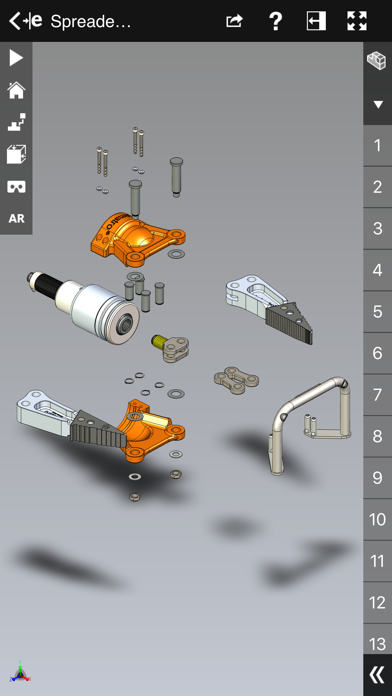
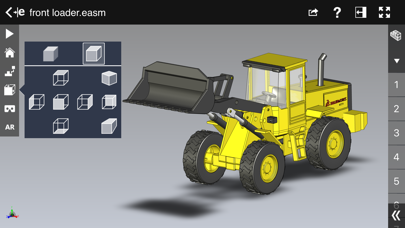
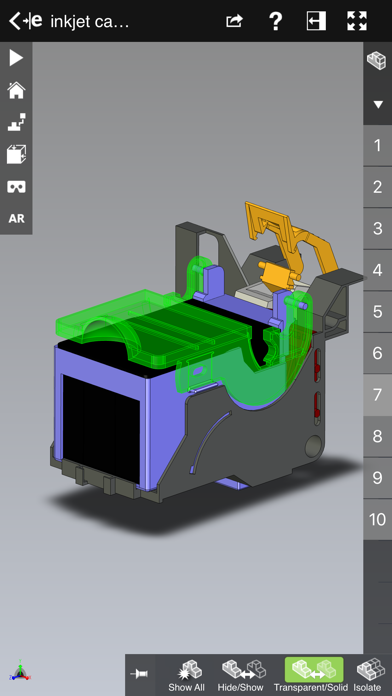
eDrawings® is the only CAD viewer on iPad, iPad mini, iPhone and iPod Touch that allows you to view native eDrawings files as well as native SolidWorks® parts, assemblies and drawings files. In addition, eDrawings allows convenient viewing of DWG and DXF files. eDrawings includes Augmented Reality (AR). This allows you to view your 3D models in 1:1 scale into the real world. By simply activating the device’s camera, you can bring your virtual 3D designs in a real context and see them in situ, sitting on your desk or on your conference room table or even in the palm of your hand, through your iPad, Pad mini, iPhone or iPod Touch’s screen. Move around the room and see your design from any perspective. eDrawings is the email-enabled communication tool that dramatically eases sharing of product design information. You can load and send files via email to collaborate more effectively with everyone involved in product development, including people who are not regular CAD software users to interpret and understand 2D and 3D designs. Multi-touch gestures let you pan, zoom, and rotate models easily. eDrawings also supports configurations, drawing sheets, and exploded views for eDrawings files published from SolidWorks® and all other supported CAD software. Features: * Intuitive and easy-to-use user interface * Visualize your 3D models in real context with Augmented Reality (AR) * Open 3D (EASM, EPRT, SLDASM, SLDPRT, IGES, IGS, JT, STEP, STP, IFC), 2D (EDRW, SLDDRW, DWG, DXF) and associated files from any source: email attachments, cloud storage services (Dropbox™, SkyDrive®, Google Drive, YouSendIt®, and others), web and FTP sites, networks, and iTunes® File Sharing. * Zoom, pan and rotate your 2D or 3D CAD data using multi-touch * Animate 3D standard views as well as 2D drawing views. * Browse your assembly components tree, configurations and drawing sheets * View your designs in full screen and double tap to fit it on screen * Adapt the scale of your 3D model in AR mode * Freeze the background in AR mode with viewpoint lock to prolong AR experience without holding up your device. * Sample files included For more information, visit: http://www.edrawingsviewer.com
What's New
Bug Fixes
Details
- Developer
- Dassault Systemes SolidWorks Corporation
- Main Category
- Productivity
- Version
- 34.2.0057
- Version Release
- 2026-04-16
- Initial Release
- 2012-05-01
- Size
- 185 MB
- Age Rating
- 4+
- Price
- USD 1.99
- Languages
- EN
- Bundle ID
- com.solidworks.edrawings
- Version Rating
- ★ 2.47 (17)
- First Seen
- 2026-05-28
Metadata updated 2026-07-19
Rank History
Free · Max 90 days · Top 5 categories shown (Y-axis: rank, lower is better)
No rank history data
Free Rankings
No rankings
Paid Rankings
Competitive Benchmark — Productivity Top 10
What it takes to beat this app — comparison with the category's top apps. The orange row is the current app.
| # | App | Price | Rating | Ratings | Langs | Last Update |
|---|---|---|---|---|---|---|
| 1 | Parchment: Agenda & Daily Note | USD 4.99 | ★ 4.67 | 6 | 1 | 2026-07-15 |
| 2 | QuickBend: Conduit Bending | USD 6.99 | ★ 4.82 | 3,839 | 0 | 2026-07-16 |
| 3 | Things 3 | USD 9.99 | ★ 4.82 | 27,744 | 9 | 2026-07-16 |
| 4 | Scrivener | USD 23.99 | ★ 4.18 | 2,589 | 10 | 2023-09-29 |
| 5 | Due - Reminders & Timers | USD 7.99 | ★ 4.67 | 2,779 | 17 | 2026-07-01 |
| 6 | Site Audit Pro | USD 12.90 | ★ 4.83 | 10,767 | 1 | 2026-07-15 |
| 7 | Ugly's Electrical References | USD 12.99 | ★ 4.39 | 1,467 | 1 | 2026-06-19 |
| 8 | LineLearner | USD 3.99 | ★ 4.38 | 136 | 1 | 2024-07-13 |
| 9 | Tampermonkey | USD 2.99 | ★ 3.14 | 56 | 26 | 2026-07-17 |
| 10 | iBend Pipe | USD 3.99 | ★ 4.30 | 97 | 1 | 2018-01-02 |
| 30 | eDrawings | USD 1.99 | ★ 2.47 | 17 | 1 | 2026-04-16 |
More by This Developer

User Reviews
오늘 26/1/25 프로버젼 구매했습니다 환불 부탁드립니다
Paid for the app even after reading all the bad reviews. App doesn’t function. I have the free desktop viewer which loads the files fine. This just sits and spins… 0/5 if I could
바로 프로 버전을 구매했습니다. 환불요청 드립니다
金取っといてあり? PCではちゃんと読めてるデータだしサムネは表示されてるよ
Maybe this works well on small models, but this thing completely falls on its face when you try to open up anything remotely complex, even on an M2 iPad.
Solidworks already costs a lot. Even the viewer charges as well. Seriously?
I can't explode in iOS or iPadOS but it's works well in PC with same file
This app is a joke. Owning an automation engineering company that has use SW since 96’ it’s a joke. I wish things worked like they used to. I could say more but it definitely not worth anything. Even if it was free. They just don’t care. As engineers we collaborate and communicate all day long and wish the tools we are forced to use work.
サンプルに入っているsldprtファイルは開けましたが、SolidWorks2020で自作したsldprtファイルは開けませんでした。(そもそも選択できない) 同じファイルをstepに変換したら開けたので、ファイル形式の互換性問題だと思われます。 わざわざ汎用形式に変換しないでもsldprtファイルを閲覧するために購入したのですが、たった250円とはいえ無駄になってしまいました。無償版で試せたら良かったです。
Practical for on the go quick checks
The app just gets stuck rendering a file of 60 mb. What’s the point to have this for .easm files viewer if it doesn’t work! I bought it for opening and viewing files larger than 60 mb, sections of facilities to build that should be effectively discussed when outside the Construction Site. This will never happen using this app.
Funciona perfecto y puedo ver el vídeo de las piezas fabricadas. O 360 grados fácilmente. Gracias.
Reviews are collected only for apps with detected changes (new entries or sharp risers).