

2Do - Todo List, Tasks & Notes
🇰🇷 KR LocalizedScreenshots

Description
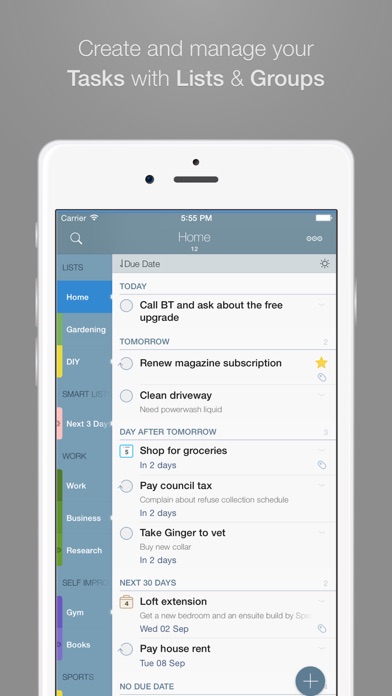
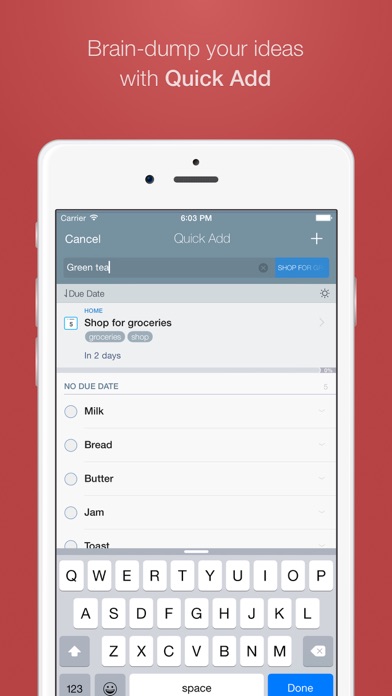
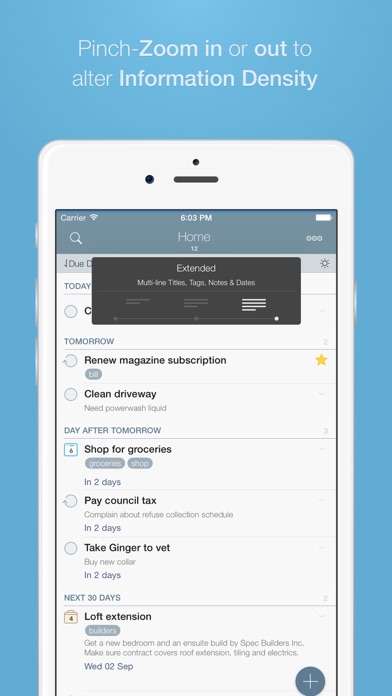
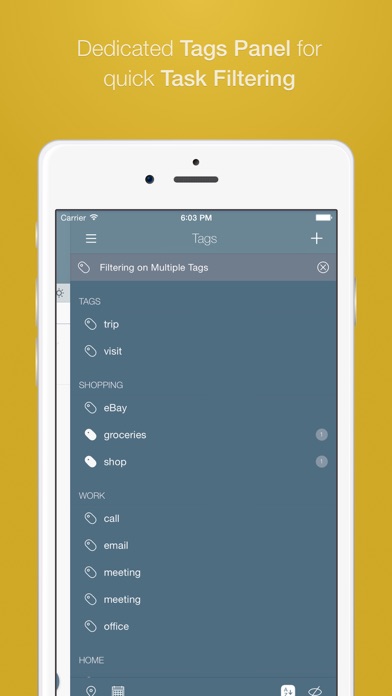
"2Do adapts to my needs, not the other way around. 2Do gets me."- Macstories 2Do lets you take a completely different approach to managing your tasks. With its extremely simple-to-use interface and a comprehensive and flexible set of powerful features, it lets you focus on what's most important to you: your life. There is no wrong way of using 2Do, and unlike other to-do apps, it won't force you in adhering to a particular task management methodology. AWARDS • Macstories: App of the Year 2015 • Apple - App of the week, June 2015 • Apple - Mac App Store “Best of 2013” • “Best App Ever Awards” Winner • Cult Of Mac - 5/5 • Gizmodo "Best app for forgetful people" - Gold Medal PLUGINS: Email to 2Do: Optional plugin that allows you to integrate your email address directly with 2Do, thus allowing you to email yourself tasks from anywhere. You can even use automation, such as IFTTT, to add reminders to your list. SYNC • Stay in sync using one of the following: Dropbox, Reminders (CalDAV), Toodledo, Fruux (CalDAV), Calendar Server (CalDAV), ownCloud (CalDAV), SabreDAV (CalDAV) or a 3rd party CalDAV Server of choice. • Using Reminders CalDAV sync enables Siri • Periodic automatic backups are created for you (compatible with 2Do for Mac) for a rainy day. • Automatic Push sync between devices SIMPLE TASKS, CHECKLISTS & PROJECTS • Create simple tasks, or checklists and projects with sub-tasks. Tasks can have notes, attachments and multiple alarms. • Set any task to repeat using a flexible set of options. • Assign multiple alerts / reminders PASSWORD PROTECTION • Set a lock to the whole app or individual lists LIST GROUPS, LISTS, INBOX & SMART LISTS • In addition to built-in Focus lists that allow you to conveniently view upcoming, starred or scheduled tasks, you can create multiple lists to manage and organize your tasks. • Built-in support for GTD Inbox • Smart lists let you harness the true potential of 2Do using a number of search options, filters and search pre-sets. Using Smart Lists, you can create custom views of your tasks and use them to focus-in or find frequently managed tasks. PINCH ZOOMING • Control the amount of information you wish to see with a simple pinch-to-zoom gesture, from single line titles to multiple lines of titles, notes and tags. BATCH EDITING & SHARING • Drag & Drop support to move tasks between lists or drop on calendar to defer • Batch tagging, starring, marking tasks done and more • Task Sharing via AirDrop, iMessage and Email REIMAGINED TASK EDITOR & QUICK ADD • With focus on switching between editors effortlessly using a single tap only, you’ll save dozens of taps and swipes when editing your tasks. • Save your thoughts as they come to you, by using Quick Add (Tap-hold on [+]) • X-callback-url support TAGS • Manage tags from a dedicated Tags Panel • Organize your tags within groups • Leverage the powerful integration of Tags & Smart Lists to filter on frequently managed tasks. • Find Used vs. Unused tags YOUR TASKS UNLIMITED • Set a Start Date to hide tasks from a list before they're relevant and add Duration to put an estimate on the amount of time you’ll be spending on your task • Add an action to call, write an email or trigger a URL Scheme right from 2Do • Attach an image or a voice note to your tasks • Customizations for time management • Use as an events / party planner, or an effective birthday reminder • Desktop-class Task Manager ALERTS • Attach multiple alerts to each task • Attach locations to tasks and get nearby alerts as you approach assigned locations DESKTOP-CLASS IPAD APP • Everything from Tasks to Calendar Events - all managed from the same screen. • Manage calendar events and schedules • Split-screen support • Keyboard shortcuts EXTRAS • TextExpander support Follow us: Twitter: @2DoApp Facebook.com/The2DoApp Youtube.com/user/The2DoApp
What's New
· Improvements to auto-backup reliability · Improved third party CalDAV sync support · Non-matching projects are no longer shown in search results when Show Sub-Tasks Separately is enabled · Fixed a bug with search inheritance failing to work for checklists · Ongoing stability related improvements
Details
- Developer
- Beehive Innovations Services
- Main Category
- Productivity
- Version
- 3.89
- Version Release
- 2026-04-15
- Initial Release
- 2009-10-15
- Size
- 84 MB
- Age Rating
- 4+
- Price
- USD 9.99
- Languages
- AR, CA, CS, NL, EN, FR and 12 more
- Bundle ID
- com.guidedways.2Do
- Version Rating
- ★ 4.69 (3,717)
- First Seen
- 2026-05-28
Metadata updated 2026-07-19
Rank History
Free · Max 90 days · Top 5 categories shown (Y-axis: rank, lower is better)
No rank history data
Free Rankings
No rankings
Paid Rankings
Competitive Benchmark — Productivity Top 10
What it takes to beat this app — comparison with the category's top apps. The orange row is the current app.
| # | App | Price | Rating | Ratings | Langs | Last Update |
|---|---|---|---|---|---|---|
| 1 | Parchment: Agenda & Daily Note | USD 4.99 | ★ 4.67 | 6 | 1 | 2026-07-15 |
| 2 | QuickBend: Conduit Bending | USD 6.99 | ★ 4.82 | 3,839 | 0 | 2026-07-16 |
| 3 | Things 3 | USD 9.99 | ★ 4.82 | 27,744 | 9 | 2026-07-16 |
| 4 | Scrivener | USD 23.99 | ★ 4.18 | 2,589 | 10 | 2023-09-29 |
| 5 | Due - Reminders & Timers | USD 7.99 | ★ 4.67 | 2,779 | 17 | 2026-07-01 |
| 6 | Site Audit Pro | USD 12.90 | ★ 4.83 | 10,767 | 1 | 2026-07-15 |
| 7 | Ugly's Electrical References | USD 12.99 | ★ 4.39 | 1,467 | 1 | 2026-06-19 |
| 8 | LineLearner | USD 3.99 | ★ 4.38 | 136 | 1 | 2024-07-13 |
| 9 | Tampermonkey | USD 2.99 | ★ 3.14 | 56 | 26 | 2026-07-17 |
| 10 | iBend Pipe | USD 3.99 | ★ 4.30 | 97 | 1 | 2018-01-02 |
| 79 | 2Do - Todo List, Tasks & Notes | USD 9.99 | ★ 4.69 | 3,717 | 18 | 2026-04-15 |
More by This Developer

User Reviews
最近、iCloudのパスワードを変更したため、同期できなくなったが、それを直すための「設定」が出せなくなった。愛用していただけにとても残念。
I bought them all to cheer them on Please support us with updates for a long time I'll be rooting for you. Fighting! Please update me forever Plz~~👏 너무 편하고 좋다!!!!⭐️⭐️⭐️
Please don’t force the new long-tap feature and let users choose it as an option.
This app is one of the best task apps. However, I would like to request an additional feature. Please update it so that tasks can be checked off directly from a small widget like reminder.
업데이트 되면서 항목 추가 버튼이 사라졌어요. 하루빨리 고쳐주세요.
新規タスク登録開始のボタンが表示されなくなり、利用不可能になってしまいました。
ios 18.6.2 새일 생성버튼이 사라졌습니다
화면 우측 하단에 있던 할 일 추가 버튼은 어디로 갔을까요? 할 일 추가하는 방법을 못 찾겠습니다ㅠ
追記 タスクの追加方法がわかりました。 追加したいリストをダブルタップするとタスクの追加が出来ました。 説明がないと分かりません。 ver3.70です。 アップデート後、タスクの追加ボタンが見つかりません。 今まで、タスクの追加ボタンがあった位置には、一括編集ボタンがあります。 どのように操作をすれば良いでしょうか? 至急回答がいただきたいです。
今日のアップデートでタスクの追加ボタンが無くなってしまい、タスクの追加ができない。
期限設定し、期限が過ぎているのにバッチ表示がされない。他の通知も来ない。つまりアラーム機能が働いてない。(もちろん通知は全部許可している) アプリを開いたら、ようやくバッチが反応する。 ToDoアプリとして機能がイマイチ。
Good
Reviews are collected only for apps with detected changes (new entries or sharp risers).