

Label Pics+
Screenshots



Description
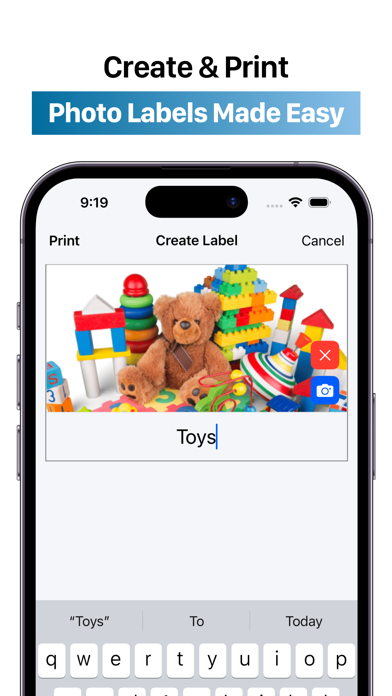
Use your device’s camera to snap photos for your labels, and easily print them from your printer. This intuitive, all-in-one picture-labeling tool makes it so easy, that you'll label everything in sight. ++ HIGHLIGHTS ++ - Clean and modern design - Performant app without Ads - Super Easy and Intuitive Navigation - Add titles to your photos with ease - Capture images with your device’s camera or choose from your photo library - Print just one or as many labels as possible on one piece of paper ++ BENEFITS OF THIS APP ++ - Organize office supplies or craft materials - Design picture labels for early childhood settings - Create personalized photo name tags - Make pocket chart items - Develop picture flashcards for words or sounds - Label classrooms efficiently - Quickly update or change labels in your spaces - Establish permanent records for inventory and insurance purposes - Label boxes for moving or storage - Make tidying up toys fun with name and picture labels - Create schedules, chore charts, and behavior charts with visual cues - Develop classroom visual aids - Provide clear, consistent instructions ++ DON'T BE A STRANGER ++ We have some exciting features coming soon, but you can always email suggestions or write a review for the app. Don't forget to share this app with a friend, because your support will make this app incredible. Contact us: developer@apps4world.com ++ WE CARE ABOUT YOUR PRIVACY ++ Privacy Policy: https://apps4world.com/privacy-policy-apps.html Terms & Conditions: https://apps4world.com/terms-and-conditions-apps.html
What's New
- Added the option to change the font style. - Stability improvements and minor bug fixes.
Details
- Developer
- Apps4World
- Main Category
- Utilities
- Version
- 1.5
- Version Release
- 2026-04-06
- Initial Release
- 2024-08-20
- Size
- 4 MB
- Age Rating
- 4+
- Price
- USD 1.99
- Languages
- EN
- Bundle ID
- com.apps4world.printLabels
- Version Rating
- ★ 3.64 (574)
- First Seen
- 2026-05-29
Metadata updated 2026-07-19
Rank History
Free · Max 90 days · Top 5 categories shown (Y-axis: rank, lower is better)
No rank history data
Free Rankings
No rankings
Paid Rankings
Competitive Benchmark — Utilities Top 10
What it takes to beat this app — comparison with the category's top apps. The orange row is the current app.
| # | App | Price | Rating | Ratings | Langs | Last Update |
|---|---|---|---|---|---|---|
| 1 | Shadowrocket | USD 2.99 | ★ 4.48 | 12,076 | 7 | 2026-07-07 |
| 2 | FORScan Lite - for Ford, Mazda | USD 6.99 | ★ 3.02 | 192 | 7 | 2026-05-09 |
| 3 | Wipr 2 | USD 4.99 | ★ 4.69 | 1,225 | 1 | 2026-07-07 |
| 4 | Goblin Tools | USD 2.99 | ★ 4.77 | 2,951 | 1 | 2023-06-23 |
| 5 | Necrophonic | USD 9.99 | ★ 3.75 | 532 | 1 | 2022-06-19 |
| 6 | Noir - Dark Mode for Safari | USD 2.99 | ★ 4.56 | 1,339 | 2 | 2026-06-29 |
| 7 | Stash - Rule Based Proxy | USD 5.99 | ★ 4.36 | 1,196 | 9 | 2026-07-16 |
| 8 | Necrometer | USD 9.99 | ★ 2.75 | 265 | 1 | 2024-11-02 |
| 9 | IONIQ 5 Companion | USD 12.99 | ★ 4.74 | 47 | 9 | 2026-07-09 |
| 10 | Just Press Record | USD 6.99 | ★ 4.25 | 1,519 | 13 | 2026-05-05 |
| 27 | Label Pics+ | USD 1.99 | ★ 3.64 | 574 | 1 | 2026-04-06 |
More by This Developer

1828 Dictionary - Webster's
Reference · ★ 4.8 (176)

Half-Staff Flag Alerts
Reference · ★ 4.4 (74)

Global Entry Appointment
Travel · ★ 4.1 (70)

EPA 608 Practice - HVAC Exam
Education · ★ 4.5 (19)

FODMAP Coach - Diet Foods
Food & Drink · ★ 4.3 (3)
Cooking Timer+ Multiple Timers
Food & Drink · ★ 0.0 (0)

AFI Library - Publications
Reference · ★ 0.0 (0)

Profit Story+
Business · ★ 0.0 (0)
User Reviews
I use this app to label things in my preschool classroom and really like it. However, I do wish that it had a font available, where the a is ‘correct’ (not double story a) with a normal font. There is a font where the a is correct (single story) but it has a slant/cursive look to it. Having the correct font/lettering is so important in ECE classes!
amazing
Make life easier in my pre k classroom.
The old app is much more user friendly
I can’t adjust the photos.
I don’t like how you can’t edit the photos on this new app. The old app was much easier to work with.
This has made labeling shelves in my PK classroom SOOO much easier!!
I miss the old app. It allowed you to do so much more. For all the teachers out there, the old app was just right. Bring the old app back. Please!!!
This app is not working correctly. I took picture and named them, but it will only print one page at a time. I paid for this app and now I’m wasting time that I don’t have. There is no menu available. Very disappointing.
I used the older version of this app for the last 6 years. I went to open it this week and it was gone. I went to the App Store and found the updated version for $1.99. This update is terrible. There are no directions, the sizes are too small, I can’t change the size and direction of the photos, and printing is much more complicated. Very much miss the old version.
The old version of Label Pics was so user friendly! This is NOT!! Each time I use it I can’t figure out how to edit the text size, and moving/resizing the photo is something I haven’t figured out at all! I am very unhappy with this change.
The old app was so much better. You cannot adjust font, size of font and crop like you used to. There also used to be a way to delete images. Much more complex to use.
Reviews are collected only for apps with detected changes (new entries or sharp risers).