

Blackmagic Camera
🇰🇷 KR LocalizedScreenshots




Description
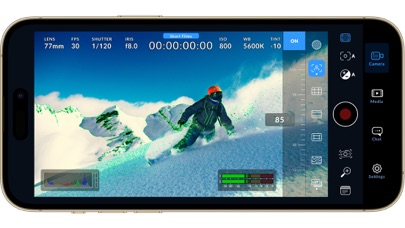
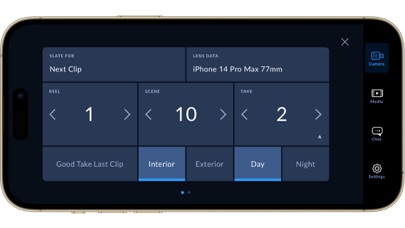
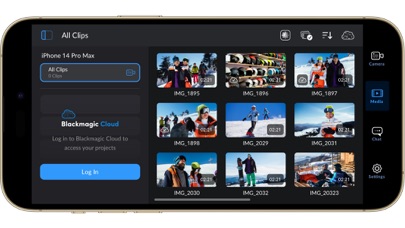
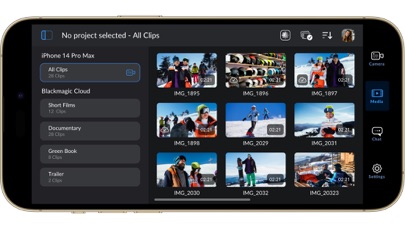
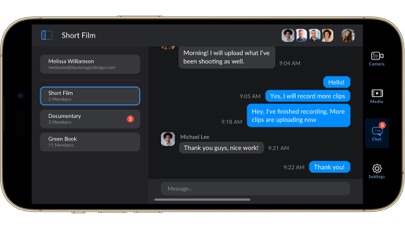
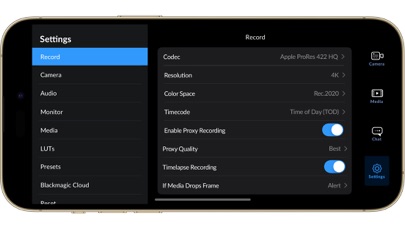
Introducing Digital Film for iPhone and iPad! Blackmagic Camera unlocks the power of your iPhone and iPad by adding digital film camera controls and operating systems! Now you can create the same cinematic ‘look’ as Hollywood feature films. You get the same intuitive and user friendly interface as Blackmagic Design’s award winning cameras. So it’s just like using a professional digital film camera! This means you can adjust settings such as frame rate, shutter angle, white balance and ISO all in a single tap. Or record directly to Blackmagic Cloud in industry standard 10-bit Apple ProRes files up to 4K! Recording to Blackmagic Cloud Storage lets you collaborate on DaVinci Resolve projects with editors anywhere in the world, all at the same time! Get the "Hollywood Look" with Digital Film! Blackmagic Camera puts the professional features you need for feature film, television and documentaries in your pocket. Now you can create YouTube and TikTok content with a cinematic look, and broadcast quality ENG! Imagine having a run and gun camera on hand to capture breaking news whenever it happens! Or use Blackmagic Camera as a B Cam to capture angles that are difficult to reach with traditional cameras, while still retaining control of important settings. Best of all, recording to Blackmagic Cloud allows you to get your footage to the newsroom or post production studio in minutes. Interactive Controls for Fast Setup Blackmagic Camera has all the controls you need to quickly setup and start shooting! Everything is interactive, so you can tap any item and instantly change settings without searching through confusing menus! The HUD shows status and record parameters, histogram, focus peaking indicators, levels, frame guides and more. Show or hide the HUD by swiping up or down. You can auto focus by tapping the screen in the area you want to focus. You can shoot in 16:9 or vertical aspect ratios, plus you can shoot 16:9 while holding your phone vertically if you want to shoot unobtrusively. On Screen Heads Up Display The heads up display, or HUD, controls have the most important camera controls such as lens selection, frame rate, shutter angle, timecode, ISO, white balance, gain and audio levels. You can adjust settings such as exposure by touching the ISO indicator, or you can change the audio levels simply by touching the audio meters. Everything is interactive, so if you tap any item you can instantaneously change its settings without having to search through complex menus! Camera Setup Menus The settings tab unlocks the full power of your phone’s camera, with quick access to advanced settings such as monitoring, audio, camera setup, recording and more! The record tab gives you total control over video resolution and recording format including industry standard Apple ProRes or space efficient H.264 and H.265. Plus, you can set anamorphic de-squeeze and lens correction settings. Professional audio options include AAC and PCM format and VU or PPM audio metering. You can even add external microphones! Or add 3D LUTs to recreate film looks! Media The Blackmagic Camera media tab has all the controls you need to browse or scrub clips for quick review, search and sort and view the upload status of your media. Access your media from Blackmagic Camera’s all clips folder by choosing the Media button to see the thumbnails for each clip you have stored. Plus, you can save to the files folder on the phone, send it to Blackmagic Cloud Storage via Blackmagic Cloud or manually choose which clips to upload to a project library. You can even sync media from Blackmagic Camera directly into the DaVinci Resolve project so you’re ready to edit! Live Sync to Blackmagic Cloud Storage When shooting with Blackmagic Camera, the video you capture can be instantly uploaded as a proxy file, followed by the camera originals, and saved to Blackmagic Cloud Storage. This means you can start editing quickly using your proxies, speeding up your workflow.
What's New
• Camera control with companion app for Apple Watch. • Support for full screen portrait mode HDMI output. • Support for ProRes RAW stabilization in iOS 26.1 and above. • Support for ATEM camera control with Blackmagic Camera ProDock. • Support for Blackmagic Focus and Zoom demands. • Front camera now supports portrait and landscape without rotation for iPhone 17. • Addressed possible issue recording ProRes RAW from front lens. • Addressed preview lag with Blackmagic Camera ProDock as audio source. • Addressed open gate H.264 and H.265 using incorrect bit rates. • General performance and stability improvements.
Details
- Developer
- Blackmagic Design Inc
- Main Category
- Photo & Video
- Version
- 3.3.1
- Version Release
- 2026-04-18
- Initial Release
- 2023-09-14
- Size
- 191 MB
- Age Rating
- 4+
- Price
- Free
- Languages
- EN, FR, DE, IT, JA, KO and 3 more
- Bundle ID
- com.blackmagic-design.DaVinciCamera
- Version Rating
- ★ 4.83 (20,658)
- First Seen
- 2026-05-28
Metadata updated 2026-07-19
Rank History
Free · Max 90 days · Top 5 categories shown (Y-axis: rank, lower is better)
Free Rankings
Paid Rankings
No rankings
Competitive Benchmark — Photo-Video Top 10
What it takes to beat this app — comparison with the category's top apps. The orange row is the current app.
| # | App | Price | Rating | Ratings | Langs | Last Update |
|---|---|---|---|---|---|---|
| 1 | Twitch: Live Streaming | Free | ★ 4.72 | 2,753,564 | 28 | 2026-07-13 |
| 2 | CapCut: Photo & Video Editor | Free | ★ 4.62 | 1,115,327 | 20 | 2026-07-14 |
| 3 | Free | ★ 4.69 | 29,277,967 | 31 | 2026-07-13 | |
| 4 | YouTube | Free | ★ 4.67 | 48,142,765 | 72 | 2026-07-12 |
| 5 | Snapchat | Free | ★ 4.51 | 5,871,779 | 35 | 2026-07-15 |
| 6 | Google Photos: Backup & Edit | Free | ★ 4.83 | 1,439,915 | 39 | 2026-07-16 |
| 7 | Canva: AI Video & Photo Editor | Free | ★ 4.88 | 3,450,878 | 83 | 2026-07-15 |
| 8 | KICK - Live Streaming | Free | ★ 4.65 | 128,873 | 1 | 2026-07-17 |
| 9 | Edits: Video Editor | Free | ★ 4.78 | 68,945 | 31 | 2026-07-13 |
| 10 | PhotoCircle | Free | ★ 4.87 | 117,709 | 1 | 2026-07-16 |
| 21 | Blackmagic Camera | Free | ★ 4.83 | 20,658 | 9 | 2026-04-18 |
User Reviews
表題の通り、縦向きで写して投影したい場合でも以前では使用できていたが、 現在では出来なくなっており、大半が画角外になり横向きに… 撮影後のものは縦になるが、そんなもの写真アプリでできるので… 詳細機能はあるがバラエティ色のある公演では使用出来なくなりました。
Now Every Lut Imported is HEDIOUSLY CYAN PREDOMINANTLY PROCESSED - JEOPARDIZES PROPER BLUE OCEAN & SKY NOT USABLE AT ALL IN BAKING-IN. WHAT HAPPENED TO MIGHTY Black Magic Camera App WE HAVE NEVER EXPERIENCED THIS ABYSMAL BUG !!!!!!!!!!!!!!!! FIX ASAP !!!!!!!!!!!!!!!!
機能的には概ね満足しているのですが、時々挙動があやしいです。iPhone17Proで動画をアプリ内と写真フォルダの両方に記録する設定にしているのですがたまに写真フォルダに記録されてないことがありました。データが見つからない時には自分の撮影ミスだと絶望する前にアプリの「メディア」フォルダを確認してみましょう。
촬영한 영상들을 제 계정 클라우드에 일부 옮긴뒤 실수로 삭제버튼을 눌렀는데 고스란히 다 삭제되어서요.. 이앱은 복구방법이나 휴지통이 아예 없는건가요?
アプリそのものは全く良い出来で申し分ないです。小さい要望で恐縮ですが、動画の再生中に画面の左右スライドで次の動画に切り替えた際、再生を自動的にスタートさせるスイッチがあったらプレビュー時に楽で良いなと思っています。また、純正フォトアプリを使用中にアクションボタンを通じて本アプリを起動させると、UIが不自然にクロップされた状態で起動したり、撮影画面に何も映らず真っ黒な状態になったり、最後にはフリーズしてしまうというバグがあります。静止画と動画の撮影を頻繁に行き来することが多いので、ちょっと確認してみていただけたら嬉しいです。
앱을 지우고 다시 깔아도 촬영 시 자꾸 지 멋대로 종료 되어서 촬영 시 신뢰도가 떨어지는데 저만 이런가요? 와이프 폰(15프로) 에서는 문제 없이 잘 되는데 17프로랑 뭔가 호환이 잘 안되는건가 ㅠㅠ
너무 감사합니다 어떻게 이런 앱을..사랑합니다ㅜ
iPhone側の設定をしてもiPhone 17Proでは日本語にならないバグだと思います。
왜 이제 알았지
좋아요
Muchas opciones de configuración para mejorar la calidad del video y audio .
여기서 영상 찍었는데 아까까지만해도 있던게 지혼자 모조리 삭제됨
Reviews are collected only for apps with detected changes (new entries or sharp risers).