

iFTx
🇯🇵 JP LocalizedScreenshots



Description
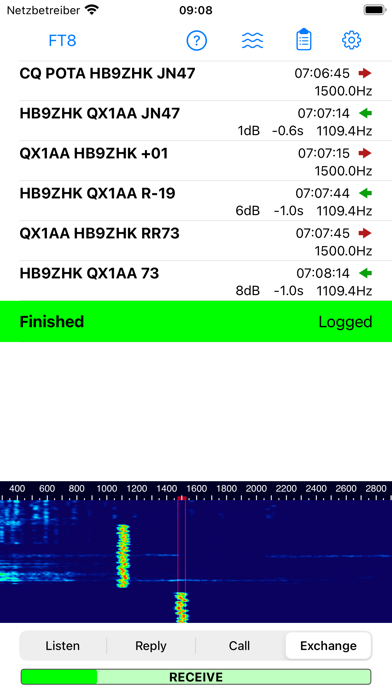
Introducing iFTx: The Essential iOS App for FT8 and FT4 Digital Modes! - Seamlessly Engage: iFTx brings FT8 and FT4 digital modes to your iOS device, enabling convenient and portable digital communication. - Anytime, Anywhere: Enjoy the flexibility to connect with operators globally from the comfort of your iOS device. - Effortless Operation: Navigate the user-friendly interface for quick setup and real-time messaging. - Reliable Performance: Experience clear signals and adapt to changing propagation conditions with ease. - Log Your Success: Keep track of your contacts effortlessly with integrated QSO logging.
What's New
Bugfixes: - The waterfall settings dialog became vertically compressed after being opened a second time, making it unusable. - Country information was missing. - Log export swapped western and eastern longitudes. - The locator was missing in logs from CQ messages. - An occasional crash occurred when opening the waterfall settings dialog.
Details
- Developer
- Christoph Nadig
- Main Category
- Utilities
- Version
- 1.8
- Version Release
- 2025-08-29
- Initial Release
- 2023-09-29
- Size
- 7 MB
- Age Rating
- 4+
- Price
- USD 1.99
- Languages
- EN
- Bundle ID
- com.lobotomo.iFTx
- Version Rating
- ★ 4.14 (65)
- First Seen
- 2026-05-29
Metadata updated 2026-07-19
Rank History
Free · Max 90 days · Top 5 categories shown (Y-axis: rank, lower is better)
No rank history data
Free Rankings
No rankings
Paid Rankings
Competitive Benchmark — Utilities Top 10
What it takes to beat this app — comparison with the category's top apps. The orange row is the current app.
| # | App | Price | Rating | Ratings | Langs | Last Update |
|---|---|---|---|---|---|---|
| 1 | Shadowrocket | USD 2.99 | ★ 4.48 | 12,076 | 7 | 2026-07-07 |
| 2 | FORScan Lite - for Ford, Mazda | USD 6.99 | ★ 3.02 | 192 | 7 | 2026-05-09 |
| 3 | Wipr 2 | USD 4.99 | ★ 4.69 | 1,225 | 1 | 2026-07-07 |
| 4 | Goblin Tools | USD 2.99 | ★ 4.77 | 2,951 | 1 | 2023-06-23 |
| 5 | Necrophonic | USD 9.99 | ★ 3.75 | 532 | 1 | 2022-06-19 |
| 6 | Noir - Dark Mode for Safari | USD 2.99 | ★ 4.56 | 1,339 | 2 | 2026-06-29 |
| 7 | Stash - Rule Based Proxy | USD 5.99 | ★ 4.36 | 1,196 | 9 | 2026-07-16 |
| 8 | Necrometer | USD 9.99 | ★ 2.75 | 265 | 1 | 2024-11-02 |
| 9 | IONIQ 5 Companion | USD 12.99 | ★ 4.74 | 47 | 9 | 2026-07-09 |
| 10 | Just Press Record | USD 6.99 | ★ 4.25 | 1,519 | 13 | 2026-05-05 |
| 45 | iFTx | USD 1.99 | ★ 4.14 | 65 | 1 | 2025-08-29 |
User Reviews
I have used iFTx with a QMX+ doing a POTA, and it worked well. I cannot use iFTx with my mobile IC-7100 because ICOM does not support VOX on USB.
Love this. Have it on all my iOS devices and use it regularly. Would love to see FT2 incorporated into it.
It is rare that we have an application that works so phenomenally well out of the box with a radio. I’m using an FT – 891 with a DigiRig 891 and this application just works. Even better, I have a QMX QRP rig with a chameleon off-center fed dipole for backpacking trips. This set up this app on my iPhone make it for ultra portable operations. My question to the developer is this. Can you please try to figure out how to do JS8CALL or Winlink just like iFTX. That would be an absolute game changer! Keep up the great work.
App works in a basic sense, but needs basic CAT to trigger the PTT for RX. A USB-C cable betewwen the iPad and Xiegu x6200 results in audio going back and forth but you have to trigger the PTT manually. Less than ideal. One of the advantages of radios like this is the built in sound card and USB-C data flow and control. It doesn't have VOX so we're out of luck that way. Note that you can acoustically couple the iPad to the radio by simply setting the two near each other. The iPad decides the sound out of the radio speaker just fine, and the radio accepts the sound from the iPad, but only if you keybtge handset manually at the correct moment.
It doesnt work over bluetooth or cable. It inly works using iphones microphone.
This app works great. Use with Icom-7300, Signalink, and Ipad. This setup replaces HRD and PC. iFTx has no import capability so can’t use it for my master logbook which contains 8,500 contacts. Ham-Toolbox contains my master logbook. With this setup, iFTx can’t “see” which contacts I have already worked. ADI file import function would really be a plus for a really great product!
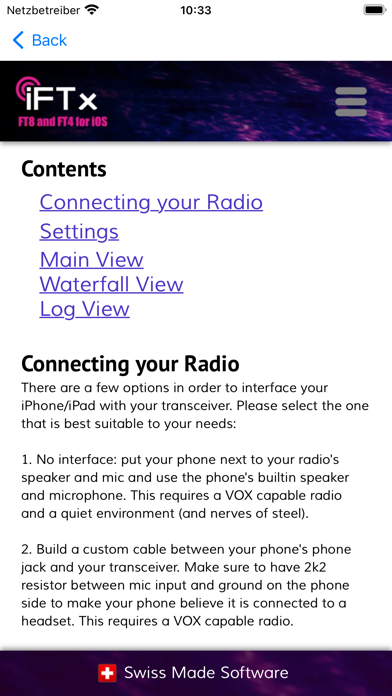
I cannot find the manual as shown in the screen grabs.
Can’t get it to TX with a digirig and a g90 on either my iPad Air 5th or iPhone 16 pro
Tried on my FT991 and kenwood ts690 with digirig doesn’t activate PTT absolutely no instructions whatsoever on how to use with these radios. Update: set your ft991a vox input to data and vox on F M-list on menu then it will work.
Being new to FT8 this app was easy Just wish it had an option to call different CQ for POTA or QSO parties that would make it more better but love the app and for what it does . Super happy
Reviews are collected only for apps with detected changes (new entries or sharp risers).