
Randominder | Routine Hacker
Screenshots


Description
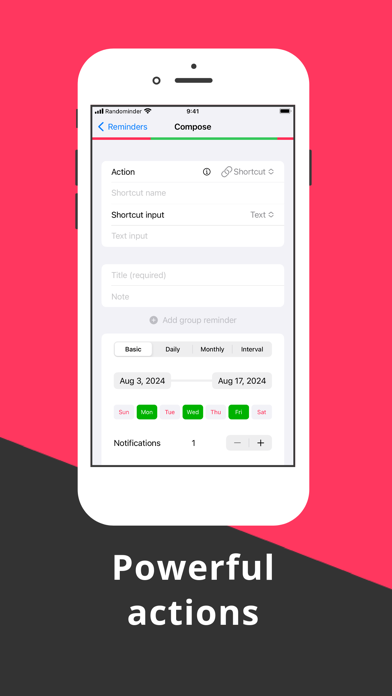
Looking to shake up your routine and break bad habits? Say goodbye to predictable reminders and hello to Randominder! This unique app allows you to customize your reminders like never before. You can set time slots for when you want to be reminded and filter out specific days that don't fit your schedule. Whether you want to remind yourself to quit smoking, start journaling or take a much-needed break, Randominder has got you covered. But that's not all. You can even set up daily reminders with affirmations or surprise yourself with a memo next month. And the best part? You can connect reminders to Actions, like composing emails or texts, making phone calls, or even triggering shortcuts. It's like having a personal assistant in your pocket! With Randominder, you can also schedule a list of reminders for more variety. And when it's time for a notification, its contents will be randomly selected from your group. Plus, setup is a breeze. Simply choose between Allow and Block mode and set your sleep schedule to avoid being reminded at night. So why settle for boring reminders when you can have Randominder? Download now and start living your best, most mindful life. And don't forget to follow @randominder_app on Twitter for updates. Thanks for stopping by!
What's New
Small improvements
Details
- Developer
- Dana Sami
- Main Category
- Productivity
- Version
- 2.8.1
- Version Release
- 2024-04-01
- Initial Release
- 2021-07-20
- Size
- 6 MB
- Age Rating
- 4+
- Price
- USD 3.99
- Languages
- EN
- Bundle ID
- com.danasami.Randominder
- Version Rating
- ★ 4.33 (12)
- First Seen
- 2026-06-23
Metadata updated 2026-06-23
Rank History
Free · Max 90 days · Top 5 categories shown (Y-axis: rank, lower is better)
No rank history data
Free Rankings
No rankings
Paid Rankings
Competitive Benchmark — Productivity Top 10
What it takes to beat this app — comparison with the category's top apps. The orange row is the current app.
| # | App | Price | Rating | Ratings | Langs | Last Update |
|---|---|---|---|---|---|---|
| 1 | QuickBend: Conduit Bending | USD 6.99 | ★ 4.82 | 3,789 | 0 | 2026-03-03 |
| 2 | Things 3 | USD 9.99 | ★ 4.82 | 27,669 | 9 | 2026-03-25 |
| 3 | Site Audit Pro | USD 12.90 | ★ 4.83 | 10,547 | 1 | 2026-06-17 |
| 4 | Scrivener | USD 23.99 | ★ 4.18 | 2,578 | 10 | 2023-09-29 |
| 5 | Ugly's Electrical References | USD 12.99 | ★ 4.40 | 1,458 | 1 | 2026-06-19 |
| 6 | Due - Reminders & Timers | USD 7.99 | ★ 4.67 | 2,778 | 17 | 2026-06-06 |
| 7 | Tampermonkey | USD 2.99 | ★ 3.11 | 54 | 26 | 2025-07-09 |
| 8 | Dumbify | USD 4.99 | ★ 2.98 | 206 | 1 | 2024-06-02 |
| 9 | Pythonista 3 | USD 9.99 | ★ 4.46 | 1,512 | 1 | 2023-04-27 |
| 10 | iBend Pipe | USD 3.99 | ★ 4.29 | 96 | 1 | 2018-01-02 |
| 78 | Randominder | Routine Hacker | USD 3.99 | ★ 4.33 | 12 | 1 | 2024-04-01 |
User Reviews
“I’m awake between these times” does nothing. I get reminders while I sleep, which is worthless.
The app works well and generates reminders randomly per user specifications. But it advertises the ability to execute shortcuts, and I can't figure out how to use this feature. And there is absolutely no support information or tutorials on this app anywhere I can find online. When I try to add a shortcut to a routine I am given the option to use either "Text" or "Clipboard", and I have no idea how to use that to link to a shortcut. If I can get a reply from the app maker on how to do this I'll increase my rating.
I’m trying to find a way to contact the developer to see if they can make an improvement for me. I work a night time security job where I do checks every 15 minutes on sleeping kids who are in a state of high risk of causing harm to themselves or others. My job is to make sure they stay alive and don’t hurt anyone. The problem is that if I set reminder alarms every 15 minutes, they catch on to the pattern and will misbehave between my 15 minute checks because they know the schedule. I found this app in my search for an iOS app or a clock or something to help me make sure I’m remembering to do at least 4-6 checks every hour but I wanted the time to be split up into random increments so they can’t predict the schedule. This is the perfect app!! I set up 9 separate schedules between 10pm-11pm, 11pm-12am, 12am-1am, etc. The small problem is I can’t schedule something through the last hour of the of the day, 12 am. For the 11pm-12am schedule, the app keeps shifting the time to PM or else adjusting the time I have scheduled. So the closest I can get for that hour is 11pm-11:45pm. To the developer, I work in software too so I know the feeling of getting emails requesting random things from people that doesn’t seem to fit the way the software was intended to be used. As a result their requests can sometimes fall off the side. If you can make this change for me, I’d really appreciate it!! I’m still rating 5/5 because it’s perfect for everything except that 15 minute window between 11:45pm-12:00am
This does exactly what I was looking for. Random reminders and it took me to my shortcuts. I build the shortcut to take me to a google sheet where I could record my energy level to start tracking how I feel at different times of day. Random sampling is the best way to do that and this is a perfect way to get random sampling. Also the support was fantastic!
Reviews are collected only for apps with detected changes (new entries or sharp risers).