

Soro - For Sonos
🇯🇵 JP LocalizedScreenshots




Description
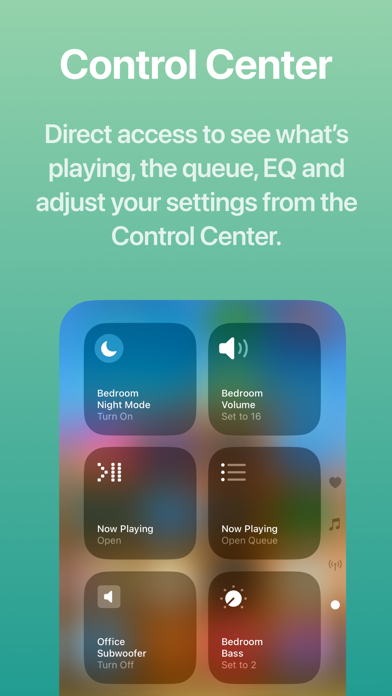
▶ NEW: Soro is now updated with a Liquid Glass redesign, music services support** and extended Apple Music integration, both in-app and in the Shortcuts app. Soro provides modern, intuitive user interface to control your speakers, extends your iPhone, iPad, and Mac with Control Center and Home Screen widgets, Live Activities and 30+ powerful Shortcuts actions. Soro lets you create both quick actions or extensive workflows to control your speakers with the Shortcuts app using widgets, Siri voice commands or automations. ▶ Control Center * Instantly adjust speaker settings from anywhere * One tap to open Now Playing, Queue, and EQ views right from the Control Center ▶ Modern Interface * Modern design that feels at home on iOS and iPadOS ▶ Browse Your Music * Support for Music Services that you already added in the Sonos app (YT Music is not supported currently) * Browse your Sonos Music Library ▶ Extended Apple Music Integration * Add tracks, albums to your Apple Music playlists or favorites (in-app and via Shortcuts action) * Play artist stations * See additional details of albums and artists, such as related items and notes ▶ Learn About What’s Playing * Chat-based web search to explore songs, albums, artists, and more—right from inside Soro ▶ Live Activity, Widgets & Shortcuts * Revamped Live Activity with more controls—jump directly to EQ and queue * Lock Screen, Home Screen & StandBy Mode widgets for instant access * App Shortcuts for Spotlight, Siri, and the Action Button ▶ Speak Text on Your Speakers * Send announcements or media with built-in text-to-speech * Playback resumes automatically when the message ends * Works across supported Sonos speakers* ▶ Shortcuts & Automations * 30+ actions to control your speakers in the Shortcuts app * Build quick actions or extensive automations or integrate with other third-party apps * Examples included in the app to get you started ▶ Available Actions Play - Play Sonos Music - Play Favorite - Play Sonos Playlist - Play Sonos Music Library - Play Apple Music Artist Station - Play URL - Speak Text - Play Audio Clip Queue - Get Queue - Go To Track in Queue - Clear Queue - Save Queue Input/Source - Use TV Input - Use Line-In - Use Queue Playback Control - Control Playback: Play, pause, skip, or seek - Select MP3 Chapte Rooms and Groups - Now Playing - Group/Ungroup - Wake Speaker - Create Stereo Pair - Separate Stereo Pair - Set Direct Connect IP Settings - Sonos Settings: Change speaker or group settings like volume, bass/treble, loudness, speech enhancement, night mode, surround settings, subwoofer settings, trueplay, and more. - Load Sound Preset: Apply a saved sound/EQ preset to a room or its group. - Get Battery Status Alarms - Create Alarm - Update Alarm - Delete Alarm App / Live Activity / Widgets - Open Soro: Open the Soro app to a specific screen (Select, Queue, EQ, or selected Music Service), optionally targeting a room, defaults to currently playing. - Start/Update Live Activity - End Live Activity - Reload Widgets Apple Music - Add Track to Apple Music Playlist - Favorite Track in Apple Music Playlist management - Add Music to Sonos Playlist * Speak Text supported on Sonos One, Amp, Port, Play:5 (Gen 2), Beam, One SL, Move, SYMFONISK (table lamp & bookshelf), and all newer Sonos S2 speakers. ** Currently YouTube Music is not supported Soro is not affiliated with Sonos Inc. nor is it an official Sonos app. Sonos is trademarked by Sonos Inc.
What's New
* User Interface Redesign — Enjoy a visual refresh throughout the app to feel at home on your devices and make controlling your speakers and browsing your music more intuitive * Music Services Support — Now you can access music services in-app and in the Shortcuts app via the new ‘Play Sonos Music’ action. (YT Music is currently not supported) * Extended Apple Music Integration — Add tracks, albums to your Apple Music playlists or favorites (in-app and via Shortcuts action), play artist stations and see additional details of albums and artists. * Revamped Live Activity UI — Redesigned Live Activity for quicker access to essential tools—jump to the EQ, view the music queue and take more actions without leaving your lock-screen or home screen. * Smarter Automations & Actions — More intuitive control and automation options so the routines you love are easier to build. Everything from triggering playback to adjusting sound settings is more logical to configure. 4.1.9: - Live Activity Dynamic Island improvements to allow all interactions that are available via the lock screen activity - Full Live Activity appears in StandBy mode now without causing any activity crash - Live Activity update logic has been improved as well 4.1.8: - Live Activity stability fixes - Added ‘Set Surround Distance’ action - The various 'Play' action’s ‘Set Volume’ option now uses numerical input instead of the slider - Added option to set TV Autoplay and Ungroup On Autoplay via the Sonos Settings action - Ungroup action now returns the ungrouped room(s) - Fixed 'Create Alarm' action crash - Fixed issue where the 'Open Music Service' and 'Open Sounds Settings' actions didn't work properly - Added Find Favorite action. It will allow filtering by favorite type and music service and pass the output to the Play Favorite action. - Fixed SiriusXM issues - Fixed audiobook starting over instead of resuming (where supported, ie. Audible) - Fixed audiobook playback control buttons not appearing properly - Play Favorite action now supports selecting multiple favorites (only queue-able items will be added to the queue). 4.1.6: - Added 'TV Dialog Audio Delay' option to the 'Sonos Settings' action and control center widget - Fixed the 'Speak Announcement' and 'Play AudioClip' actions’ override volume logic - Favorites and playlists order on Soro Home Screen respect sort order set - Fixed 'Update Alarm' action, where weekday alarms didn’t get updated properly - Added selecting Sonos Playlists as an option to the 'Play Favorite' action 4.1.5: - Bug fixes and stability improvements 4.1.4: - Added 'Load Only' parameter to the 'Play' action types - Resolved timeout issues improving overall reliability of discovering speakers - Fixed issue with the Speak Text/Play Audio Clip actions of the clip playing multiple times on already grouped speakers - Updated the order of settings in the Sonos Settings action to make more sense based on usage patterns 4.1.3: - Fixed issue Sonos Radio favorites disappearing - Fixed issue when favorites didn't show up in the Play Favorite action - Added iPad layout improvements - Various other fixes 4.1.2: Improved search experience, grouping/ungrouping and shortcut execution times. Plus various other fixes
Details
- Developer
- Laszlo Gergely
- Main Category
- Utilities
- Version
- 4.1.9
- Version Release
- 2026-05-25
- Initial Release
- 2021-03-02
- Size
- 53 MB
- Age Rating
- 4+
- Price
- USD 7.99
- Languages
- EN
- Bundle ID
- com.LG.PresetsforSonos
- Version Rating
- ★ 4.07 (112)
- First Seen
- 2026-05-30
Metadata updated 2026-06-14
Rank History
Free · Max 90 days · Top 5 categories shown (Y-axis: rank, lower is better)
No rank history data
Free Rankings
No rankings
Paid Rankings
Competitive Benchmark — Utilities Top 10
What it takes to beat this app — comparison with the category's top apps. The orange row is the current app.
| # | App | Price | Rating | Ratings | Langs | Last Update |
|---|---|---|---|---|---|---|
| 1 | Shadowrocket | USD 2.99 | ★ 4.48 | 11,962 | 7 | 2026-06-10 |
| 2 | IONIQ 5 Companion | USD 12.99 | ★ 4.80 | 25 | 7 | 2026-06-03 |
| 3 | Wipr 2 | USD 4.99 | ★ 4.69 | 1,167 | 1 | 2026-06-10 |
| 4 | Goblin Tools | USD 2.99 | ★ 4.78 | 2,931 | 1 | 2023-06-23 |
| 5 | FORScan Lite - for Ford, Mazda | USD 6.99 | ★ 3.02 | 192 | 7 | 2026-05-09 |
| 6 | Noir - Dark Mode for Safari | USD 2.99 | ★ 4.56 | 1,328 | 2 | 2026-06-08 |
| 7 | Necrophonic | USD 9.99 | ★ 3.78 | 524 | 1 | 2022-06-19 |
| 8 | Stash - Rule Based Proxy | USD 5.99 | ★ 4.35 | 1,166 | 9 | 2026-04-01 |
| 9 | V2Box Pro - V2ray Client | USD 2.99 | ★ 4.22 | 27 | 9 | 2026-06-11 |
| 10 | Just Press Record | USD 6.99 | ★ 4.25 | 1,516 | 13 | 2026-05-05 |
| 56 | Soro - For Sonos | USD 7.99 | ★ 4.07 | 112 | 1 | 2026-05-25 |
User Reviews
Apple Watch is unable to run shortcut without asking permission each time
App has more features than most others & looks nice, But man is the performance bad! I wanted to utilize lock screen & volume controls but they are unreliable. Lots of lag, delays, or no response. Constantly needs to be refreshed to work even slightly which is annoying. I requested a refund with Apple, thats how terrible this is. Good idea but needs work.
Possible to have a double wide widget?
For a brief period, the Sonos app allowed you to control playback from your Lock Screen… then it went away. This Soro app now bridges the gap and allows you to do just that- plus a lot more. When I’m hosting people, I’m often skipping tracks, adjusting volume up or down, and each time I’d have to open my phone and get into the Sonos app. Not the biggest of first world problems, but when you are trying to be an attentive host, it’s nice to be on your phone as little as possible. A tap to wake it and a tap to skip, then my attention is back on my guests.
The app description states that you can add the currently playing track to Apple Music Favorites via Shortcuts. Unfortunately this doesn’t work (no supported way to use the currently playing track using Apple Music track URL to favorite or add to playlist. Requesting Refund.
What I liked about Soro was that it WAS one iPad screen, full sized, to manage the volume of all my different Sonos devices, so easy. However, now with the redesign instead of using the full screen, it uses about 1/6 of it, and I have to scroll to see all my speakers and inadvertently tap on something that I didn’t mean to change. I don’t see any settings to adjust either… Going back to the Sonos app 🤨
I have been using it mostly for the shortcuts actions and it has been working flawlessly. It is simple to use, snappy and a joy to use.
I don't want to take my frustration with Sonos/apple/spotify out on Soro. Soro does thes best it can with what Sonos gives it. I got too excited by some online reviews for Soro and was hoping for more but ended up spending $8 for an EQ shortcut. Hoping to someday have a button that just plays my current Spotify session on a group of speakers.
This app accomplishes so many smart tasks that honestly should be available natively through the Sonos app. Since so many smart home functions are lacking in the Sonos app, this is the logical next best thing. It is awesome and more than worth the small price!
Soro simplifies playback on my Sonos system and allows me to set up shortcuts that initiate playback of my favorites and reset my preferred settings like volume and speaker groupings. I highly recommend this app for anyone that wants additional control of their Sonos experience.
Reviews are collected only for apps with detected changes (new entries or sharp risers).