

VN: Photo & Video Editor
Screenshots




Description
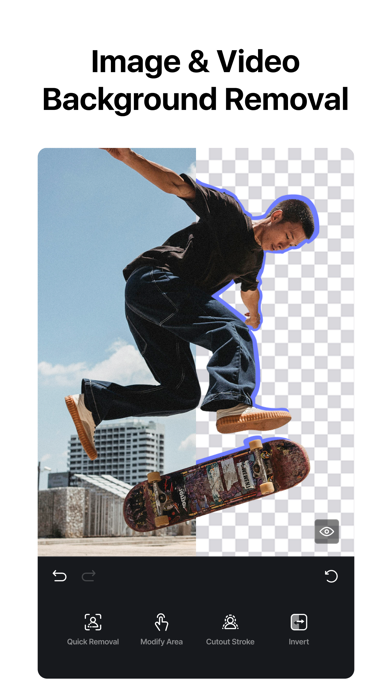
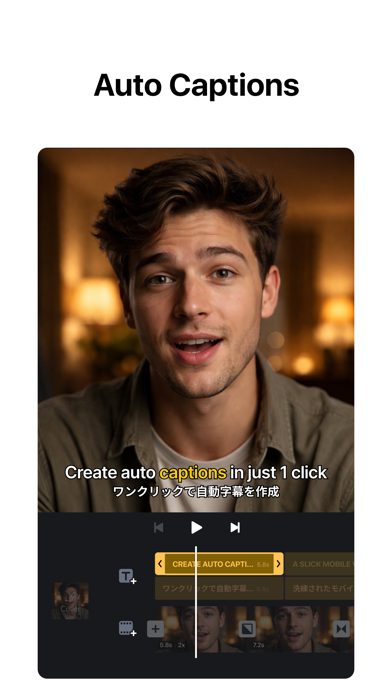
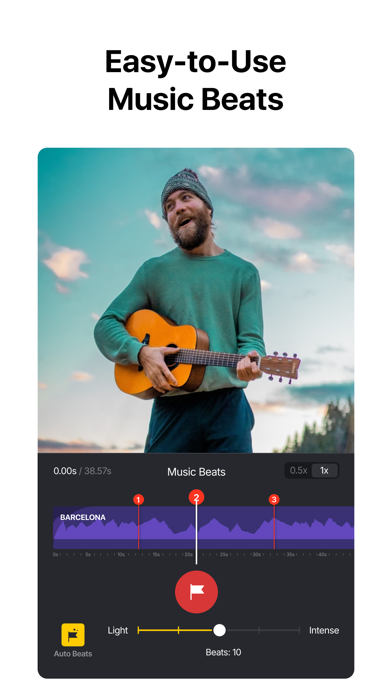
VN: Professional Video and Photo Editing—Free with No Watermark. Edit like a pro with an intuitive multi-track timeline, beat-synced templates, and powerful creative tools. Whether you're a beginner or a professional, VN helps you create high-quality videos and photos with ease. [Smart Tools] • Auto Captions. Automatically generate subtitles from audio—supports multiple languages, subtitle templates, and animated text styles. • Text-to-Speech. Generate voiceovers for your videos without recording. • Video/Photo Cutout. Remove backgrounds from videos and photos in one tap. • Smooth Slow Motion. AI frame interpolation for fluid slow-mo—even when slowing down standard frame rate footage. [Video Editing] • Trim & Merge. Cut clips with frame-accurate precision (0.05s) and merge them into a seamless timeline—with up to 30x zoom. • Overlay. Add overlay videos, photos, stickers, and text on a multi-layer timeline. • Masks. Apply masks to layers for precise, creative compositions. • Reverse, Zoom & Freeze Frame. Play clips backward, add zoom motion, or freeze key moments. • Add Text & Stickers. Customize text and stickers with keyframe animation. • Music & Voice-over. Add music, sound effects, and record voice-overs directly in the app. • Speed Control. Speed up or slow down clips with presets or advanced curve-based speed ramps. • Keyframe Editing. Add custom keyframe animations with 19 built-in effects and adjustable curves. • Beat Editing. Add markers to sync your clips with music beats. • Non-destructive Editing. Save drafts anytime with full undo/redo support. [Filters, Effects & Transitions] • Cinematic Filters & LUTs. Apply built-in filters or import LUTs for a professional look. • Transitions & Effects. Smooth transitions and diverse visual effects for polished edits. [Quick Create] • BeatsClip. Generate beat-synced templates from your video or music—use them in the template or with AutoCut. • AutoCut. Turn your footage into a finished edit automatically—select a BeatsClip template and sync clips to the beat. • Story. Organize clips along a storyline first, then generate your video. • Teleprompter. Read your script while recording talking-head videos—stay on track and never lose your flow. [Templates] • Custom Templates. Create your own templates and reuse them across projects to keep a consistent style and edit faster. • Platform Templates. A rich library for every scenario—talking videos, Instagram Reels, Instagram Stories, Posts, YouTube videos, TikTok covers, YouTube thumbnails, festivals, business, and more. [Photo Editing] • Add text and stickers to photos, make fun story. • Add filters and adjust brightness, contrast, etc. [Photo Collage] • Photo Collage Maker. Stitch multiple photos with preset layouts—switch compositions anytime. • Customize Collages. Add backgrounds, filters, adjustments, text, and stickers to your collage. [Import & Assets] • Easy Import. Add media via AirDrop, Wi-Fi, WhatsApp, Telegram, or Zip. • Asset Library. Access stickers, fonts, filters, LUTs, and more. [Share] • High-Quality Export. Export up to 4K resolution at 60fps. • HDR Editing. Support Dolby Vision HDR (iPhone 12+). • Cross-Platform. Transfer projects via AirDrop or iCloud. • Secure Mode. Protect drafts with passwords and expiration dates. • Share to Social Apps. Share to YouTube, Instagram, TikTok, WhatsApp, and more. Discord: https://discord.gg/eGFB2BW4uM YouTube: @vnvideoeditor Email: vn.support+ios@ui.com Terms: https://www.ui.com/legal/termsofservice Privacy: https://www.ui.com/legal/privacypolicy Website: www.vlognow.me
What's New
• Collage — Stitch multiple photos into one image with a variety of preset layouts. • AutoCut — Turn your footage into a finished edit automatically with BeatsClip templates synced to the beat. • Timeline zoom — Zoom the timeline up to 30x for frame-accurate trimming and precise edits. • Added a Sub-Track Extension toggle — When enabled manually, Sub-Tracks can extend beyond the Main Track length. • Fixed an issue where Cross Transition might not take effect. If you have any questions, please contact us via the following methods. Instagram: @vnvideoeditor Youtube丨Telegram: @vnvideoeditorapp Email: vn.support+ios@ui.com Official website: https://vlognow.me/
Details
- Developer
- Ubiquiti Labs, LLC
- Main Category
- Photo & Video
- Version
- 2.17.0
- Version Release
- 2026-07-14
- Initial Release
- 2018-04-22
- Size
- 578 MB
- Age Rating
- 4+
- Price
- Free
- Languages
- EN, FR, DE, HI, ID, IT and 12 more
- Bundle ID
- com.frontrow.vlog
- Version Rating
- ★ 4.77 (307,554)
- First Seen
- 2026-05-28
Metadata updated 2026-07-19
Rank History
Free · Max 90 days · Top 5 categories shown (Y-axis: rank, lower is better)
Free Rankings
Paid Rankings
No rankings
Competitive Benchmark — Photo-Video Top 10
What it takes to beat this app — comparison with the category's top apps. The orange row is the current app.
| # | App | Price | Rating | Ratings | Langs | Last Update |
|---|---|---|---|---|---|---|
| 1 | Twitch: Live Streaming | Free | ★ 4.72 | 2,753,564 | 28 | 2026-07-13 |
| 2 | CapCut: Photo & Video Editor | Free | ★ 4.62 | 1,115,327 | 20 | 2026-07-14 |
| 3 | Free | ★ 4.69 | 29,277,967 | 31 | 2026-07-13 | |
| 4 | YouTube | Free | ★ 4.67 | 48,142,765 | 72 | 2026-07-12 |
| 5 | Snapchat | Free | ★ 4.51 | 5,871,779 | 35 | 2026-07-15 |
| 6 | Google Photos: Backup & Edit | Free | ★ 4.83 | 1,439,915 | 39 | 2026-07-16 |
| 7 | Canva: AI Video & Photo Editor | Free | ★ 4.88 | 3,450,878 | 83 | 2026-07-15 |
| 8 | KICK - Live Streaming | Free | ★ 4.65 | 128,873 | 1 | 2026-07-17 |
| 9 | Edits: Video Editor | Free | ★ 4.78 | 68,945 | 31 | 2026-07-13 |
| 10 | PhotoCircle | Free | ★ 4.87 | 117,709 | 1 | 2026-07-16 |
| 61 | VN: Photo & Video Editor | Free | ★ 4.77 | 307,554 | 18 | 2026-07-14 |
User Reviews
The best edit app
Simple, direct, easy, and straight to the point. Very good for beginners. Can be a bit limiting for professionals though. Please add more color grading options.
This is the best app ever and it’s very useful. It would be wonderful if you added an option where you can extract audio and move it to like match your video basically like CapCut but without the templates because those templates are from hell bro
使いやすくて重宝していたのに、突如として動画のエクスポートができなくなった。「エクスポートに失敗しました」というポップが出て、そこからやり直しを選択しても変化なし。容量はもちろん問題ないのにも関わらず、動画を複製しても変わらないし、動画速度を調整している素材を削除してもエクスポートできず、とにかく困ってます。
TikTokとかで使える流行りの曲があるといい
This app is so much cleaner and smoother than CapCut and has a few key features I’ve been chasing.
يخبلللل
Best editing app for reel editors ❤️🫶 I love it
I use it to make YouTube videos and it is so good. I’m using it right now and it asked me I review it’s awesome. I love it and it’s perfect for me so thank you so much for this. It’s awesome. I use it for videos. Could you watch my channel maybe
No edita videos que fraude !!
Easy, fun, but a very capable editor. Recommended.
I was trying to make a video on CapCut, the worst editing software I asked my friend does he know any good ones? He tells me VN I type it in. Instantly met with a beautiful site. It has a similar layout to CapCut, which CapCut layout was in the problem. There’s basically no paywall. Overall, just the best editing software I’ve seen.
Reviews are collected only for apps with detected changes (new entries or sharp risers).