

Otter Transcribe Voice Notes
Screenshots

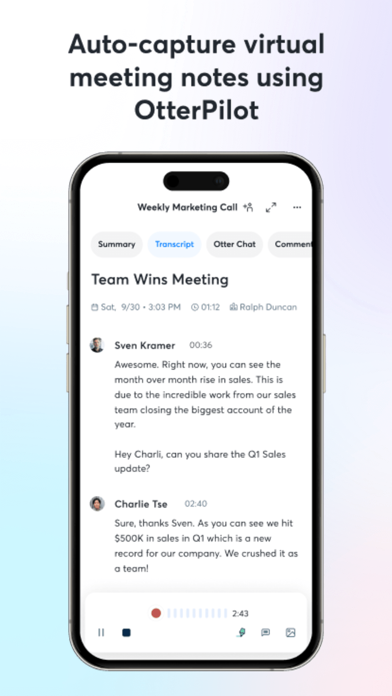


Description
Never take meeting notes again. Otter AI is the fastest way to transcribe voice in real time. Get a meeting assistant that records audio, writes notes, automatically captures slides, and generates summaries. Available in English, Spanish, French and Japanese. Otter AI is also available on the web. Start for free. Trusted by over 10 million people and featured by Apple as "App of the Day" and "Editors' Choice." Automated meeting notes for Zoom, Google Meet, Microsoft Teams, and more. Stay connected and collaborative when you work from home. Otter transcribes all your meetings, interviews, lectures, and everyday voice conversations in real time, so you can focus on the discussion. KEY FEATURES • AI Meeting Assistant: get automated meeting notes & summaries • AI Chat: get answers and generate content • AI Channels: combine live conversations with async updates. Chat with teammates. • Record & transcribe live • Automated meeting notes & summaries • Share & collaborate • All notes are searchable & shareable • Edit & highlight • Organize & export • Import & sync Looking for a specific feature? Here are the details: RECORD & TRANSCRIBE LIVE • Instantly record in one tap • Transcribe in real time • Highlight key points to review later • Insert photos of whiteboard discussions, slides, etc. • Input audio via built-in mic or Bluetooth device ENRICH NOTES WITH AI • Gather information across all your conversations • Ask questions about a specific meeting • Generate follow- up emails • Automated Slide Capture during virtual meetings • Generate summary, outline and keywords after all meetings • Punctuate, capitalize, and break paragraphs automatically SHARE & COLLABORATE • Invite group members to view, edit, and highlight collaboratively • Add comments and assign action items • Share links externally SEARCH & PLAYBACK • Search the text so you don't have to scrub through the whole audio • Playback at adjustable speeds • Follow along the highlighted word as the audio is playing • Tap on any word to jump the audio to that spot EDIT & HIGHLIGHT • Edit the text to correct any errors • Tag the speakers to label the paragraphs and train Otter to identify speakers too • Highlight sentences in one tap IMPORT & SYNC • Import audio and video files • Upload from other call recording apps • Sync your calendars to be reminded to record your meetings and auto-title your notes • Import your contacts for easy sharing OPTIMIZED FOR iOS • Start/Stop recording with Siri Shortcut & home widget • Record via AirPods • Sync with iOS Calendar, Contacts & Camera Otter Pro Get more playback speeds, skip silence, and bulk export. Payment will be charged to your iTunes Account at confirmation of purchase. Subscription automatically renews unless auto-renew is turned off at least 24-hours before the end of the current period. Account will be charged for renewal within 24-hours prior to the end of the current period. You can manage your subscriptions in Settings and auto-renewal may be turned off by going to your Account Settings after purchase. Any unused portion of a free trial period, if offered, will be forfeited when you purchase a subscription. Need help? Check out our Help Center: https://help.otter.ai Terms of Service: https://otter.ai/terms-of-service Privacy Policy: https://otter.ai/privacy-policy
What's New
Working hard to provide the most accurate transcription. Enhanced recording for online meetings and multi-language.
Details
- Developer
- Otter.ai, Inc.
- Main Category
- Productivity
- Version
- 3.103.0
- Version Release
- 2026-07-07
- Initial Release
- 2018-02-17
- Size
- 246 MB
- Age Rating
- 4+
- Price
- Free
- Languages
- EN
- Bundle ID
- com.aisense.otter
- Version Rating
- ★ 4.77 (67,043)
- First Seen
- 2026-05-28
Metadata updated 2026-07-19
Rank History
Free · Max 90 days · Top 5 categories shown (Y-axis: rank, lower is better)
Free Rankings
Paid Rankings
No rankings
Competitive Benchmark — Productivity Top 10
What it takes to beat this app — comparison with the category's top apps. The orange row is the current app.
| # | App | Price | Rating | Ratings | Langs | Last Update |
|---|---|---|---|---|---|---|
| 1 | ChatGPT | Free | ★ 4.83 | 8,691,130 | 60 | 2026-07-14 |
| 2 | Claude by Anthropic | Free | ★ 4.72 | 203,603 | 10 | 2026-07-18 |
| 3 | Google Gemini | Free | ★ 4.72 | 2,000,721 | 70 | 2026-07-14 |
| 4 | Gmail - Email by Google | Free | ★ 4.71 | 2,423,439 | 57 | 2026-07-13 |
| 5 | Meta AI | Free | ★ 4.66 | 165,268 | 39 | 2026-07-17 |
| 6 | Grok AI | Free | ★ 4.88 | 1,303,972 | 38 | 2026-07-18 |
| 7 | Google Drive | Free | ★ 4.78 | 7,668,349 | 66 | 2026-07-13 |
| 8 | Microsoft Authenticator | Free | ★ 4.72 | 670,859 | 42 | 2026-06-30 |
| 9 | Microsoft Outlook | Free | ★ 4.80 | 9,075,553 | 47 | 2026-07-13 |
| 10 | VPN - Super Unlimited Proxy | Free | ★ 4.63 | 2,071,251 | 15 | 2026-07-13 |
| 80 | Otter Transcribe Voice Notes | Free | ★ 4.77 | 67,043 | 1 | 2026-07-07 |
User Reviews
Otter is very capable, but there is increasing competition in this space and they must watch their pricing if they’re not to be superseded. Worth also checking out Notta, which appears to be the main competitor.
I’ve used the transcript feature to create minutes. Very helpful.
Fantastic product. Been using it for a while. As someone that is constantly in meetings, not only is the basic AI transcription fantastic, the image capture feature is often indispensable as it gives you instant context to what you were discussing without having to go find materials.
Best tool for hands-free note taking in the market hands down.
Otter transcribes even when the app is closed! I set it to record/begin transcribing and then I go to social media and play a video and when I come back to Otter, it’s transcribing all of it!!
Capturing my work life. Ideas, meetings, and everything else. Otter figured out what I couldn’t. Encapsulating my everything and my experiences in a way that I hadn’t figured out just yet. Thank you Otter for connecting the dots!
Not that great at identifying names of speakers. My hope is that it would identify a voice and give it a speaker number, but you have to go in and label every speaker even when it’s the same person and you’ve already given them a label. Also, I have not figured out a way to crop transcripts so if you record longer than you meant to, you can’t crop that part out.
I like the AI service but I find it expensive because some months I don’t use it at all but lose all the minutes and some months I use it heavily and run out of minutes. So would be great if our minutes could be rolled over.
Love using otter to transcribe any audio files I need transcription for. I’ve tried everything and it’s been the most accurate.
1 star is generous
Need option to record in different languages
Saves so much time capturing important information from meetings and I can go back and listen and review to catch details.
Reviews are collected only for apps with detected changes (new entries or sharp risers).