
스크린샷

설명
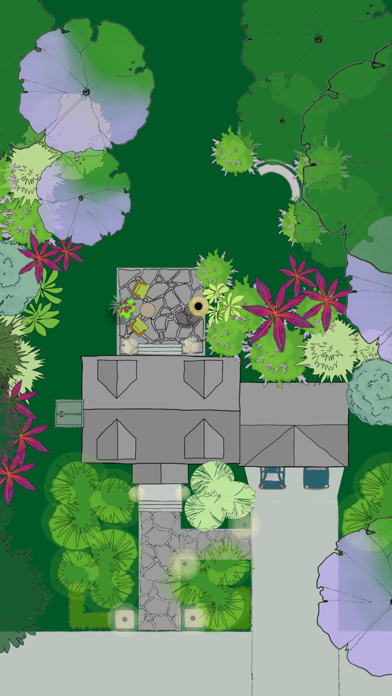
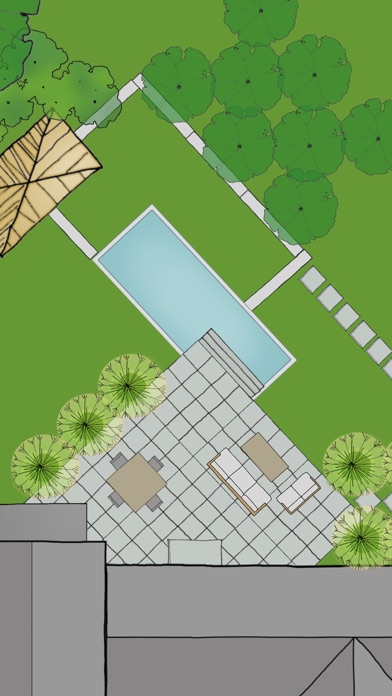
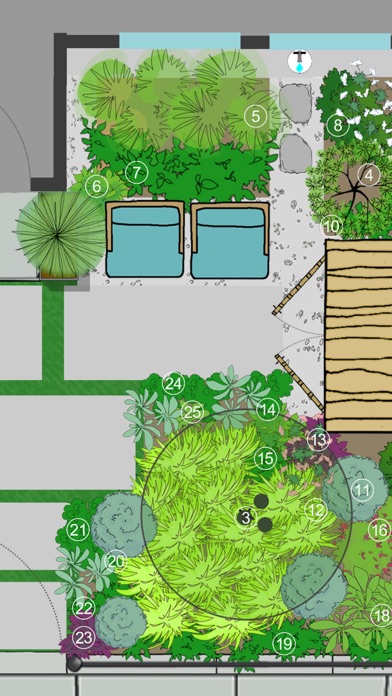
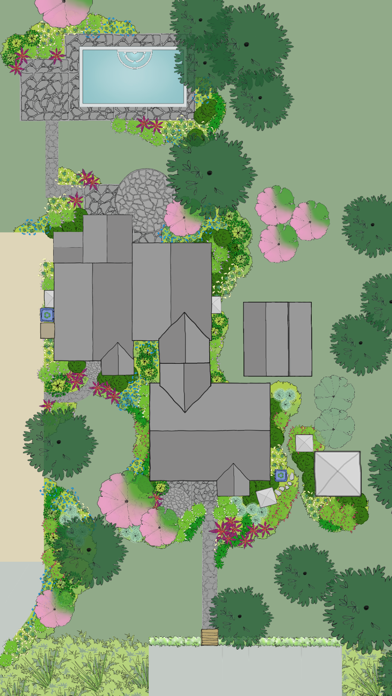
YARD PLANNER is a simple drag-and-drop 2D landscape design app with all the tools you need to mock up your property, create new designs, and share them with friends and family. YARD PLANNER is ideal for homeowners who want to try out fresh ideas for their yard. Useful for landscape professionals to share designs with clients and contractors. Also perfect for children and adults alike to exercise their imagination and creativity! Use YARD PLANNER to select and place over 800 beautiful hand-drawn elements including trees, gardens, pools, patios, hammocks, driveways, houses and sheds, solar panels, and just about anything you might want for your property–even parties and weddings! Features include: • Sample designs to inspire or get you started • Simple drag-and-drop functionality • 34 palettes (800+ hand-drawn elements) to create your landscape design layout • Resize, Rotate, Undo/Redo, Duplicate, Flip, Group • Rotate elements with “Snap to 90” or turn off to rotate more precisely • Snap to grid (elements stick to a re-sizeable grid of guidelines, turn on/off in Settings) • Rulers (visible at edges of design; zoom in to the single unit; user selects feet/meters; can be turned on/off) • Choose from 15 different background colors • Sketch Tool (allows users to draw garden beds and other free-form shapes with an eraser and brushes of different colors, widths and opacity) • Map Tool (This highly accurate mapping tool based on Google Maps allows you to drop pins at the corners of your property and import the map image with measurements into the app as a background.) • North arrow (appears with Map Tool) • Site Analysis palettes to mark the locations of your site’s utilities and light and moisture conditions • Notes (allows users to tag elements in their designs with typed comments or descriptions) • Light/Dark mode (changes Note tags and North arrow from white to black for visibility against light backgrounds.) • Animated Figures (a palette of animated elements—a person, dog, cat, bird, and car—that move through your design on a looped or repeating path, adjustable speed, play and stop animation) • Import a Photo as a background (useful for importing a digital image of your property plan) • Create different Layers of elements in your design. Add, delete, rename layers, make each layer visible/invisible, lock/unlock for editing, and reorder layer position. • In-app step-by-step guide to creating your Property Plan. • Designs automatically save to the app’s Saved Designs gallery • Share designs on social media • Email an editable design so friends can edit one another’s designs and email them back and forth ***As featured in The New York Times, Fox News, USA Today, Gardenista, and more. “Home Outside allows you to create intricate and varied landscapes…And when you’re finished designing your yard or indulging in a little dreamscaping, you can email results to friend.” –Kate Murphy, The New York Times “The app gives you drag and drop tools to create a garden design idiosyncratic to your garden [and] allows you to choose hardscape materials, design paths and patios, and arrange furniture in your outdoor space.” –Dalilah Arja, Gardenista “I can’t imagine a designer who wouldn’t want to have this on their phone or tablet. I’ve tried this app … it’s a great tool for a ‘quickie’ design that you can show clients … and then refine as you like.” –Jane Berger, Garden Design Online
새로운 소식
Bugs fixes and improves
상세 정보
- 개발사
- Home Outside, Inc.
- 주 카테고리
- Lifestyle
- 현재 버전
- 3.6.2
- 버전 출시일
- 2024-09-08
- 최초 출시일
- 2011-06-01
- 용량
- 762 MB
- 연령 등급
- 4+
- 가격
- USD 3.99
- 언어
- EN
- 번들 ID
- com.alldreamsdigital.home-outside-design
- 현재 버전 평점
- ★ 3.36 (381)
- 첫 수집
- 2026-05-28
메타데이터 갱신 2026-06-16
순위 히스토리
무료 기준 · 최대 90일 · 상위 5개 카테고리 표시 (Y축: 순위, 낮을수록 상위)
순위 히스토리 데이터가 없습니다
무료 순위
순위 없음
유료 순위
경쟁 벤치마크 — Lifestyle Top 10
이 앱을 이기려면 무엇이 필요한가 — 같은 카테고리 상위권과의 비교입니다. 주황색 행이 현재 앱입니다.
| # | 앱 | 가격 | 평점 | 리뷰 수 | 언어 | 최근 업데이트 |
|---|---|---|---|---|---|---|
| 1 | Spirit Talker ® | USD 4.99 | ★ 2.80 | 675 | 0 | 2025-02-26 |
| 2 | Stylebook | USD 4.99 | ★ 4.68 | 8,660 | 6 | 2025-06-15 |
| 3 | Falling Fruit | USD 0.99 | ★ 2.39 | 111 | 1 | 2026-06-11 |
| 4 | Cloud Baby Monitor | USD 6.99 | ★ 4.78 | 17,880 | 1 | 2025-07-10 |
| 5 | B-hyve Pro | USD 9.99 | ★ 4.70 | 7,923 | 8 | 2026-06-08 |
| 6 | Baby Led Weaning Recipes | USD 5.99 | ★ 3.40 | 42 | 1 | 2026-01-25 |
| 7 | Universalis | USD 9.99 | ★ 4.92 | 8,917 | 1 | 2026-06-09 |
| 8 | 12 Steps Companion AA Big Book | USD 2.99 | ★ 4.48 | 141 | 1 | 2026-02-15 |
| 9 | Ourcana | USD 0.99 | ★ 4.50 | 30 | 1 | 2026-05-17 |
| 10 | Board Game Stats | USD 5.99 | ★ 4.88 | 441 | 17 | 2026-06-11 |
| 29 | Yard Planner | USD 3.99 | ★ 3.36 | 381 | 1 | 2024-09-08 |
유저 리뷰
It’s not the $4 you’ll regret, it’ll be all the time you waste trying to get worthwhile results out of it.
You can’t do anything.
This thing is old and antiquated!
Essentially this is a fancy yard doodle board, but isn’t accurate enough to use with good project outcome. The main problem is the lack of the ability to correctly scale a drawing. In settings, there is no way to see the adjustments that the slider bar is making, not even the draw line width. But the worst of it is that the grid and the scale don’t match at all, when total zoomed in, there are 6 lines between 0 and 14. Then when you add things there is no size indicators on the objects either. So, have fun, but don’t plan on accuracy being better than a couple of feet this way or that.
This app is fantastic. If it had an option to adjust aspect ratios/ size of layout, it would be almost perfect. Everytime i start a new project, it’s locked at 144 x 244
Just custom dimensions for houses, x and y or whatever, height and width, maybe depth, possibly just a isometric view, perhaps a dark mode, maybe even floors. This app has the ability to map out entire rust bases, 🔥🔥🔥 it is straight fire, I just want my driveway to be gravel
App does not function. Made some pretty picture and slapped. Price tag on it. Absolutely worthless. Spent an hour trying to figure out how to use it, then all of the work disappeared. Pencil and graph paper will save you the heartache.
Can’t change rectangle aspect ratios. Can’t change house aspect ratios. Can’t import photo or use a map image (apply stays greyed out). Can’t change the size of the palette Too dumbed down to do anything useful..
This app could be great but there are drawbacks. Simple things such as changing the size of the item makes it frustrating to design. An item’s size can change but not the width and length separately. For instance putting in a fence is immensely time consuming. Individual small fence sections must be added to create the appropriate length. And they don’t link to each other. Trying to get everything lined up is ridiculous. I would love it if you clicked on the item (ie: fence) and a box pops up that you could add the correct measurement and it automatically created the fence to the appropriate length. Along with having certain items link would make the design process more efficient. I would enjoy more options for items. In trying to put a garden bed in there was no brown option for shapes. instead of having to scroll through many different shapes in multiple colors, it would be quicker to have many different shapes options then just choose the color from a color wheel. I also wish the paths and patios could adjust the shape as well… a free form type option. I appreciate the layer buttons and locking layers comes in handy but it would be helpful to set each individual item’s layer. The menu could be more efficient as well. It always takes you back to the main menu instead of where you left off. Or if you back out of a subheading you’re back at the main menu again. For instance if I’m in pathways and I back out it doesn’t take me to hardscapes it takes me to the main menu again. More item options would be nice, especially in hardscapes and structures. The app works fine it’s just not very efficient. A few changes would make it more user friendly.
I bought this hoping for the squarespace of landscape design. I’m a graphic designer and I’ve used graph paper to draw to scale, I’ve used procreate, I’ve used illustrator…I wanted more pre-built options where I could adjust the shape of a flowerbed for example, enter actual dimensions and get something to drop plants etc into. This interface just felt like it wanted to sort of be like procreate but clunkier. Lots of steps. No useful tool tips or tutorial videos to get started. The FAQ kind of helped but not really. I can draw faster on my iPad or on paper than I can use this app so I regret spending the money and won’t be using it.
변동(신규 진입·급상승) 감지된 앱에 한해 Apple RSS 최신 리뷰를 수집합니다.