
SSTV Slow Scan TV
🇯🇵 JP LocalizedScreenshots
Description
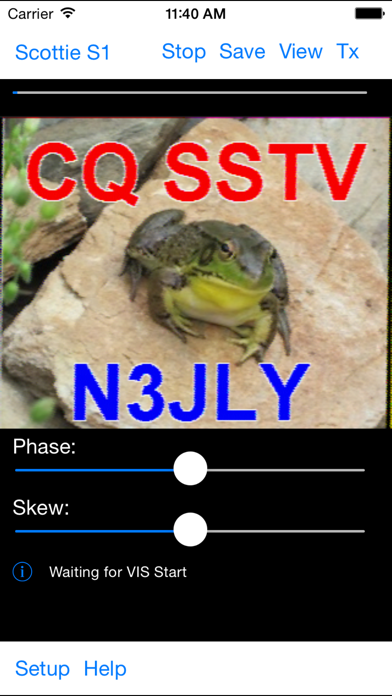
Want to display or send SSTV transmissions, without using a bulky computer? SSTV Pad lets you decode and display Ham (Amateur) Radio SSTV (Slow Scan TV) transmissions. Just connect your device to an HF radio (or even set it next to the radio's speaker), tune in an SSTV frequency, and watch the pictures. SSTV Pad decodes all of the popular SSTV modes, including Robot, Scottie, Martin, and more. Some modes are receive only. Decoding of SSTV transmissions begins automatically as soon as the start of image audio signals are detected, and the image format is automatically selected. Manual control is also available for use when receiving conditions are poor. Timing signals (phase and skew) can be adjusted to compensate for mismatches with the sending station. Received images can be saved - including automatically as they are received. You can leave the app running unattended, and come back to view all the received images. You can review saved images, as well as send them via email, and use iTunes file sharing to transfer them to your computer. You can even share them on your Facebook page, or tweet them to your followers, directly from the app! (iOS 6 and later) You can also transmit images, taken from your saved photos or taken with your device's camera. Text, such as your callsign, can be added to the sent image. Buy your copy right now, and start decoding and displaying SSTV transmissions in minutes. Just set your iPhone or iPad next to the radio speaker, and watch the pictures come rolling in. Note: If you cannot see the transmit button, go to the Accessibility settings for your device and turn Button Shapes OFF. It makes the buttons too large so you cannot see them all. Also, It is very important to have a well tuned signal of good quality, and make sure you get the audio from your radio to your device without adding additional distortion, or auto start and mode detect will not work optimally. Please see this page for tips on using the app and connecting your radio: http://www.blackcatsystems.com/ipad/iPad_SSTV_Pad_FAQ.html You can also use Bluetooth audio devices to feed audio into your device. Please be sure to use a good quality Bluetooth device, that does not distort the audio. Modes supported for reception (not all modes can be transmitted): B&W 8 sec B&W 12 sec B&W 24 sec B&W 36 sec Martin M1 Martin M1 Martin M2 Martin M3 Martin M4 MP73" MP115 MP140 MP175 MR73 MR90 MR115 MR140 MR175 PD 50 PD 90 PD 120 PD 160 PD 180 PD 240 PD 290 Robot 12C Robot 24C Robot 36C Robot 72C SC-1 32 sec SC-1 16 sec SC-1 8 sec SC-2-60 SC-2-120 SC-2-180 Scottie S1 Scottie S2 Scottie S3 Scottie S4 Scottie DX
What's New
This update from Apple will improve the functionality of this app. No new features are included. Can now add multi line text to transmitted images. Updates for iOS 10.2
Details
- Developer
- Black Cat Systems
- Main Category
- Lifestyle
- Version
- 2.0
- Version Release
- 2017-01-10
- Initial Release
- 2010-08-27
- Size
- 2 MB
- Age Rating
- 4+
- Price
- USD 3.99
- Languages
- EN
- Bundle ID
- com.blackcatsystems.SSTVApp
- Version Rating
- ★ 3.95 (147)
- First Seen
- 2026-05-28
Metadata updated 2026-06-16
Rank History
Free · Max 90 days · Top 5 categories shown (Y-axis: rank, lower is better)
No rank history data
Free Rankings
No rankings
Paid Rankings
No rankings
More by This Developer

User Reviews
I have tried a few other pieces of SSTV software, and none have been this easy to set up. The app is super easy to use and has great reception and options.
CQ SSTV by Black Cat is one of the best SSTV apps available for amateur radio operators. The interface is clean, simple, and reliable, making it easy to send and receive SSTV images whether you’re a beginner or a longtime ham. The app performs extremely well with clear decodes, stable operation, and excellent compatibility with popular SSTV modes. What really stands out is how fast and responsive the app feels during live operation. The controls are straightforward, audio handling is solid, and it works great for portable operations, field events, and casual SSTV nets. The developer has clearly put a lot of thought into both usability and ham radio functionality. If you enjoy SSTV, especially events like SSTV Sundays or portable operations, CQ SSTV is absolutely worth downloading. Huge thanks to Black Cat for creating such a dependable and enjoyable app for the amateur radio community!
First, I miss the mode of automatic detection of the message encoding mode during Rx. Second, during tx at the beginning of the program, there is no code sound indicating the transmission mode. Thirdly, there are not enough modes for tx. Fourth, outdated interface. Fifth, when I want to take a photo using the camera in the application, it crashes. If all these points are fixed, it will be the best application on the market and sales will bring a lot of money
I guess the last “what’s new” being from nine years ago should have been a hint. iPhone 15 pro and this app just crashes any time I try to do anything at all with it.
I just tried this program for the cost it is great I couldn’t find any thing better!
Dear developer the App is awesome in terms of the use cases but after first use its always crashing while trying to open it, im using 16 pro max and 17 pro both has same issues, as i have purchased it for professional use - now its not worth it, please fix the issue ASAP while uninstalling and installing again i can use the app for once only.
Some people are mentioning that the program superimposes the word NULL on your image and there’s no way to get rid of it. Not true. If you press the transmit button, you’ll see the option to upload a photo from your Photos, or use your camera. If you press upload photo from photos library, AND you then select your photo, THEN you will see a list of five options. Pick option three, “set text.” You have to put something in here to get rid of the word, NULL that shows up in your transmitted picture. Leaving it blank is not an option. At least it gives you the opportunity to make the superimposed text Tiny or Large. I picked Tiny and just put in my callsign. You might be able to get away with just dropping a period in the cell and making it tiny. So, you can either choose to not put your call sign in your picture and let this program superimpose your call sign where it’s going to and build your photo around it, or you can create your call sign in your picture and then just have this stupid functionality put your call sign again, in super small letters and just say “whatever”. The functionality to get rid of NULL is there, it’s just buried.
I just downloaded the app last night. I went to show my friend how it works with sending or TX. When I go to pick an image from my photos in my iPhone. The app shuts down. Please help. Thanks
Sitting in my home office, it's a little after midnight, and a glorious pass of the International Space Station just streaked across the sky. With this app and a handheld radio, I captured two gorgeous images from the ISS. No cables, no sound card interface - just holding up my handheld radio near my smartphone. How much cooler can it be?
So far, so good.
Reviews are collected only for apps with detected changes (new entries or sharp risers).