

ACARS
🇯🇵 JP LocalizedScreenshots
Description
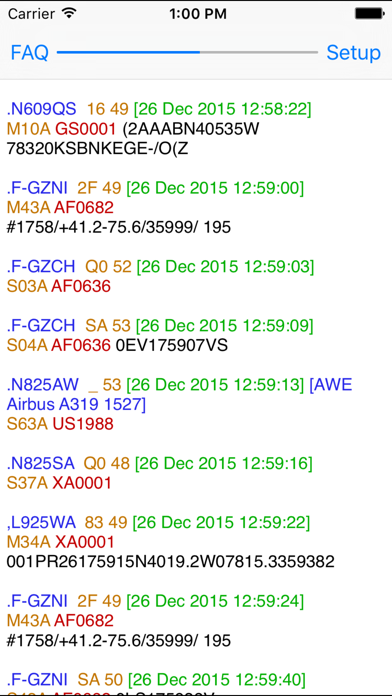
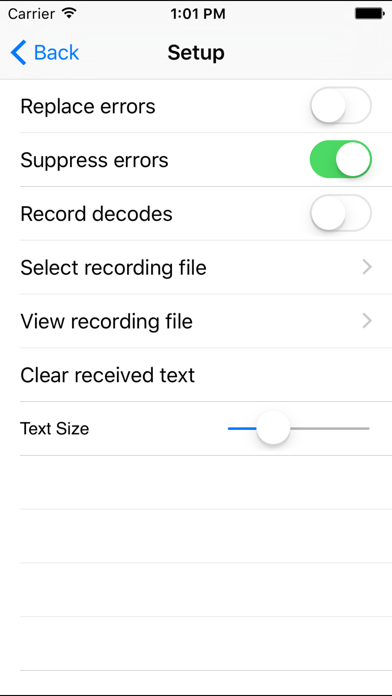
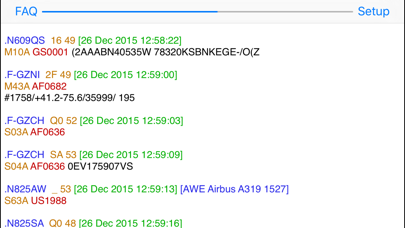
Want to display ACARS transmissions, without using a bulky computer? ACARS lets you view ACARS aircraft transmissions on your iPad, iPhone, and iPod Touch. A radio/scanner capable of tuning the 118-136 MHz aircraft band is required. Just set it next to the radio's speaker, tune in an ACARS frequency, and watch the decodes. Or, for even better reception, use a pair of earbuds, plugged into the radio’s headphone jack, rather than the internal speaker. You can save decoded ACARS packets to a file to view later, or transfer to your computer via iTunes. Aircraft model information for many planes in a built in database is displayed along with the decoded packets. You can also add your own plane information to the database. Packet fields are color coded on iOS 6 and later. Buy your copy right now, and start decoding and displaying ACARS transmissions in minutes.
What's New
This update from Apple will improve the functionality of this app. No new features are included. Updates for iOS 9.2.
Details
- Developer
- Black Cat Systems
- Main Category
- Lifestyle
- Version
- 1.4
- Version Release
- 2016-01-07
- Initial Release
- 2010-08-26
- Size
- 2 MB
- Age Rating
- 4+
- Price
- USD 2.99
- Languages
- EN
- Bundle ID
- com.blackcatsystems.AcarsPad
- Version Rating
- ★ 3.33 (12)
- First Seen
- 2026-06-10
Metadata updated 2026-07-06
Rank History
Free · Max 90 days · Top 5 categories shown (Y-axis: rank, lower is better)
No rank history data
Free Rankings
No rankings
Paid Rankings
No rankings
More by This Developer
Shortwave Broadcast Schedules
Lifestyle · ★ 4.5 (238)
SSTV Slow Scan TV
Lifestyle · ★ 3.9 (147)

DX Toolbox
Lifestyle · ★ 4.4 (68)
Audio Spectrum Analyzer
Utilities · ★ 3.9 (52)
HF Weather Fax
Weather · ★ 3.7 (18)

Packet Pad
Lifestyle · ★ 3.8 (17)
Selcall Selective Calling Tone
Utilities · ★ 3.2 (14)
NAVTEX Pad
Utilities · ★ 1.9 (12)
User Reviews
The app does work, but requires some tweaking/experimenting with the microphone and speaker placement, signal/antenna. Pretty good app, would like to see an update though. I copied signals from two different radios, an Icom ICR6 Communications Receiver and an XHDATA D808 portable shortwave radio . Both performed reasonably well tuned to 130.551 mHz Air band (AM).
First make sure you can get the RF from the planes as high quality as you can (good antenna, receiver tweaks). Then it will require various experimenting placing the iPhone in good position so the phone mics can hear the transmission. And also experiment with the receiver’s volume. You will see the data scrolling on the phone screen if you get all of the above correct. Now look at your data for quality decodes. If the data looks garbled, play around with the settings and positions again. And....in the app’s configuration, make sure you have a file selected to store the data on the phone. Another thing I really dislike in the app is that if you open another app, all the data displayed in the ACARS screen goes blank and then if you want to view the data, you have to open the stored data files. It does this everytime you goto another app on your phone. I want to try this app after adding an external microphone to my iPhone 8+ via a splitter cable. I really hope this will help with the decoding of crap data to quality data. Good luck - when all is tweaked correctly, it is a great app. But honestly, use PDW on a PC.
VERY minimum application, it receives ACARS and that's it. You can put your earbud microphone next to radio speaker, but best bet would be a line-level microphone input. Even if packet doesn't fully decide properly, you get what does decode. Thats a plus. Wish it could run in the background. Only thing I understand is Tail number and type aircraft in packet. It would be nice if the rest of the jibberish is translated to what it actually means. However, it does work. I use in with SDR on the Airband.
Needs support for Apple Watch
I have used top notch ham decoding apps and bad ones. I'm current iOS and this app works beautifully even unsquelched. This is my first time playing with this mode and this app let me confirm some very useful info. Even jumbled garbage tells you something. I had a minor career in comma and I am going to rate this a 5 because it works off the air( no cable), you have virtually unlimited number of folders. An improvement would be to have a bigger buffer per file but hey, it was worth it's weight In gold to ME, others not wanting specific data or range extrapolation might not rate it as high. All in all, if I wanted to follow say a friends aircraft using a minimal outside antenna for about 250 miles with just a used scanner and iOS device can have an easy relatively advanced system incorporating this quick down and cool app. I'm not into iOS, computers or apps and have no idea who or how this was written so take my 5 stars for what it's worth and who wrote it. A forever novice to iOS and apps!
Does not work on iOS 8.04 FAQ error with unable to read Avoid don't waste your money
I’ve tried other ACARS decoding software and have been disappointed, but this app worked reasonably well. My only wish would be for it to work in the background. I’ve already had $3 worth of fun with it...
I have verified (iPhone 4/IOS 6) that this app works in both audio (scanner next to phone) and direct-connect (using home-made adapter) modes. If you are handy with electronics, build the adapter - it works better (there's a link to the plans in the description); if you're not, there are some commercial versions now available (google "iphone microphone adapter"). Obviously you need a scanner or other aircraft radio to receive signals in the first place. Nicely done app!
Like the other reviews have alluded, this app operates like a proof-of-concept. Yes, it decodes, but that's it. There's no organization of data, no filtering, no background running of the app, screen colors are fixed at black on white. It's just simplistic.
Excellent App, using it on iPad 2 and works great with just a standard VHF handheld scanner positioned beside the microphone. To the developer just one suggestion, if you could please update it so that the decoder can run in the background while other apps are being used. Many Thanks.
Reviews are collected only for apps with detected changes (new entries or sharp risers).