

스크린샷


설명
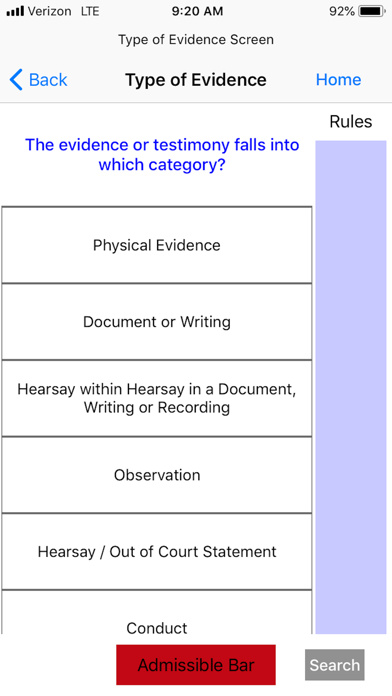
Introduction to the “Federal Evidence Applied” The Federal Evidence Applied app allows attorneys and judges to determine with great accuracy the admissibility of any piece of evidence or testimony presented in federal courtrooms. It is a great learning tool for law students as it teaches a consistent methodology for analysis of federal evidence. Upon selecting options about the prospective evidence or testimony, the screen will light up GREEN if admissible and RED if inadmissible. The app directs users to various screens calling for a selection of options to determine admissibility. The app screens evidence on competency, relevancy, hearsay, authenticity and best evidence. The app guides the user through the relevant rules of evidence to determine admissibility or exclusion. The Federal Rules of Evidence consist of 68 interrelated rules. Based upon the proposed evidence the app sorts the rules creating a consistent step by step approach to the analysis The app contains thousands of slides guiding the user through the applicable Rules of Evidence dependent upon the selections made by the user. The app has six basic modes to begin the analysis of the evidence. The modes are Objection, Move to Admit, Rules of Evidence a Search and Screen option. The app allows users to immediately 1. respond to objections 2. determine how to secure admission or exclusion of evidence 3. analyze rule by rule the Rules of Evidence and 4. instantly search any evidentiary term directing the user to the appropriate screen to begin the analysis. Below is the functionality: 1) Objection The Federal Evidence Applied app identifies 19 objections with 171 subtopics. The objection function guides users in responding to and making objections. 2) Move to Admit This function allows the user to run a particular piece of evidence or testimony through the app to determine its admissibility. The app analyzes an infinite number of items of evidence or testimony by running the evidence though an analysis on competency, relevancy, hearsay, authenticity and best evidence. The initial screen for the Move to Admit function provides the user with four options to begin a complete analysis. 3) Rules of Evidence This function provides a rule by rule analysis. This option is ideal for law students learning the rules as it provides a methodology for analysis under each rule. 4) Search The search function provides the user with instant access to evidence screens on hundreds of evidentiary terms. By merely typing a few letters the app will propagate the desired evidentiary term allowing the user to instantly proceed to the appropriate screen to begin the analysis. The search feature provides for fast analysis often required in the courtroom. Each screen includes the relevant rule button which when pressed will display the actual language of the rule. Each screen includes a button with the rule number in the lower left corner. When activated it displays the Advisory Committee Notes providing the user with detailed legal analysis. Upon selecting a response the app will proceed to the next screen. If the user uses the back function the previous selection will appear highlighted in yellow allowing the user to trace prior selections by following the “bread crumbs.” The screen selections will appear in three colors: white, green or red. The white means more selections will be necessary to determine admissibility. A green highlighted option means that, if selected, the evidence is admissible. A red highlighted option means, if selected, the evidence is inadmissible. The home button when selected will take the user back to the opening screen that contains the four modes of Objection, Move to Admit, Rules of Evidence and Search. Some screens contain a blue highlighted NOTE: feature at the bottom of the selection options which provide practical tips or further explanation of the evidentiary issue. The app was developed by David and Tyler Shroyer both lawyers
새로운 소식
We added new app preview screenshots with descriptions of functions
상세 정보
- 개발사
- david Shroyer
- 주 카테고리
- Education
- 현재 버전
- 4.2
- 버전 출시일
- 2020-12-20
- 최초 출시일
- 2017-05-24
- 용량
- 54 MB
- 연령 등급
- 4+
- 가격
- USD 1.99
- 언어
- EN
- 번들 ID
- evidenceapp.federalevidenceapplied
- 현재 버전 평점
- ★ 4.83 (30)
- 첫 수집
- 2026-07-19
메타데이터 갱신 2026-07-19
순위 히스토리
무료 기준 · 최대 90일 · 상위 5개 카테고리 표시 (Y축: 순위, 낮을수록 상위)
순위 히스토리 데이터가 없습니다
무료 순위
순위 없음
유료 순위
경쟁 벤치마크 — Education Top 10
이 앱을 이기려면 무엇이 필요한가 — 같은 카테고리 상위권과의 비교입니다. 주황색 행이 현재 앱입니다.
| # | 앱 | 가격 | 평점 | 리뷰 수 | 언어 | 최근 업데이트 |
|---|---|---|---|---|---|---|
| 1 | AnkiMobile Flashcards | USD 24.99 | ★ 4.04 | 2,302 | 25 | 2025-09-08 |
| 2 | SkyView® | USD 2.99 | ★ 4.58 | 7,658 | 1 | 2025-05-02 |
| 3 | Label Pics | USD 1.99 | ★ 3.50 | 4 | 1 | 2026-03-03 |
| 4 | Stack the States® | USD 2.99 | ★ 4.44 | 2,180 | 1 | 2024-09-25 |
| 5 | Teach Your Monster to Read | USD 8.99 | ★ 4.50 | 27,607 | 1 | 2025-09-03 |
| 6 | Wagotabi: Learn Japanese | USD 4.99 | ★ 4.93 | 1,392 | 12 | 2026-07-09 |
| 7 | HamStudy.org | USD 3.99 | ★ 4.92 | 2,502 | 1 | 2026-06-10 |
| 8 | Prepware Aviation Maintenance | USD 9.99 | ★ 3.81 | 360 | 1 | 2025-05-30 |
| 9 | Stack the Countries® | USD 2.99 | ★ 4.56 | 1,019 | 1 | 2025-11-01 |
| 10 | ABA Wizard | USD 14.99 | ★ 4.81 | 3,873 | 1 | 2025-10-08 |
| 93 | Federal Evidence Applied | USD 1.99 | ★ 4.83 | 30 | 1 | 2020-12-20 |