

Symphony – Music Notation
🇯🇵 JP LocalizedScreenshots
Description
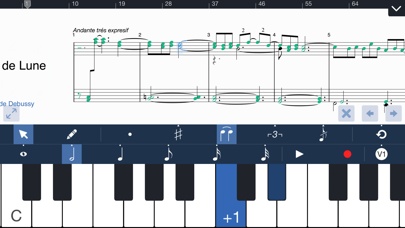
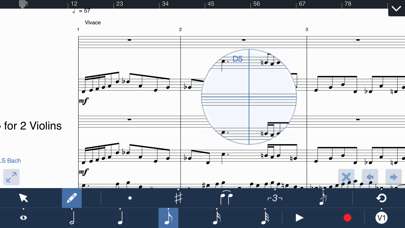
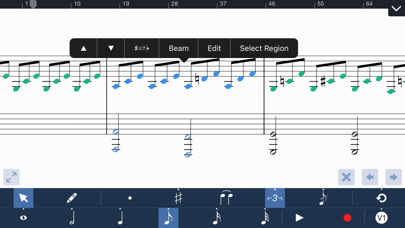
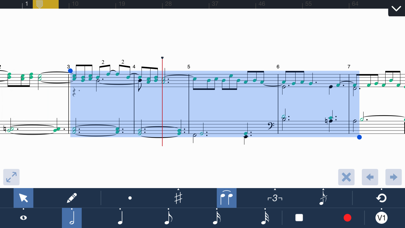
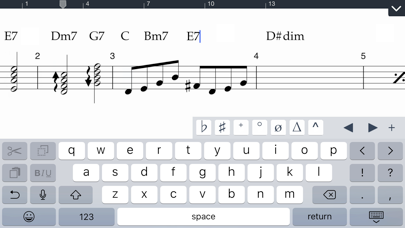
Symphony is the premiere notation app and notepad for professional musicians, composers, and students alike, allowing to you create anything from piano sheet music to large orchestrations directly on your iPhone. The Pencil tool allows you to tap anywhere on the canvas to quickly add notes and chords with the multi-staff & multi-voice editor. Powerful editing features like vertical drag to transpose and On-Screen piano lets you compose even more quickly. Switch to the other Select tool to highlight one or more notes to modify duration, transpose, erase, cut, or paste multiple tracks & bars anywhere you want. To hear your performance, choose from 100+ acoustic instruments available for live, low-latency, multi-track playback. Import an existing Symphony/SP project or a MIDI/XML file to bring your music collection to life, with an interactive score display & interface optimized for the small screen. To send your work to a different editor or to a sheet music viewer, Symphony can print your score with AirPrint, share it as a PDF attachment, or as a MIDI, MusicXML, or audio file to DropBox and iCloud Drive. More Features: • Write notes using direct touch, an on-screen instrument, a MIDI input device, or even a QWERTY keyboard • Notate beautifully formatted chord charts & lead sheets using the Chord Symbol and Lyric tools. • Import MusicXML, MIDI, MXL, or Symphony files • Export as a PDF, MusicXML, MIDI, AAC, or Symphony file • Print the score from your iPad with AirPrint • Edit grace notes and percussion/drum set notation • Intuitive score and document navigation • Up to 15 instruments, 45 staves, 4 voices/layers per score • Record MIDI to notation in real-time using a click track • Backup & sync scores with iCloud • Edit tablature and standard music notation • Large selection of articulations & dynamics in the Expressions menu • Copy/Paste function can select multiple measures & staves, and cut single or multiple voices/layers • Unlimited undo and redo • Customizable stem directions & note beaming • Transposing instruments & concert pitch options • Change tempo or clef at any point in the score • Stream audio or share your screen wirelessly with AirPlay • Advanced document management support • Customizable part groupings for SATB and instrument families • Customizable chord symbol, lyric, and annotation font • Loop playback between a region selection • Auto-save For more info, please visit: • Product overview: http://symphonypro.net/iphone • Ask support questions by visiting forums.symphonypro.net • Like us on Facebook at facebook.com/symphonyapp ************************************************** • Symphony iPhone is now a paid app before download: – Free Edition users who have never upgraded can now enable Symphony: Full Edition by rating or reviewing the app
What's New
- iOS 13 fixes - Dark mode support - General bug fixes
Details
- Developer
- Xenon Labs, LLC
- Main Category
- Music
- Version
- 5.3.7
- Version Release
- 2020-06-08
- Initial Release
- 2015-01-08
- Size
- 279 MB
- Age Rating
- 4+
- Price
- USD 4.99
- Languages
- EN
- Bundle ID
- com.xeapps.symphony-iphone
- Version Rating
- ★ 4.44 (515)
- First Seen
- 2026-05-30
Metadata updated 2026-07-08
Rank History
Free · Max 90 days · Top 5 categories shown (Y-axis: rank, lower is better)
No rank history data
Free Rankings
No rankings
Paid Rankings
No rankings
More by This Developer

User Reviews
Good app
I needed something like this for several varied situations and so happy to have it. Thanks.
This is hands down the dumbest app I’ve ever purchased. I may never buy another app knowing this kind of garbage is for sale in the App Store.
Like the hasty first draft of a Where's Waldo paintball collage. No instruction page or key to simply getting the desired notation symbol to appear where you're touching your finger on the staff. Arbitrary and convoluted. Don't even think about it. Which was the programmers' work ethic.
Good app. Useful on the go
I’ve used Symphony in the past. Amazing they unlocked all the features even if you originally downloaded the free version. Looking forward to a reintroduction of this superior music software.
I use this for mostly sketching on the run. Awesome app👍
Great App for making your own backing tracks for vocal performances!
As much as I love music, I don’t know jack about the mechanics of creating it. The fact that little dots on paper can translate into audio pleasure is like sorcery to me. I love using this program to delve into the magic of music.
I have really enjoyed using Symphony for writing simple arrangements for my kindergarten and preschool class performances. I like that I can print music and also make mp3s for the kiddos to practice to. Yay!
Reviews are collected only for apps with detected changes (new entries or sharp risers).