

Alfred Remote
🇰🇷 KR LocalizedScreenshots

Description
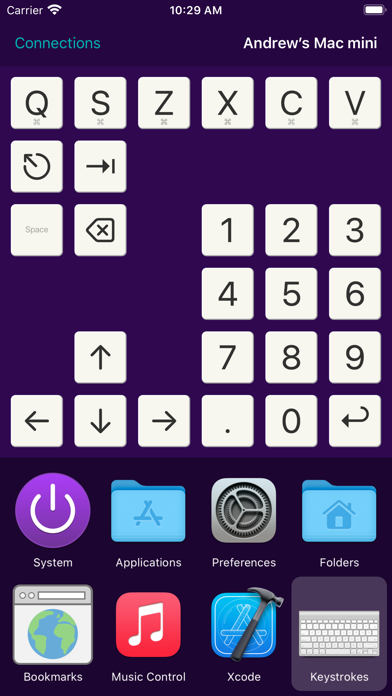
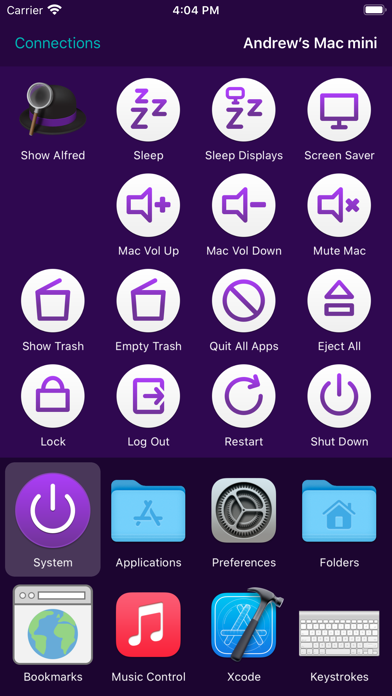
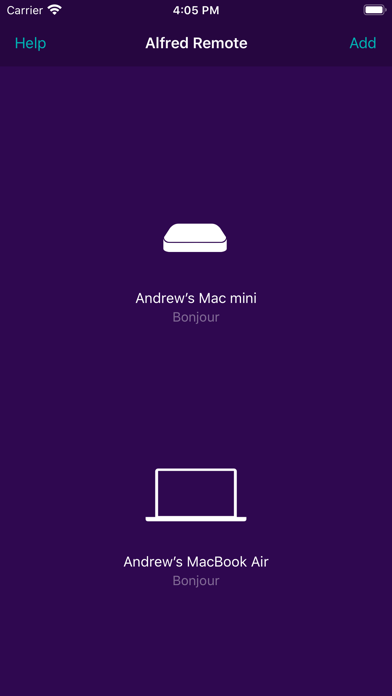
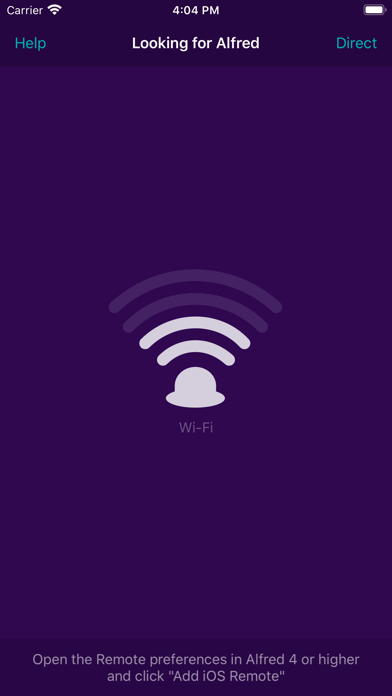
Alfred Remote is your personal command centre for Alfred for Mac. Your iPhone or iPad now becomes the perfect day-long companion to your Mac, giving you instant access to your favourite features, commands and workflows. Alfred Remote needs to be on the same network as your Mac. Alfred 4 is recommended for the broadest range of features and best experience. Alfred 3.8.6 is the minimum requirement. Alfred 4 for Mac is available from https://www.alfredapp.com/ WHAT CAN I DO WITH REMOTE? With a single touch on your iOS device, you can control many Alfred actions on your Mac, including: - Show Alfred on your Mac - System Commands: Lock, restart, shut down, log out or sleep your Mac, eject all devices, quit all apps and empty trash - Launch Applications and System Preferences on your Mac - Open files and folders you've defined on your Mac - Open websites and bookmarks, or pop up Alfred with a custom search filled in - Replace hard to remember hotkey combinations and keywords with icons on iOS If you're an Alfred 4 or Alfred 3 Powerpack user, you can control Powerpack features, such as: - Quickly paste user-defined clipboard snippets into text fields and documents on your Mac - Run user-defined scripts, AppleScripts and terminal commands - Music.app on your Mac: Play, skip, even start playing random albums - Connecting Remote to your favourite Alfred workflows gives almost limitless possibilities! SETTING UP REMOTE 1. Ensure that your Mac and iOS device are on the same network 2. Open Alfred's Remote preferences on Mac and select 'Add iOS Remote' 3. Open Alfred Remote on iOS to the 'Add' screen, "Looking for Alfred" 4. Select your Mac when you see it appear on iOS, then type the passcode on your Mac Your Mac and iOS device will now be securely connected, and the power of Alfred will be at your fingertips, making you even more productive! MINIMUM REQUIREMENTS: Alfred Remote is a counterpart app which requires Alfred on Mac, and the ability to connect to it from your iPhone/iPad over Wi-Fi. - Alfred Remote is available for iPhone & iPad on iOS 12+ - Alfred 4 is recommended for the best experience and new features. Minimum requirement is Alfred 3.8.6 on macOS 10.9+ on your Mac - You'll need the ability to connect both your Mac and your iOS device to the same network through wired or Wi-Fi connection - To control Alfred's Powerpack actions, you'll need the Powerpack for Alfred on your Mac Take a look at https://www.alfredapp.com/ for more details about Alfred for Mac and Alfred Remote.
What's New
We've added bigger grids (up to 6x6), better Split View support and refreshed navigation. - Updated to take advantage of modern iOS device sizes and layouts - Rewritten framework for improved performance and future-proofing - Improved navigation layout for faster page switching - Additional features available when using Alfred 4.3.3 and above - Button grids can now be up to 6x6 in size - Button labels can be hidden for a cleaner look
Details
- Developer
- Running with Crayons Ltd
- Main Category
- Productivity
- Version
- 1.5
- Version Release
- 2021-04-15
- Initial Release
- 2015-01-28
- Size
- 1 MB
- Age Rating
- 4+
- Price
- USD 4.99
- Languages
- EN
- Bundle ID
- com.runningwithcrayons.AlfredRemote
- Version Rating
- ★ 3.13 (15)
- First Seen
- 2026-05-28
Metadata updated 2026-07-19
Rank History
Free · Max 90 days · Top 5 categories shown (Y-axis: rank, lower is better)
No rank history data
Free Rankings
No rankings
Paid Rankings
No rankings
User Reviews
Especially given how much Alfred for Mac still promotes it, links to it, and continues to include it in new work flows. The current version isn’t even designed for the current version of Alfred (5.5)! Its last update was 3 years ago and designed for Alfred 4. I wonder how many potential customers of Alfred for Mac were turned off when they saw this bizarre app. I was put off from anything Alfred for years - when I first heard of Alfred I looked it up on my phone to see what the internet had to say about it, and this iOs Alfred app showed up for me to click before even any search engine results. I was just as embarrassed for Alfred then than I am know. Only difference is that I forgot about the remote app for so many years that I did actually eventually get the Mac version. So now I’m embarrassed on behalf of both the team AND myself.
App is unreliable. It allowed me to connect and hasn’t allowed me to connect since. Don’t waste your money.
There is no way to get access to arbitrary keyboard and mouse controls so you have to manually build workflows for any little thing you would want to do.
I will request a refund.
I'm just sad that the play/pause button doesn't work. I don't use apple music, so I don't know if it works on that, but it does nothing to spotify and YouTube, etc. I have no idea why the pause, skip, rewind buttons are not just equivalent to pressing the same on the keyboard and are instead bound to a software I'll never use.
An update in 6 years? Please don’t abandon us again Alfred.
I’ve been using this across two Macs for a number of years. Having a remote that you can configure yourself for just about anything? Priceless. I didn’t think I’d like the 1.5 changes but they’re growing on me…. And yes one of the 5 remote screens is a TV remote for the 3 Mac media players on my machines. Tip: Try to match key bindings in every player you use… Infinite possibilities here, even if you’ve never programmed a line of code in your life.
The app is misrepresented on the Apple store site. The iOS app is inexpensive but it’s catch bait BEWARE: it’s useless without buying the “power pack” for the MacBook Pro which is in British pounds @ $1.4/lb do >$30. It’s somewhere between childish and dysfunctional. It took about an hour to figure out how to connect the iPhoneX and then the functionality was minimal. Day 2 could not reconnect. Ok so forget about a few $ for an app but the system is constructed in a idiosyncratic way. Just a huge waste of time and money.
This is a great idea and a well made product. However, a redesign, additional of things like widgets, and maybe siri integration, would make it very much better. I think, the big part has been finished. It is worth going that 15% just to make the experience smoother.
Where did you go, Alfred? I thought we were friends?
아이맥과 연결하고 설정을 한후 사용해보니 아주 잘되고 저는 마음에듭니다. 자주 사용하는 어플 등록하고 사용하니 편합니다. 자주 사용하는 사이트,풀더,파일들을 등록해서 사용하면 은근히 재미있어요^^
그러나 맥프레와 연결이 전혀 안되고 있네요.. 공유기에러인가?
Reviews are collected only for apps with detected changes (new entries or sharp risers).