

Pixelmator Classic iOS
🇯🇵 JP LocalizedScreenshots



Description
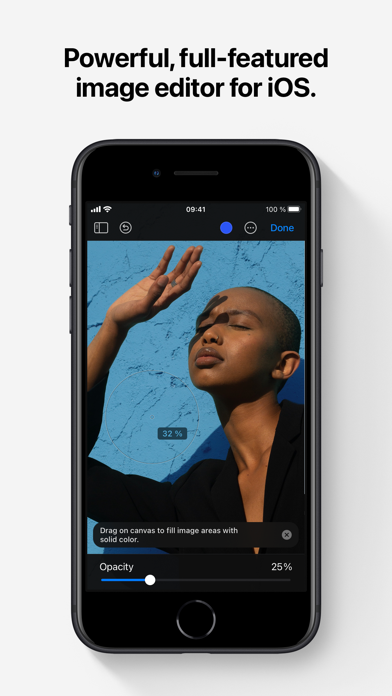
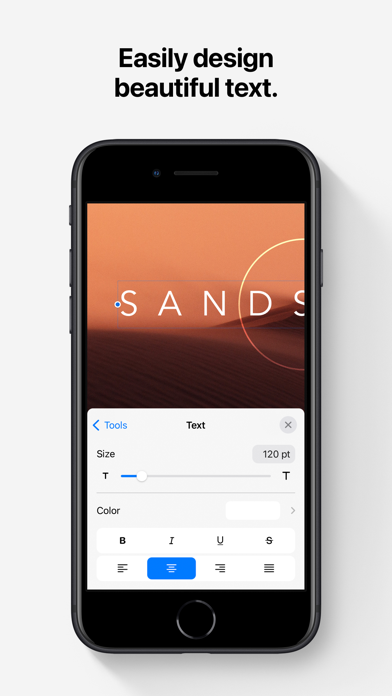
Pixelmator is a powerful, full-featured, layer-based image editor that lets you add shapes, images, and text to create beautiful image compositions, touch up and enhance images, sketch, and paint on iPad and iPhone alike. Designed exclusively for iOS and iPadOS, Pixelmator takes full advantage of the latest iOS and iPadOS 17 features and technologies, giving you innovative, fast, and powerful tools. Create Eye-Catching Designs - Combine words, shapes, and images to create breathtaking artwork right on your iPhone and iPad - Apply non-destructive layer styles like shadows, outlines, gradient fills, and more - Insert, group, and blend layers of an image - Easily add, combine, and customize shapes - Blend layers, shapes, and text using any of the blending modes - Use precise selection tools to edit areas of an image - Automatically select subjects in images with the machine learning-powered Select Subject - Crop, arrange, and rotate objects and layers with pixel-perfect precision - Easily remove the background of images or cut and paste objects from one image to another Add Shapes and Text - Create flyers, logos, and other compositions using vector shapes and their styling options - Customize Smart Shapes with easy-to-use controls - Add text and make it look gorgeous with 24 pre-designed text styles - Change the font, size, alignment, line spacing, use custom fonts, and more Paint and Sketch - Paint stunning images right on your iPhone and iPad - Choose from over artist-designed brushes and numerous painting techniques - Paint with near-natural wetness effect of watercolor and crayon brushes - Create stunning pixel art images with the custom-designed Pixel brush - Paint with incredible detail thanks to the double texture brush technology - Vary the speed of your stroke to change the thickness of some of the brushes - Easily select and fine-tune colors with a full-featured color picker - Instantly choose colors right from your image with the Eyedropper - Paint more naturally than ever with the Apple Pencil, featuring palm rejection, pressure, tilt, and acceleration sensitivity Edit and Enhance Photos - Get started with dozens of beautifully designed templates - Instantly improve your photos with single-tap color presets - Take full control over the tonal range of your image with levels and curves - Easily remove color casts and set the right white balance - Wipe away image imperfections, skin blemishes, and unwanted objects with the Repair tool - Duplicate areas of your image with the easy-to-use Clone tool - Pinch, bump, twirl, or warp areas of an image with powerful, Metal-based Distort tools - Blur, sharpen, lighten, or darken areas of an image - Choose from dozens of breathtaking effects to subtly improve or completely change the look of an image - Open and edit images of up to 256 megapixels Export and Share Images - Optimize images for the web using quality, color depth, and size settings - Export images to Files, iCloud, or open in other apps using a file format of your choice - Using the integrated share extension, easily share your artwork with friends and family using Mail, AirDrop, or post it to social platforms like Instagram, Twitter, or Facebook Compatibility - Open and save images using HEIF, JPEG, PNG, and TIFF formats - Work with multilayered Pixelmator Pro and Adobe Photoshop documents - Save your edited images directly to Photos - Create, edit, and keep all your images up to date on all your devices thanks to iCloud support - External keyboard support with over 70 keyboard shortcuts Built for iPhone and iPad - Pixelmator is meticulously thought through and created from the ground up for iPhone and iPad devices - Designed to take full advantage of powerful iOS and iPadOS features and technologies — iCloud Drive, Photos extension, Split View, and more - Thanks to Apple silicon, Metal, Core Image, and Core Animation, Pixelmator delivers state-of-the-art performance and real-time responsiveness
What's New
This update contains bug fixes and improvements.
Details
- Developer
- Apple
- Main Category
- Photo & Video
- Version
- 3.1.17
- Version Release
- 2026-01-28
- Initial Release
- 2014-10-24
- Size
- 410 MB
- Age Rating
- 4+
- Price
- USD 9.99
- Languages
- EN, FR, DE, IT, JA, KO and 5 more
- Bundle ID
- com.pixelmatorteam.pixelmator.touch
- Version Rating
- ★ 4.47 (1,194)
- First Seen
- 2026-05-28
Metadata updated 2026-07-19
Rank History
Free · Max 90 days · Top 5 categories shown (Y-axis: rank, lower is better)
No rank history data
Free Rankings
No rankings
Paid Rankings
Competitive Benchmark — Photo-Video Top 10
What it takes to beat this app — comparison with the category's top apps. The orange row is the current app.
| # | App | Price | Rating | Ratings | Langs | Last Update |
|---|---|---|---|---|---|---|
| 1 | Moment Pro Camera II | USD 9.99 | ★ 4.37 | 353 | 1 | 2026-06-30 |
| 2 | PhotoPills | USD 10.99 | ★ 4.71 | 1,515 | 9 | 2026-04-16 |
| 3 | YoungPhoto - Aesthetic Camera | USD 1.99 | ★ 5.00 | 2 | 5 | 2026-06-26 |
| 4 | Stop Motion Studio Pro | USD 5.99 | ★ 4.74 | 13,535 | 17 | 2025-12-10 |
| 5 | Print to Size | USD 2.99 | ★ 4.86 | 19,385 | 6 | 2026-03-13 |
| 6 | PromptSmart Pro - Teleprompter | USD 29.99 | ★ 4.60 | 11,303 | 1 | 2026-06-03 |
| 7 | iWebTV PRO | USD 6.99 | ★ 4.71 | 4,083 | 2 | 2026-07-18 |
| 8 | myLightMeter PRO | USD 3.99 | ★ 4.79 | 1,074 | 7 | 2026-07-14 |
| 9 | CineTemp | USD 19.99 | ★ 4.88 | 25 | 1 | 2026-07-13 |
| 10 | LumaFusion | USD 29.99 | ★ 4.75 | 24,671 | 13 | 2026-07-06 |
| 22 | Pixelmator Classic iOS | USD 9.99 | ★ 4.47 | 1,194 | 11 | 2026-01-28 |
More by This Developer





User Reviews
自定义图片尺寸🙏🙏🙏
Not helpful
I have Pixelmator on multi iOS devices and my Mac computers. I do like the app in general however the latest version in iOS 17.6.1 has a number of issues. The text alignment option will switch to left after beginning in center. The files are sent to the bottom of the page while they used to be at the top. Sometimes the text style selection window will go blank and one must close and reopen to continue text style selection. Sometimes when opening an new image the app will say “can’t open now” or something like that. Again, open and close may fix that. I hope this will help your techs in fixing these issues.
Love this app, its exactly what you need to do true photo and graphic editing on an iPhone. The Photos and Photomator apps lack true editing features, and Pixelmator Pro is only on iPad. Don't know what I'll use when this stops working on new iOS versions.
This has been one of my favorite (and most-used) apps since I began tinkering with images and piecing things together - usually to share for a laugh or two among friends and family. I just read the news that, per 9to5 Mac, Apple stated the app is no longer receiving updates. This comes on the heels of also hearing that they are moving many of their in-house creativity and productivity sweet over to a freemium and/or subscription model. I find the loss of future support for this app to be a sad development and one which will negatively impact my iOS experience when the day finally comes that I can no longer install this on new devices. I find the transition of other apps by Apple (especially those previously designed by other developers) to subscription-based models to be hostile to the consumers that buy into its very ecosystem and experience. We are all systematically being priced out of the very technologies that decades of consumer-patronage enabled to be developed. Pixelmator will die. Apple will have killed it. Long live Pixelmator!
Standard retouching tools. Meant to be used in tandem with Photomator. Controls for some tools are frustrating and unintuitive due to a delay in registering the action. Example: when using the Distort tool, there is the pinch option. This tool works in two ways where you can suck in an area by pinching your fingers together or blow it up by spreading your fingers on the screen. 9/10 times, instead of blowing up the desired area, the app will zoom in on the photo instead. Needs more options for more precise distortions and maybe a tutorial or two for those who are new to retouch. Otherwise, it does its job.
Love this app. I use it to make stickers but it’s missing skew. Need it to skew logos on some pictures because the way the picture I’m using the person is at. Other than that it’s an amazing app to use.
Make sure not to confuse this with the full featured, subscription, Pro version. For my purposes, this application is a wasted $10.
Bought this with the promise of perspective editing and it is no where to be found. It is available on the old version and on the desktop version but missing from this one. Requesting a refund.
Pretty powerful for a phone editor.
I think te new browser view makes it a lot harder to find your projects. Should be a way tor revert the view back to the old way if you want to. Also the app crashed on me and deleted a project i was working on that was saved. Finally the new update has the clone tool glitching. Now when you go to brush it on the whole image disappears, so you can’t see what you are doing live anymore it just glitches out
ペンツールで色を変えたいのですが、カラーピッカーのようなものがどこにも見当たらずカラーが変えられません。 Mac版ユーザーなので購入したのですが、これでは全く絵を描くことができません。
Reviews are collected only for apps with detected changes (new entries or sharp risers).