
Crayon Style - クレヨンで日常に彩りを
🇯🇵 JP LocalizedCrayon Style
PSOFTScreenshots

Description
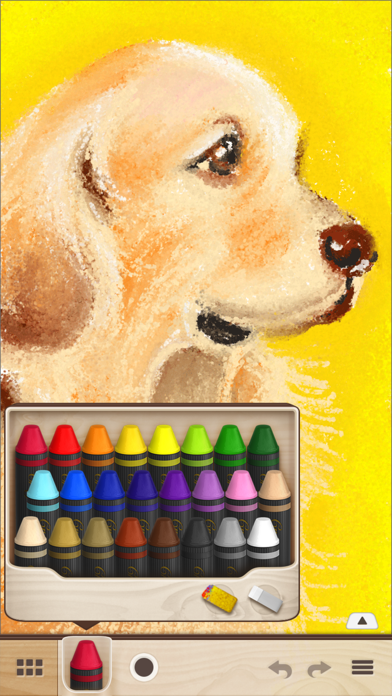
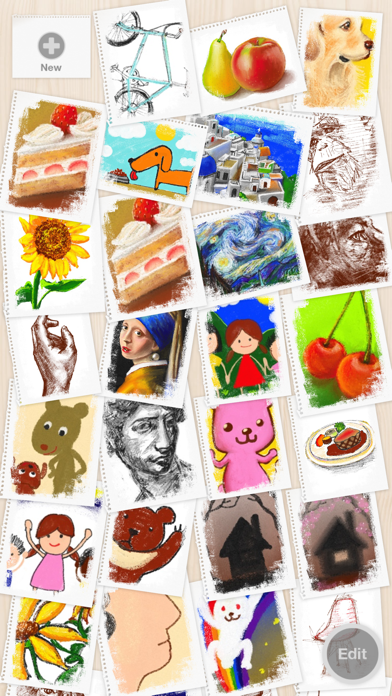
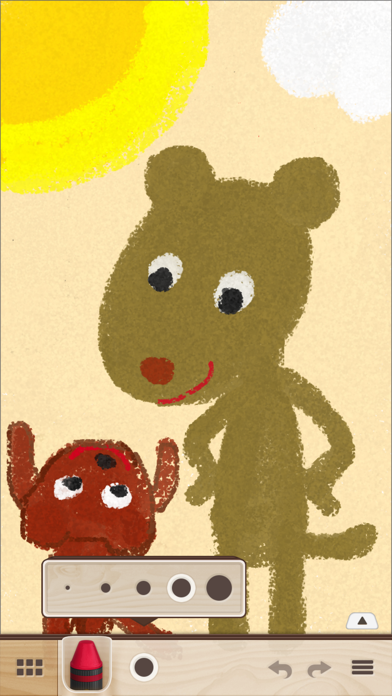
Crayon Style(クレヨンスタイル)は、クレヨンの温かい質感と描き味を再現したペイントアプリです。iPhoneやiPadを画用紙に見立て、落書きやスケッチから本格的なアートまで、幅広い表現が楽しめます。 シンプルでスタイリッシュなUIは軽快で使いやすく、いつでもどこでも気軽に利用できます。アイデアのメモ、風景のスケッチ、イラストの制作など、様々なシーンでご活用下さい。 ・クレヨンの表現を追求した描画エンジン 独自開発の描画エンジンにより、線のかすれ具合、顔料の厚み、重ね描きにおける色の混ざり方など、クレヨン独特質感と描き味を忠実に再現しました。 ・お気に入りの写真を下絵にできる「スケッチガイド」 写真や画像を下絵にできる「スケッチガイド機能」を搭載。好きな写真を元に絵を描いたり、線画にしてオリジナルのぬりえも楽しめます。 ・スマートで遊び心のあるUI 洗練されたデザイン、シームレスな画面遷移、軽快な動作など、使っていて楽しい・気持ち良いと感じられるUIを採用。大人も子供も楽しめるシンプルでスマートなアプリに仕上げました。 ・SNSで作品を共有 描いたイラストは共有機能を使用しTwitterやFacebookに投稿できます。投稿されたイラストの一部はギャラリーサイト( http://crayon-style.tumblr.com )で紹介しています。どれも素晴らしい作品ばかりです。ぜひご覧下さい。 ・より自然に、描きやすく。 Apple Pencil / 3D Touch対応 スタイラスペンを使用すれば、より素晴らしい描き心地を体験できます。iPad Pro の Apple Pencil(筆圧)に対応。iPhoneでは、3D Touchを筆圧として使用し、細かな濃淡を可能としています。この3D Touch機能により、指はもちろん、一般的なスタイラスペンを使用した場合でも、筆圧を使用することが出来ます。 ◆主な特徴 - クレヨンの質感と描き味を追求した描画エンジン - 24色のカラー - こすって色をなじませるスポンジツール - 消しゴムツール - カラー選択の履歴(3つまで保持) - 5段階の線の太さ(ツールごとに線の太さ設定を保持) - アンドゥ、リドゥ(各4回) - キャンバスの拡大、縮小、回転 - ツールバーを上下に移動可能 - 作品のギャラリー機能 - 写真や画像を下絵にできるスケッチガイド機能 - 出力(エクスポート) - カメラロール(jpg) - Share.. - Open In.. - Apple Pencil 対応(筆圧) - 3D Touch 対応
What's New
iPadOS 16に対応
Details
- Developer
- PSOFT
- Main Category
- Entertainment
- Version
- 1.05
- Version Release
- 2022-11-01
- Initial Release
- 2013-04-16
- Size
- 45 MB
- Age Rating
- 4+
- Price
- USD 2.99
- Languages
- EN, JA
- Bundle ID
- jp.co.psoft.Crayon-Style
- Version Rating
- ★ 4.43 (14)
- First Seen
- 2026-06-14
Metadata updated 2026-07-05
Rank History
Free · Max 90 days · Top 5 categories shown (Y-axis: rank, lower is better)
No rank history data
Free Rankings
No rankings
Paid Rankings
No rankings
More by This Developer

User Reviews
Don’t know why but this app I always have to do and study art works for me! I know there are so many good apps for art purposes, but this app ( Crayon) I always use first and never delete from my iPhone!!!! This app is so simple and the best.
It saves your pictures
This is the worse $3 I’ve ever spent. What sort of “ professional artists” are lauding this app? The smudge doesn’t work at all. Given other apps of much higher caliber this app delivers ZERO. I thought I could drag it into another app and make some interesting adjustments but it’s not worth the effort. Did you drag this out to see if you could milk some more income out if it? I look all the time for new art apps and haven’t ever seen this one. Maybe a 2, 3 or 4 year old would get a kick out if this.....
Professional artist asking that you upgrade Crayon Style to compatibility with IOS 11. This deceptively “simple” app has for years been a favorite in my toolbox. I would happily pay a reasonable fee for an upgrade.
this is by far one of my favorite creative apps. yes, it's quite simple but that's one of the things i love most about it. the colors are vibrant and the blend texture is fantastic. (ps i'm a professional artist) PLEASE PLEASE PLEASE UPDATE IT SO ITS COMPATIBLE WITH IOS 11!!! THANKS!!!
Get your fingers dirty! Fun
I enjoy painting with this app and if like abstract expressionism you will have to give this one a try. The smudge stick really makes it versatile- too bad they don't include that on their Zen Brush App. Would be great if there were more colors to choose from but this a clever and useful app. Being able to import images to work from is great but you only get black and white- still useful and adds a dynamic with oftentimes unexpected results. It gives me a lot of ideas that I might later want to try and put on a real canvas. If you paint you will want to play around with this. You might actually create a masterpiece- I've already fooled a couple of my friends who are painters into believing I've created works on canvases. Get it! It's not what you might think. If crayons were this great to work with I'd run out and buy a box. The next step is getting these creations printed on a larger scale.
Awesome
As a user of many art programs to doodle whenever I can, this has moved to one of my favorites. Excellent blending an drawing capabilities along with a trace layer. Only thing I can complain about is colors are not organized in a logical manner in the box and the lack of a custom color. But that is minor -- this is a great crayon / pastel digital app that works on both my iPad and iPhone.
Remember as a kid how annoying it was trying to get crayons to fill in those tiny white spot holes on the paper? This Psoft app makes it easy, BUT, the spots become your friend when drawing over existing colors, making the effect known as broken color in oil painting. Skipping deftly across your Ipad with finger or stylus leaves a wonderful see through texture. Layering these textures can make for a beautiful delicate surface hard to get with analog crayons. Be clear, this app is very simple to use, zen like, and that is a pleasant feature when you want concentrate more on the art than the app!
Reviews are collected only for apps with detected changes (new entries or sharp risers).