

Green Screener
Screenshots



Description
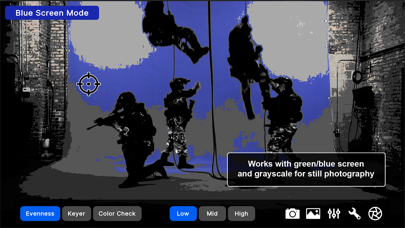
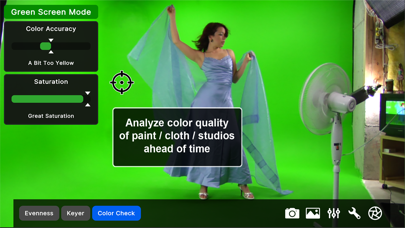
Get amazingly perfect green screen with Green Screener. For good chroma keying, green/blue screens must be extremely even, or fine edge detail like hair and transparency starts to become blotchy, which is the hallmark of bad green screen. Features: * See green screen problems with your own eyes using unique banding visualization. * Built-in chroma keyer and spill analyzer to preview composites live on the set. * Built-in color quality analyzer to verify if the color of a studio green screen, paint at the hardware store, or backdrops you're considering purchasing is good enough. * Works with all device cameras. * Free desktop version including to use with webcams or HDMI capture devices. * Works with imported images, and a built-in library of green and blue screen examples ranging from good to bad. * Works with imported backgrounds, or a library of backgrounds with a variety of lighting scenarios. * Zoom and position background. * Flip X and Y on both foreground and background. * Save snapshots of quick composites to the camera roll.
What's New
Fixed potential startup crash loop. Increased iOS/Mac SDK version.
Details
- Developer
- Hollywood Camera Work SRL
- Main Category
- Photo & Video
- Version
- 2.0.22
- Version Release
- 2025-01-12
- Initial Release
- 2013-02-24
- Size
- 168 MB
- Age Rating
- 4+
- Price
- USD 9.99
- Languages
- EN
- Bundle ID
- us.hollywoodcamerawork.greenscreener
- Version Rating
- ★ 3.71 (21)
- First Seen
- 2026-06-24
Metadata updated 2026-06-24
Rank History
Free · Max 90 days · Top 5 categories shown (Y-axis: rank, lower is better)
No rank history data
Free Rankings
No rankings
Paid Rankings
Competitive Benchmark — Photo-Video Top 10
What it takes to beat this app — comparison with the category's top apps. The orange row is the current app.
| # | App | Price | Rating | Ratings | Langs | Last Update |
|---|---|---|---|---|---|---|
| 1 | Moment Pro Camera II | USD 9.99 | ★ 4.31 | 299 | 1 | 2026-06-16 |
| 2 | PhotoPills | USD 10.99 | ★ 4.71 | 1,510 | 9 | 2026-04-16 |
| 3 | PromptSmart Pro - Teleprompter | USD 29.99 | ★ 4.60 | 11,191 | 1 | 2026-06-03 |
| 4 | Stop Motion Studio Pro | USD 5.99 | ★ 4.74 | 13,323 | 17 | 2025-12-10 |
| 5 | Print to Size | USD 2.99 | ★ 4.86 | 19,233 | 6 | 2026-03-13 |
| 6 | Pro Camera by Moment | USD 4.99 | ★ 4.58 | 9,230 | 1 | 2026-03-05 |
| 7 | LumaFusion | USD 29.99 | ★ 4.75 | 24,650 | 13 | 2026-03-30 |
| 8 | BerryFilm - Korean Style Cam | USD 1.99 | ★ 4.91 | 46 | 5 | 2026-06-22 |
| 9 | Slow Shutter Cam | USD 2.99 | ★ 4.62 | 2,765 | 4 | 2026-04-07 |
| 10 | Rarevision VHS: Retro Cam | USD 5.99 | ★ 4.66 | 6,716 | 4 | 2025-11-07 |
| 69 | Green Screener | USD 9.99 | ★ 3.71 | 21 | 1 | 2025-01-12 |
User Reviews
For some reason even after uninstalling and reinstalling, it is not allowing me to view through my camera. It’s all up-to-date. It is just not working.
I am new at this, but the app did not help. There is no key or directions to tell me what the different colors mean, how to read and such. I had to find other people’s youtubes and then it still did not help entirely. If I could, I would return. It was coming in yellow, yet when I did a test shot, it worked perfectly. Maybe needs a check up…
Support helped me immediately get thru an issue the very same day! I see where some folks expect it to fill in the background with a photo... This is a professional light meter. It tells you where the hot spots are to adjust lighting. That’s all, and it does it very well.
Bought this app thinking it was a useful tool, it isn’t, don’t buy it. I want my $ back.
Green screen was set up, lit well by multiple lights, wrinkle free, and easily able to key out in Premiere... Yet this app wasn't able to find a consistent color. The idea behind it was great and if it worked as described would have been very helpful. But nope. So basically this app was a waste of $10. Congrats developer, you scammed me!
Used it on a major green screen shoot over the weekend and it helped tremendously. I emailed the company that makes this a little while back to make sure this version was current and they told me if it’s on the Apple store it still works as it’s supposed to. This app helps make sure your green screen is evenly lit so you can pull a decent key from it. We used it in our green screen live stream and it worked extremely well.
This app is the best thing that you can buy to make you able to do chromakeying right. It returned its money in minutes. Seriously, this is the best. Please discard the reviews that say that it doesn't work. Those people did not read the description of the program. This app helps you in lighting your green screen, which is the most crucial thing that you need to do for a correct chromakey. The app does not process video. It's clearly stated. This app is for judging your lighting. As such, yes, if it's for professionals who need to say their screen in the best way possible. I have done GS for years and never got results as good as when using this app. Thank you to the developers for making it. It gave me renewed enthusiasm in using green screen productions.
I’m not sure how this app works. When I tap the screen it turns it green, and the YouTube video was pointless as well
This might be a great tool for experienced lighting folks, but there are no instructions, not even an informative YouTube video on how to use this app to get your lights even. What is labeled in the app as a tutorial is just a sales pitch. For me it was a waste of money.
This app does exactly what you need and makes the process a million times easier. I just started green screening. So this changes everything. Sorry to all you morons who didn’t do your research before purchasing. There’s a lot of scary dumb people in the world as you can tell by the one star reviews.
Reviews are collected only for apps with detected changes (new entries or sharp risers).