
Adding Machine 10Key Universal
Screenshots


Description
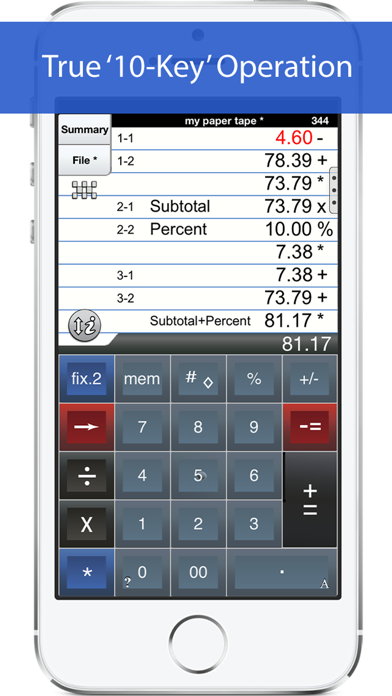
'Adding Machine 10Key Universal’ behaves like a true '10 Key' or 'adding machine' like those made by Monroe, Casio, Sharp and others. Press asterisk (*) for a total, operator entry is reversed, and calculate percentages by multiplying and adding to a stream of numbers. SEE THE 1ST FAQ BELOW. This universal version works with both iPhone and iPad. The iPad version features a full sized (1:1) keypad with TypeTone, a unique audio aid to help guide your finger back to the center of a key. The total (*) key (iPad or iPhone) can be on either the left or right side (Sharp or Canon style). Also. Review & edit numbers, add or delete lines. Save & retrieve paper tape files. Export paper tape files to iBooks©, Dropbox©, or your favorite printing utility (see the FAQs). ==== Recent Press ===== Has been featured in iTunes "What's Hot" in the Finance Category. Strategic Finance (Tools of the Trade): "If you're looking for a professional desk calculator that can give you full 10-key accounting functions with a tape you can name and save, edit, e-mail, or print, check out Interlocken's 10 Key for iPad." ================= Specifications: ================= . Behaves the same as a '10 Key' adding machine. . Export a PDF file to iBooks©, DropBox©, Email, and print with your favorite printing utility. . Use Apple AirPrint© to print directly. . TypeTone - a major innovation to aid accurate key entry using audio feedback (iPad version). . Full size (1:1) keyboard (iPad version). . Select from a menu of keypad sounds. . 400 lines of paper tape history. . 3 display formats: fixed, fix+, float . Save paper tapes to disk for later use. . Correct numbers, add comments, add/delete lines . Two keypads offer the 'total' key on the left or right (Sharp or Canon style) . Comprehensive set of help screens. . 3 Orientations: Landscape Left/Right + Portrait (iPad version) ================ FAQ's Q1. What is the difference between 'Adding Machine 10Key Univ', and 'Accountant Calc' in the App. Store.? A1. Both calculators are single-column adding machines or calculators with full-size (1:1) keypads and are optimized for the iPad User Interface. '10 Key' behaves the same as a 10 Key Adding Machine with reversed operator entry while ‘Accountant Calc’ supports free chaining of +, -, x, /, %, √, 1/x. It is easier to use if you are not familiar with how a '10-key' works. Q2. Can I touch-type? A2. The iPad version comes as close to touch-typing as a touch-screen can be. With ‘TypeTone’, a key will guide your finger back to the center of a key with an audio tone. Q3. How can I edit an incorrect number or add & delete lines from the paper tape? A3. Touch any line of the paper tape for edit mode. Touch the side controls: Add Line, Delete Line. You can also edit numbers, split Add/Sub or Mul/Div groups. Press Done to return to Calculator mode. Q4. Tell me about Email, Printing, and Exporting a Paper Tape. A4. Email includes a pdf attachment. Print requires an AirPrint capable printer. Open-In will cause a menu of 3rd party Apps to appear. Once exported, print directly to a network reachable printer (even if it is NOT AirPrint capable). ============================ TERMS AND CONDITIONS Your use of this application is governed by Interlocken Technology's Terms of Use (http://s354819480.onlinehome.us/InterlockenPrivacyPolicy/Interlocken%20Technology%20Privacy%20Policy.pdf) and Privacy Policy (http://s354819480.onlinehome.us/InterlockenPrivacyPolicy/InterlockenTechnologyTermsOfUse.pdf)
What's New
v7.10 ==== 1. Support for iOS 12.4 and newer.
Details
- Developer
- Richard Silverman
- Main Category
- Finance
- Version
- 7.10ku
- Version Release
- 2023-12-27
- Initial Release
- 2012-11-26
- Size
- 23 MB
- Age Rating
- 4+
- Price
- USD 3.99
- Languages
- EN, FR, DE, IT, ES
- Bundle ID
- com.papercalc-mobile.papercalc-10Key-universal-suite
- Version Rating
- ★ 4.66 (133)
- First Seen
- 2026-05-28
Metadata updated 2026-07-18
Rank History
Free · Max 90 days · Top 5 categories shown (Y-axis: rank, lower is better)
No rank history data
Free Rankings
No rankings
Paid Rankings
No rankings
More by This Developer
User Reviews
could not save taped,nor export results. Doesn’t work for new iPad
This App works very well, perfect for balancing your check book and adding long spread sheets.
This acts just like the old physical 10-key machines. There was a slight learning curve because I haven’t used a 10-key for 20 years or more. But the app works really well. It’s certainly worth the price.
The tape feature makes it easy to check and retain your work. Second, it is an adding machine. Enter the number then the operation much easier if you think that way
Sometimes an old school adding machine is just better than a calculator!
Use it all the time.
I like this calculator app for the “paper tape”. The paper tape allows one to check not only the value entered but the operand applied to the value.
I can add perfectly…BUT THIS DOES NOT SUBTRACT !!! It only adds when I tried to subtract!! I’m so ticked off I want my money back
Great app. Easy to learn, especially if you know 10 key. Can keep several lists saved. However, no way to do handoff due to lack of iCloud syncing.
I'm so used to using a calculator with a tape I was pleasantly surprised when I found this. I love the fact that I can go back & review what I entered and check for mistakes (and I make them all the time.) It's really a great app. Thanks
Reviews are collected only for apps with detected changes (new entries or sharp risers).