
liveBPM - Beat Detector
🇯🇵 JP LocalizedScreenshots
Description
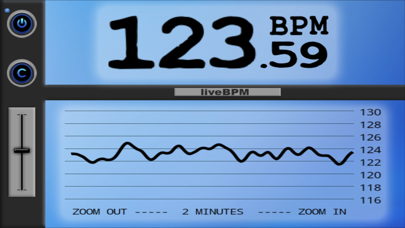
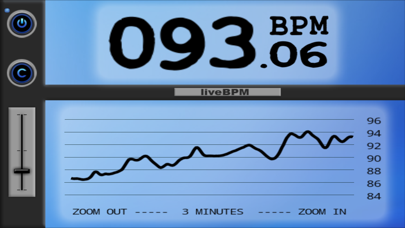
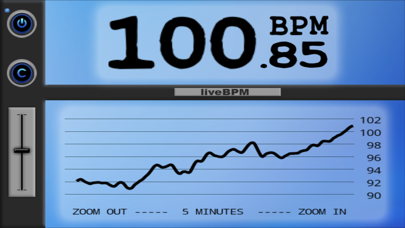
Sharpen your sense of time! liveBPM is the tempo monitoring tool for drummers, bands and DJs. It detects music and beats via the microphone and continuously displays the current tempo in beats per minute (BPM). It is easy to use and delivers high-quality results while being energy efficient. === What users said about liveBPM === John Walden, freelance musician and music technology journalist at musicappblog.com: "There are three obvious applications for the app. First, it would make a brilliant practice tool for a drummer, allowing them to monitor just how good they are at keeping a steady tempo without the aid of a click track to guide them. Second, sat beside your kit during a performance, it would allow you to judge just how well you are hitting the ideal tempo for each song in your set. It’s not just drummers that can benefit for liveBPM as the third use is in mapping the tempo – and any tempo changes – in commercial recordings. While this is useful for drummers, it is instructional for almost any musician." JonLong: "I used this at my last band practice and wasn't expecting it to work. I couldn't believe how quickly and accurately it started tracking the bpm, even despite the very loud volume of our music." PocketDrummer82: "I am a professional drummer and I have been looking for something like this for years! Unless your playing with backing tracks or recording, Playing with a Click is too Mechanical. This app allows the tempo to breathe, and its like a little angel on your shoulder telling you the band is speeding up or slowing down. It is totally worth the money." Chris Walther: "I have used this about five gigs now and have quit using my previous tempo meter. I used both for a few gigs to test the accuracy. Dead on. Thanks! Every drummer should use this." magrec: "This has been very helpful for recording. thanks!" === Detailed Description === This is a tool designed for professional use: - Well-tested beat detection engine guarantees trustworthiness - Can handle most genres - Produces results accurate to within 0.1 BPM under the following conditions: -- The tempo is constant or almost constant -- Strong impulses are defining the beat (drums, accentuated rhythm instruments like bass/guitar, etc.) Further features: - Tempo curve shows the development of tempo over time - Multiple zoom modes to show last 2, 3, 5, 7, 10, 15, 20 or 30 minutes - Advanced audio spectrum analysis via FFT - More accessible and usually more accurate than BPM counters that function through tapping - Low battery drain thanks to high performance code and efficient algorithms Using it as a musician: - Use it as an objective tempo reference like a metronome - It actually has several advantages over a metronome: -- You are not tied to a click, giving you more flexibility -- Helps you use tempo changes to enhance your musical expression -- With blind tests, it can massively improve your timing confidence, which is especially important if you are in a tempo leading role (e.g. drummer) - Discover how/whether your favorite artists use tempo changes - Measure and improve your time-keeping skills - Identify slowdowns and speedups while practicing your instrument - Always be in control of the tempo during your live gigs and rehearsals Controls: - Power Button: For freezing the tempo curve and minimizing battery drain - Clear Button: Clears the tempo curve - Slider: Adjusts the target tempo range (i.e. 80-160 BPM) - Zoom Buttons: Switch between zoom modes for the tempo curve. (2-30 minutes) Note: - You can check and improve the detection by clapping loud to the beat. Also, results can be improved by plugging in a suitable external microphone. - You can support my work by rating it on the App Store. If you have questions and/or suggestions, feel free to contact me via e-mail or facebook.
What's New
This update from Apple will improve the functionality of this app. No new features are included. - added 64 bit support to improve performance on current hardware and to ensure compatibility for iOS 11 - fixed a bug where during startup, the audio output would move to the small speaker on the iPhone when not using line-out - updated connection to iOS audio, using the native sampling rate of 48 kHz - now using the measurement mode, minimizing the amount of system-supplied signal processing Version 2.0 is work in progress, featuring a new improved beat detection engine. Feel free to contact me if you are interested in beta-testing (via facebook or dev.daniel.bach googlemail com).
Details
- Developer
- Daniel Bach
- Main Category
- Music
- Version
- 1.2.1
- Version Release
- 2017-05-09
- Initial Release
- 2012-08-31
- Size
- 1 MB
- Age Rating
- 4+
- Price
- USD 3.99
- Languages
- EN
- Bundle ID
- com.DanielBach.liveBPM
- Version Rating
- ★ 4.06 (114)
- First Seen
- 2026-05-28
Metadata updated 2026-07-19
Rank History
Free · Max 90 days · Top 5 categories shown (Y-axis: rank, lower is better)
No rank history data
Free Rankings
No rankings
Paid Rankings
Competitive Benchmark — Music Top 10
What it takes to beat this app — comparison with the category's top apps. The orange row is the current app.
| # | App | Price | Rating | Ratings | Langs | Last Update |
|---|---|---|---|---|---|---|
| 1 | TonalEnergy Tuner & Metronome | USD 6.99 | ★ 4.85 | 57,105 | 9 | 2026-03-27 |
| 2 | Blueprint 4-Track | USD 5.99 | ★ 0.00 | 0 | 0 | 2026-07-18 |
| 3 | FL Studio Mobile | USD 14.99 | ★ 3.77 | 563 | 1 | 2026-06-16 |
| 4 | Ableton Note | USD 6.99 | ★ 4.21 | 668 | 5 | 2026-05-05 |
| 5 | Koala Sampler • Beat Maker | USD 4.99 | ★ 4.76 | 1,372 | 1 | 2026-07-09 |
| 6 | iReal Pro | USD 21.99 | ★ 4.86 | 11,128 | 10 | 2026-06-30 |
| 7 | Tenuto | USD 4.99 | ★ 4.75 | 651 | 1 | 2026-04-28 |
| 8 | DJ Rehab Music | USD 4.99 | ★ 4.57 | 44 | 1 | 2026-07-15 |
| 9 | forScore | USD 24.99 | ★ 4.81 | 42,214 | 14 | 2026-04-23 |
| 10 | Drum Tuner - iDrumTune Pro | USD 12.99 | ★ 4.59 | 2,299 | 2 | 2025-12-16 |
| 68 | liveBPM - Beat Detector | USD 3.99 | ★ 4.06 | 114 | 1 | 2017-05-09 |
More by This Developer

User Reviews
My contract dance band totally relies on this to keep a good tempo for dancers. It’s the best!
Just want to say thanks for bringing Live BPM back to the App Store. I’ve really missed it.
The True OG L I VE is back! Love to see it - Eris Drew
I’m a new user to Live BPM. After working with it for many hours now, I’m happy to say it works easy and seamlessly. The one enhancement I would suggest is: Adding a regular Metronome feature that you can set at the beginning of each song on stage(to begin the song) then display the beginning tempo to the ongoing tempo during the performance. Not sure if you can do this. It would definitely be an enhancement.
Had to delete. iPhone 13 Pro. 17.4.1
This is for anyone working in professional DAWs…Pro Tools, etc. I was dealing with a click track that had undergone a move in tempo but that move had been applied via the pitch shift algorithm in pro tools putting the tempo quicker but not precisely on any whole number (in the likeness of tape machines). The music and this new click were in perfect sync but the session grid was still in the previous BPM. LiveBPM saved me a ton of time by getting me in the right “zipcode” where I could then begin going granular with the BPM in the session. After starting playback of the click, liveBPM instantly honed in on 156.81 BPM (click was subdivided into 8th notes) and then only occasionally moved to .82 or .83 but stayed locked on .81 90+% of the playback. Since the BPM / grid of the session was defined in quarter notes, I cut 156.81 in half and that got me to 78.4050 (Pro Tools has BPM defined to 4 decimals). At that setting the old and new clicks were extremely close. A couple more fine adjustments and an a/b comparison of both clicks on playback rendered no discernible difference at a final setting of 78.4056. The only way to detect any drift between the two clicks was to microscopically zoom in visually on each to see that a tiny amount of drift was beginning to happen in the final measures of the 6-minute song. My only wish would be for a pro version of liveBPM to exist with detection to 4 decimals to match pro DAWs but I can certainly understand the market for that being most likely small. I’m most grateful to have located this app. Thank you for developing it.
I wish I could set the full range to a narrow range. We want 110-120, so wish I could set the entire graph range to 100-130 or so.
Forcing you app to run in landscape mode is a PIA. Yes, if you operate in landscape the controls are similar to portrait mode but it’s awkward and what in this app requires the width? Stumble over this whenever I use it.
Love this app, use it almost every session! Daniel is there any way to feed audio into the headphone port to detect beat? An option for detecting 3/4 time would also be amazing, thanks!
How do I get it to work
serato djでうまく解析できない曲も正確にBPMを図れるため、手動でBPM設定ができ、とても助かってます。 似たようなアプリがあっても良いですがなかなか自動検出は無いので重宝します。 AppleWatchでも測れると良いと思います。
Great if this can work on split screen mode, so that another app for set list could be run in parallel Thanks
Reviews are collected only for apps with detected changes (new entries or sharp risers).