

Krafts Inventory
Screenshots


Description
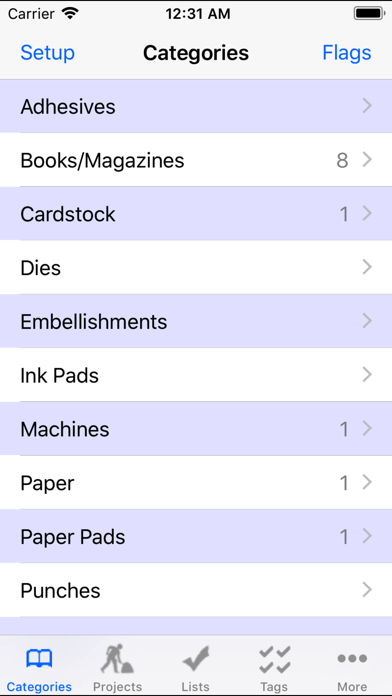
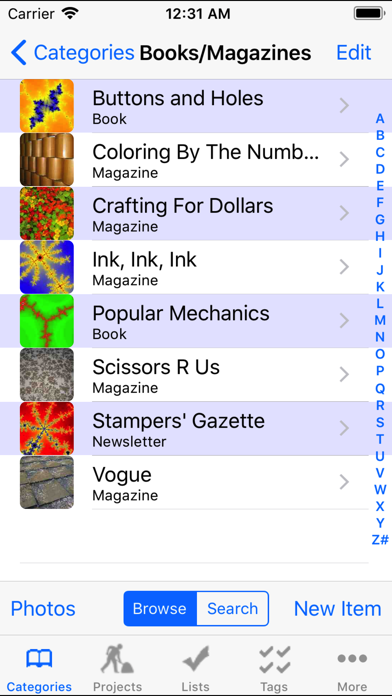
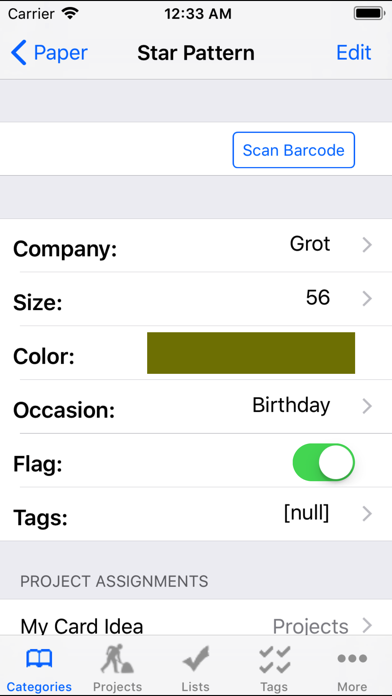
Track Crafts Inventory and Projects Custom-designed with the help of experienced crafters, Krafts is smart about helping you organize your materials and projects. You can add and edit categories to suit your needs. The built-in UPC scanner uses your device’s camera to scan barcodes and automatically fetch product images (if available online). While shopping, you can scan barcodes in the store to easily check if you have those items in your inventory. You can also “flag” items that have special significance (e.g., need restocking). Krafts is not affiliated with any supplier or retailer, so the app never tries to sell you stuff. The data in the app are YOUR data — no ads, promos, or company videos. Krafts is more complicated than similar inventory apps, but that’s because it’s flexible and does so much more. Please read the extensive Help section in the app (and online at: http://mat.buddy.com/krafts). Features: • Maintain inventory of supplies and tools. • Enter new project ideas and track projects through to completion. Add more details along the way. • Designed for any craft. • Create your own categories (e.g., “Card Stock,” “Tools,” “Books”). • Add customized fields to each category (e.g., “Name,” “Quantity,” “Company,” “Photo”). • Keeps photos of your items and completed projects. • Scan UPC barcodes using the camera (only some codes have online data, see below). • Scan store items while shopping to check for matches in your inventory. • Add item photos using the camera or barcode scan. • Help page assists with learning the app. • Tutorial mode: help and tips for every screen. • In-app Backup/Restore to/from your desktop PC. • Email or print your entire database for safekeeping. The scanner uses a public database to convert UPC codes to text. The database does not include all barcodes, and new ones are being added daily. However, even if a barcode is not in the database, Krafts will still save the number to allow match-ups when scanning the same barcode in your stash or a store. Please contact me directly with questions or suggestions (hint: use the "Email Jeff..." button on all Help pages). Please do not put questions and suggestions in a review because I'll have no way to contact you.
What's New
Be safe: do an in-app BACKUP before installing this version. v3.3: 1. Fixed: Crash when saving a photo to Photos. 2. Fixed: Can swipe/scroll Ideas/WIP/Done project photos. 3. Added a button (in Settings, Export) to email database is CSV format. v3.3.1: 4. Fixed the swiping/scroll in project photos (again!). 5. Improved interface for X-series of iPhones.
Details
- Developer
- The Buddy System, LLC
- Main Category
- Productivity
- Version
- 3.3.1
- Version Release
- 2019-03-25
- Initial Release
- 2011-09-20
- Size
- 54 MB
- Age Rating
- 17+
- Price
- USD 2.99
- Languages
- EN
- Bundle ID
- com.buddy.mat.Krafts
- Version Rating
- ★ 3.86 (22)
- First Seen
- 2026-07-11
Metadata updated 2026-07-11
Rank History
Free · Max 90 days · Top 5 categories shown (Y-axis: rank, lower is better)
No rank history data
Free Rankings
No rankings
Paid Rankings
No rankings
More by This Developer
User Reviews
I’m trying to figure out how to report a glitch and unfortunately this is the only way I see to do it. Every time I try to take a photo, the app closes down. Any help would be appreciated!
You can’t try before you buy so I purchased this app thinking it would help scan in all my craft supplies. I was sadly disappointed. It doesn’t find the barcode for Fabrico markers. It doesn’t sync with my iPad. I do not want to have to type in all my supplies because I have a lot. If you want to start off with just a basic app that you type in everything on your iPhone this would be for you. But it isn’t for me.
Been using this app for several years now and absolutely love it! It has a great tutorial to understand how the data structure is organized so you can utilize all the available fields to include lots of into on your item. I use it whenever I am looking to buy something new so I don’t duplicate. Love the ability to take up to 2 photos for an item as well as add an actual color block and name next to your items like ink pads, markers, etc. You can also customize what fields you want to show for each category. You can also search within the categories. When I updated my phone I had a minor blip in the color feature but I reached out to the developer and he was very quick to respond and helpful to give me a solution!
The big draw for me on this app was the use of a scanner to inventory items. Unfortunately i was unable to find an item in my collection of things that would scan. Based on the age of this app it is disappointing that this is an issue, though i am hopeful Apple will issue a refund.
This is the best app for all of your craft supplies! It is user friendly. Customer support has ALWAYS gotten back with me! I have been using for several years and still very happy with the App.
Having a search function would be awesome.
I really like how customizable this app is. I have been using for a few years to slowly inventory all my craft supplies. One con, Because there isn’t an account to sign into I cannot view content on both my phone and tablet. Haven’t been able to figure out a way to sync them. If that is a possibility then would give it 5 stars
I downloaded this app in April of 2020 and have been using it for almost three years now. I had to read the Help sections and allow the in app tutorial to show me the ropes but once I caught on, it was so worth it. I think this app would be difficult for anyone who isn’t tech savvy, but not impossible. (I often compare it to a simple version of Microsoft Access.) Even three years later, I am still learning new ways to incorporate this app into my card making life. And I still haven’t gotten all my supplies and told loaded in…..I have way too much stuff! LOL I have recently been working on loading in all the photos of my finished cards and I LOVE that I can link the supplies and products I used to make the card to the finished project entry. The app lets me build the details to include in each category title those categories and details as I see fit. It really is a very flexible app once you learn how to set up your categories and details. Don’t be afraid! Use the tutorial and read the help section!
But I don’t see anywhere to put notes. However, I do love that I can take photos of each item. Well I thought I could. I guess I could only for stamps? I find this app a little confusing and definitely not user friendly
I have been using this app for almost 10 years now, and it is still the best inventory app in my arsenal. I have to admit, it’s not very pretty, but when it comes to function, it has endless possibilities. You can create your own categories, tags, fields, etc, which makes it customizable for any way you want to use it. And you can add photos of your items. There is a backup function, but it is somewhat manual, so I admit I don’t backup as often as I should. Kind of wish the Dropbox backup was still available. If you’re looking for a workhorse to organize your stash, this will do the trick.
Reviews are collected only for apps with detected changes (new entries or sharp risers).