

Nav Trainer Pro
🇰🇷 KR LocalizedScreenshots
Description
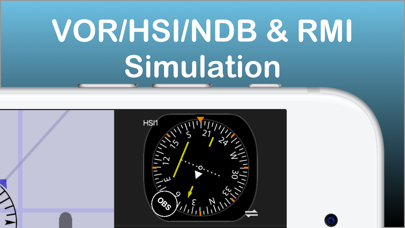
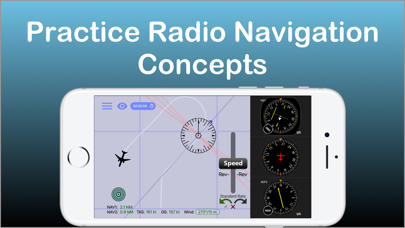
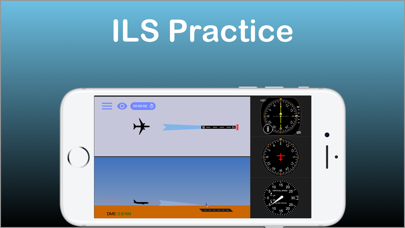
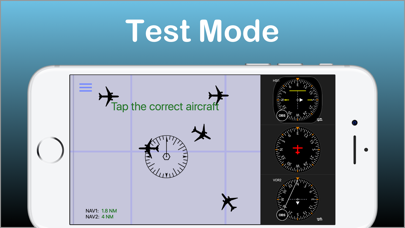
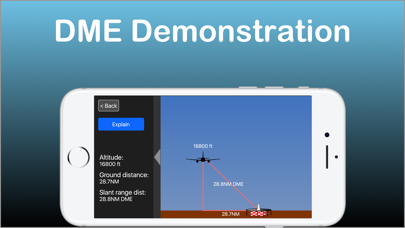
Selected by AOPA.org readers as number one of five aviation apps you can't live without! * ***** Reached No. 4 in the Navigation category of the U.S. app store for iPad! ***** Make IFR flight training easier! Practice the use of aviation navigational equipment on your mobile device. Simulates VOR, HSI, RMI, ADF, DME and ILS navigation. A must have tool for any CFII, student and instrument pilot! -Students and pilots: improve your understanding of radio instrument navigation at the comfort of your own mobile device. -Instructors: demonstrate complex IFR concepts to your students from bird's-eye view while on the ground. -Also suitable for flight simulator enthusiasts. Used in classrooms, one-on-one ground sessions and by individuals to improve their IFR orientation skills. -------------------------------------- -user reviews (from all markets) ***** Great to study instruments and saves lots of $$$!!!" "***** I have been looking for an app such as this to teach my students" "***** Before I used this app all this VOR orientation was so complicated, and now it's clear as ice!" "***** Easy to use, perfectly designed and helping to understand basic navigation stuff. Highly recommended for student pilots, instrument applicant and CFI's." - Improve your situational awareness under IFR. - Save time and money on your instrument and initial flight training. - Prepare for your instrument rating or proficiency check. - Test your NAV situational awareness with the test mode. - Flight instructors: the perfect tool to help you easily explain and demonstrate complex radio navigation concepts to your students. ***Features:*** -Dual navigation displays. -VOR\NDB trainer screen: Simulates VOR and NDB navigation using VOR, HSI, ADF and RMI displays. -ILS trainer with both VOR and HSI displays. -DME visualization screen - demonstrates how DME slant range distance is affected by ground distance and altitude. -Test mode - generates phantom aircraft around the navaids. Your goal is to find the correct aircraft position. -Drag and drop the aircraft and nav fix around the screen. -Fly! mode - Make the airplane fly around the screen. great for practicing intercepting and tracking courses. -Wind direction & velocity control. -Aircraft tracing (contrail mode). -Accelerator support for aircraft control. How to use: -Select the various instruments by double-tapping their dials. -Toggle VOR sectors visualization on/off. -Auto tune OBS by pressing the OBS knob. -Auto turn the aircraft towards the nav fix by tapping the aircraft symbol. Double tap will turn the aircraft toward NAV station #2 -Change aircraft headings by flicking your finger over the heading indicator. -Tune the OBS by dragging your finger around the HSI/VOR displays or over the OBS knob. --------------------------------------- The developer is a Gold Seal CFI/CFII/MEI and part 121 airline pilot --------------------------------------- For comments, feature requests or bug reports, if you have the app, please take the survey at http://bit.ly/hCAqgF * (https://www.aopa.org/news-and-media/all-news/2013/february/26/five-more-aviation-apps-you-cant-live-without) **If you experience any problem with the app, please contact me before leaving a review and I will do my best to solve it for you.**
What's New
- Bug fixes - UI improvements
Details
- Developer
- FLEMINGER MEDIA LLC
- Main Category
- Navigation
- Version
- 3.5.0
- Version Release
- 2024-03-27
- Initial Release
- 2011-03-28
- Size
- 13 MB
- Age Rating
- 4+
- Price
- USD 8.99
- Languages
- EN
- Bundle ID
- com.fleminger.navaid
- Version Rating
- ★ 3.89 (37)
- First Seen
- 2026-05-28
Metadata updated 2026-07-19
Rank History
Free · Max 90 days · Top 5 categories shown (Y-axis: rank, lower is better)
No rank history data
Free Rankings
No rankings
Paid Rankings
No rankings
More by This Developer

User Reviews
Great for answering the question “where are you in relation to the VOR or ILS? Especially good for those tricky reverse sensing problems when on an ILS. Back Course.
I use this extensively to test VOR knowledge. It is perfect.
The CDI needle has very low resolution. It ticks in 1 degree increments. One dot is 2 degrees, so from full deflection to intercept is only 10 ticks... it looks terrible. The CDI does not move fluidly in an analogue manner like in real-life. There is not as much trend information as in real-life. Not good. Update: Your response is nonsense. I’ve used plenty of modern digital displays like Garmin G5 and G1000 and while the OBS is only capable of selecting a course in 1 degree increments, the CDI needle itself still moves fluidly in an analogue manner as bearing to the station is changed. Stop making excuses. The instrument in this app does not behave the same as a real life VOR indicator in virtually any GA airplane.
Don’t get me wrong— there’s nothing wrong with the app. But the price point is off base. This is a $1.99 app at most.
I like it, it very helpful. And it was money well spent.
It doesn’t work at ios11. Please fix it.
Nav Trainer 3.4.1 IPad Pro 9.7 v.11.1.2 • Settings > Instruments “BIG \/ SMALL” does not work. • Motion sensors still changes heading at warp speed. Absolutely useless. • If you are going to provide an option for turning via the motions sensors, use an algorithm which works similar to a real control wheel/yoke. [Ref. X-Plane 10 for iPad] • Add delay variable when rolling in/out of standard rate. [Ref. VOR Tracker] • Based upon most textbooks (FAA, Jeppesen, ASA, Rod Machado, etc.) and typical training aircraft with ‘standard’ instrument configurations, the HI should be either on top or bottom—not in the middle of the NAV instruments. If you disagree, make the option to place any instrument in any of the tree locations. [Ref. IFR Trainer] • My guess, however I could be wrong, it’s general aviation students/pilots or CFIs using this app. Having to press twice to achieve a standard rate of 3 degrees per second is distractive. Put an option in Settings to set the default to match the pilot’s preference. ! Based upon the Law of Primacy, train the student’s eyes, motions, and thinking (even with simple trainers) according to norms/standards from the very beginning. Negative Transfer of Learning is expensive! “It’s an iPad typically held in the left/right hand” is a poor excuse. ! “This is not a flight simulator” is not an excuse for making something that could have been made otherwise and better with a little research, foresight and testing by a few CFIs / CFI-Is.
Thanks for keeping this app alive with an update for 64bit!
Please update
$5 is a lot of money for an app that hasn't been updated to work with the new iOS
Needs a bearing pointer to the station in conjunction with the HSI
Reviews are collected only for apps with detected changes (new entries or sharp risers).