
Face & Body Photo editor
Screenshots

Description
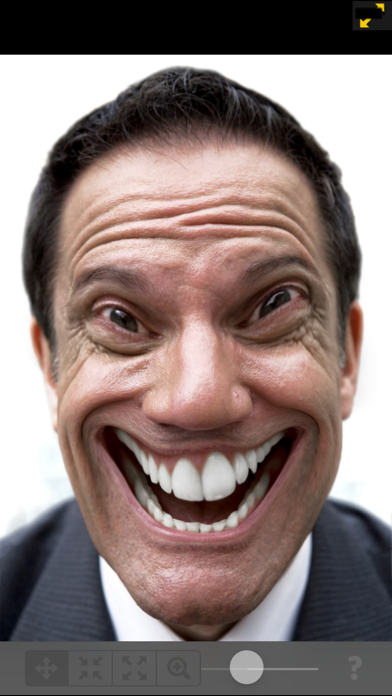
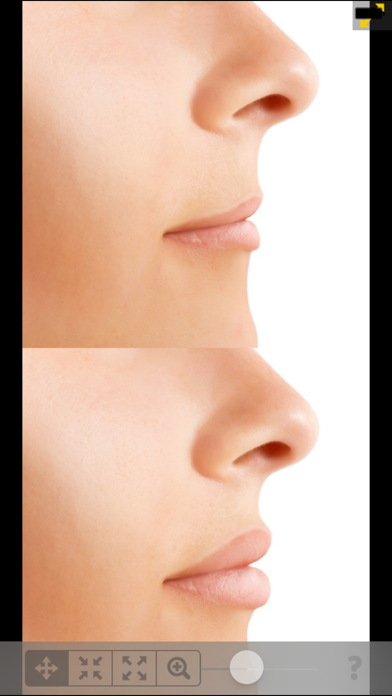
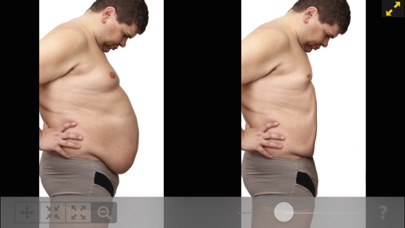
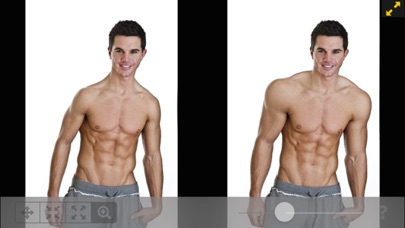
This is a simple but powerful photo distortion App. You can use it to simulate body transformations, improve your appearance on social networks, or have fun warping people. All you need to do is drag, grow or shrink the body parts you want to distort. Find out how you would look like with a different nose, chin, buttock, less weight... Our app, downloaded 10 million times on all platforms worldwide stands out because of 2 particular features: 1) The distortion algorithm we are using produce very smooth image distortions, such as the ones you find in 100x more expensive professional liquify apps. 2) Our dual display mode, which clones your image into the other half of the screen when you rotate your device, allows you to modify your image without the encumbrance of your finger hiding the area you are working on. This is ideal for small touch devices such as your phone !! - New Feature: You can now save morphing animations as videos! ************************ WHAT CAN THE APP DO? ************************ With this photo distortion app you can transform any face and body part: • Nose reshaping • Lips augmentation • Chin and face contouring • Weight loss • Muscle augmentation • anything you can reshape or shrink! For fun or simply because you are curious about how you would look with a differently shaped body part, this app will help you. ************************ HOW TO USE THE APP? ************************ Using the app is very easy, even on small screens: • Import a head-shot or full body picture from your camera or device image library. Preferably the subject should be photographed on a unified color background and well lit, so the contours are clearly visible. • Use your finger to drag or shrink the body parts that you want distorted. For example you can crush this bump on your nose, or even make you slimmer. • Undo latest changes if you are not satisfied with latest modifications. • By rotating your device, switch from single to dual view, to easily compare the before / after images on the same screen. • Zoom in, and use the dual view to see your changes on a real time workspace mirror without your finger in the way. This is a great solution to perform precise distortions on small screens!! • Launch a morphing animation between the original photo and the modified one to see the old you transforming into the new you! Download our app now. Then see how those changes you’ve been wanting to see might look.
What's New
- Update to support iOS 17. - Fixed a bug about image with certain proportion not loading properly.
Details
- Developer
- Uniqo Lab.
- Main Category
- Photo & Video
- Version
- 1.23
- Version Release
- 2023-09-23
- Initial Release
- 2011-01-27
- Size
- 5 MB
- Age Rating
- 4+
- Price
- USD 1.99
- Languages
- AR, EN, FR, DE, HE, IT and 9 more
- Bundle ID
- com.kaeria.vpssmobile
- Version Rating
- ★ 4.67 (1,740)
- First Seen
- 2026-05-28
Metadata updated 2026-07-19
Rank History
Free · Max 90 days · Top 5 categories shown (Y-axis: rank, lower is better)
No rank history data
Free Rankings
No rankings
Paid Rankings
Competitive Benchmark — Photo-Video Top 10
What it takes to beat this app — comparison with the category's top apps. The orange row is the current app.
| # | App | Price | Rating | Ratings | Langs | Last Update |
|---|---|---|---|---|---|---|
| 1 | Moment Pro Camera II | USD 9.99 | ★ 4.37 | 353 | 1 | 2026-06-30 |
| 2 | PhotoPills | USD 10.99 | ★ 4.71 | 1,515 | 9 | 2026-04-16 |
| 3 | YoungPhoto - Aesthetic Camera | USD 1.99 | ★ 5.00 | 2 | 5 | 2026-06-26 |
| 4 | Stop Motion Studio Pro | USD 5.99 | ★ 4.74 | 13,535 | 17 | 2025-12-10 |
| 5 | Print to Size | USD 2.99 | ★ 4.86 | 19,385 | 6 | 2026-03-13 |
| 6 | PromptSmart Pro - Teleprompter | USD 29.99 | ★ 4.60 | 11,303 | 1 | 2026-06-03 |
| 7 | iWebTV PRO | USD 6.99 | ★ 4.71 | 4,083 | 2 | 2026-07-18 |
| 8 | myLightMeter PRO | USD 3.99 | ★ 4.79 | 1,074 | 7 | 2026-07-14 |
| 9 | CineTemp | USD 19.99 | ★ 4.88 | 25 | 1 | 2026-07-13 |
| 10 | LumaFusion | USD 29.99 | ★ 4.75 | 24,671 | 13 | 2026-07-06 |
| 93 | Face & Body Photo editor | USD 1.99 | ★ 4.67 | 1,740 | 15 | 2023-09-23 |
User Reviews
This does not simulate plastic surgery at all. The only thing this Apple do is allow you to pinch in areas on your body or enlarge areas on your body. Thanks we can already do that with our other editing apps!
This app is a complete ripoff. It markets itself like a professional grade tool, but in reality, it’s just a glorified face filter with embarrassingly limited features. The edits are clumsy and unnatural your face ends up looking like a warped, low effort Photoshop fail. It doesn’t enhance anything, it butchers your features. Total scam. Don’t fall for the ads or fake reviews this app should be removed from the App Store.
Not great. It allows for you to drag your face around in a perfunctory way- not helpful.
This app is clunky, unable to make subtle edits without distorting an entire face, and misses a lot of important editing tools.
photo does not save on macos
The only thing missing from this app is the ability to flip the image right facing to left facing. If your subject is facing right then you’ve just got to find another app to flip it over before you load it up in the app.
Wonderful!!! I’m a Plastic & Reconstructive Surgeon, and I have some 10 years at least, using this awesome app for my Rhinoplasty studies before Surgery. My full profile view is my most used an preferred view, and of course I also study Chin augmentation and Neck Liposculpture in the same full profile view. Right side is my mostly used one, perhaps because I’m a right-handed surgeon. I strongly recommend to my colleagues this nice and useful tool in planning our surgical cases. It looks so professional! And it’s free! ¡¡¡Maravilloso!!! Soy cirujano plástico y reconstructivo, y tengo al menos 10 años, usando esta increíble aplicación para mis estudios de rinoplastia antes de la cirugía. Mi vista de perfil completo es mi vista preferida más utilizada y, por supuesto, también estudio el aumento de mentón y la lipoescultura del cuello en la misma vista de perfil completo. El lado derecho es la más utilizada, tal vez porque soy un cirujano diestro. Recomiendo encarecidamente a mis colegas esta buena y útil herramienta para planificar nuestros casos quirúrgicos. ¡Parece tan profesional! ¡Y es gratis!
Very easy to use on the iPad.
Used modified face images to paste on pop up Halloween cards Dead easy to use this program
very very very bad
画像の加工にも使えて便利です! ただ作業中に誤反応や誤作動でリセットがかかって全てパーになる事があるのでリセットなくしてやり直しをもっと幅広い範囲でできるようにしてもらいたいです、可能なら修正を戻すだけでなく進める方のボタンも欲しいですね
4年くらい前にダウンロードした時には簡単に画像変形ができるので非常に高い評価をしましたが、類似のもっと機能の高いアプリや、デスクトップアプリに近い画像編集アプリが多く出ている昨今で昔の機能のままほとんど進化、改善がないようでは、さすがに見劣りします。
Reviews are collected only for apps with detected changes (new entries or sharp risers).