

The Photographer's Ephemeris
Screenshots
Description
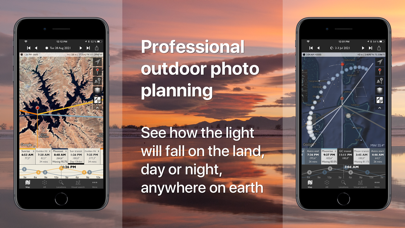
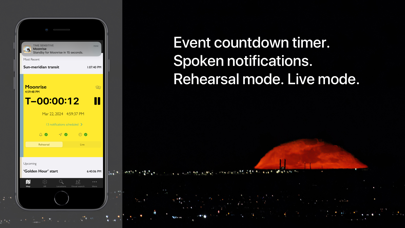
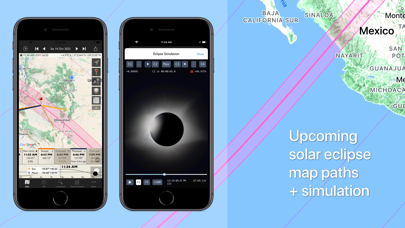
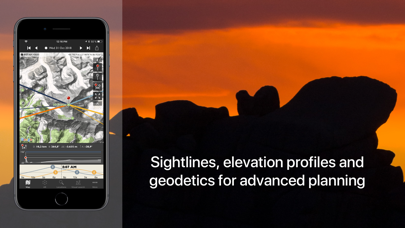
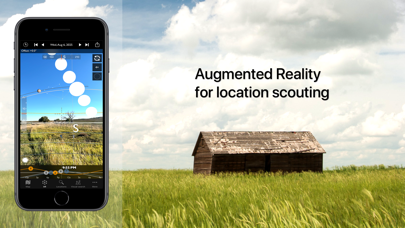
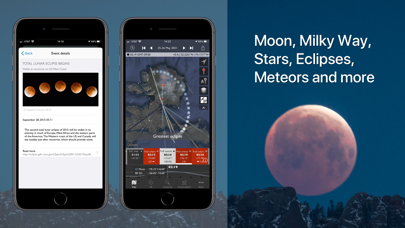
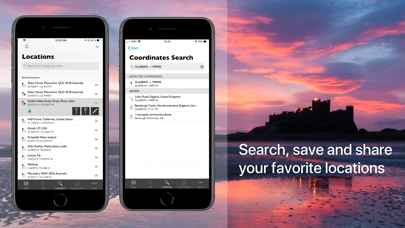
"Head and shoulders above the crowd is The Photographer’s Ephemeris. Odd name, great app." - National Geographic "One of the most useful apps for any nature photographer" - Outdoor Photographer Magazine "It worked perfectly. The program was dead on…" - National Geographic "One of the most powerful photography applications that I've seen, one that you'll be using for years and years." - AdoramaTV The Photographer's Ephemeris (TPE) helps plan outdoor photography shoots in natural light, particularly landscape and urban scenes. It's a map-centric Sun, Moon and Milky Way calculator: see how the light will fall on the land, day or night, for any location on earth. Whether you need at-a-glance information on today's sun, moon and Milky Way data for your current location, or need to plan a precise alignment of the full moon for a future shoot, TPE has the tools you need. The combination of augmented reality, line-of-sight analysis and visual search supports the most sophisticated photo planning needs. Night mode features a 3D representation of the Milky Way, pole stars and major constellations directly over the map, so you can easily visualize exactly how to align your shot. Research and save your own list of favorite photographic locations, using 7 different map types (including 2 offline maps) and save them in your locations list. Favorite locations are always displayed right on the map. Advanced features including visual sun and moon search, automatic time zone and elevation detection, correction for atmospheric refraction and height above the horizon, ensuring that you have the best possible information for planning your shoot. You can even determine when the sun or moon will rise from behind nearby hills and mountains. Key features: - Time/direction of sun, moon, and galactic center rise/set - View azimuth and altitude of sun/moon and the galactic center for any time of day/night - Milky Way, stars and asterisms visualization via 3D map overlay - Moon phase and % illumination - Civil, nautical and astronomical twilight - 2 topographic maps - 2 offline map types - Movable map pins: drag and drop the pin exactly where you need it - Map autorotation using the compass (on compatible devices) - Shadow lengths displayed to scale on map - Save any location you want: no fixed lists - Celestial events including moon phases, apogee, perigee, solstice, equinox - Solar eclipse details for August 12, 2026 and beyond: maps, simulator, times - Network connection not required for rise/set time, azimuths and sun/moon position Advanced features: - Augmented reality view for on location scouting - Saved location synchronization between devices and the free TPE web app - Automatic time zone detection - Elevation above sea level - Distance, bearing and elevation angle between any two points - Location import/export from KML - Magnetic north option - Configurable timeline display - Sun/moon transit times - 'Golden hour' time/duration - Light pollution overlay - Event countdown and notifications Geek features: - Line of sight analysis - Find when the sun/moon will appear from behind a hill or ridge - Advanced visual sun and moon search - Azimuth or altitude search priority - New crescent moon visibility - Distance to the visible horizon Available map types include: - Standard, Satellite/Hybrid, Terrain - OpenCycleMap Topographic - OpenStreetMap Sunrise/sunset color forecasts are available (covering lower 48, southern Canada and Europe) with an optional subscription to the Skyfire service, available via in-app purchase. Note: - Maps and elevation-based calculations require a data connection, except for offline map tiles previously downloaded and stored on your device - Topographic map data is available only between 60°N and 47°S - Availability of map types is subject to change, due to 3rd party map service availability, terms or conditions
What's New
4.15.2 - Fix: eclipse path rendering on Apple Maps and Google Maps - Updated eclipse data for upcoming solar eclipses - UI fixes on Help screen - Remove "legacy" from "Open in TPE 3D" action Please send your feedback and suggestions to support@photoephemeris.com - we'd love to hear from you. If you're enjoying TPE, a review on the App Store is really helpful and lets us keep improving the app.
Details
- Developer
- Crookneck Consulting LLC
- Main Category
- Photo & Video
- Version
- 4.15.2
- Version Release
- 2026-03-20
- Initial Release
- 2010-04-17
- Size
- 98 MB
- Age Rating
- 4+
- Price
- USD 9.99
- Languages
- EN, FR, DE, ES
- Bundle ID
- com.crookneckconsulting.tpe
- Version Rating
- ★ 4.75 (1,547)
- First Seen
- 2026-05-28
Metadata updated 2026-07-19
Rank History
Free · Max 90 days · Top 5 categories shown (Y-axis: rank, lower is better)
No rank history data
Free Rankings
No rankings
Paid Rankings
Competitive Benchmark — Photo-Video Top 10
What it takes to beat this app — comparison with the category's top apps. The orange row is the current app.
| # | App | Price | Rating | Ratings | Langs | Last Update |
|---|---|---|---|---|---|---|
| 1 | Moment Pro Camera II | USD 9.99 | ★ 4.37 | 353 | 1 | 2026-06-30 |
| 2 | PhotoPills | USD 10.99 | ★ 4.71 | 1,515 | 9 | 2026-04-16 |
| 3 | YoungPhoto - Aesthetic Camera | USD 1.99 | ★ 5.00 | 2 | 5 | 2026-06-26 |
| 4 | Stop Motion Studio Pro | USD 5.99 | ★ 4.74 | 13,535 | 17 | 2025-12-10 |
| 5 | Print to Size | USD 2.99 | ★ 4.86 | 19,385 | 6 | 2026-03-13 |
| 6 | PromptSmart Pro - Teleprompter | USD 29.99 | ★ 4.60 | 11,303 | 1 | 2026-06-03 |
| 7 | iWebTV PRO | USD 6.99 | ★ 4.71 | 4,083 | 2 | 2026-07-18 |
| 8 | myLightMeter PRO | USD 3.99 | ★ 4.79 | 1,074 | 7 | 2026-07-14 |
| 9 | CineTemp | USD 19.99 | ★ 4.88 | 25 | 1 | 2026-07-13 |
| 10 | LumaFusion | USD 29.99 | ★ 4.75 | 24,671 | 13 | 2026-07-06 |
| 33 | The Photographer's Ephemeris | USD 9.99 | ★ 4.75 | 1,547 | 4 | 2026-03-20 |
More by This Developer

User Reviews
New version is worthless. Old version used to have ray tracing to view the light at various hours. New version has deleted that functionality & forced me to re purchase the app after using the old version for years.
This app is an absolute must have for any Landscape Photographer! The first thing I did after getting familiar with the apps controls was to get on the map and Pin, and save all my favorite places, and places I plan on shooting in the future. That way I can use my ipad offline at any of the locations and still be able to use all the calculators for sunrise and set, and moonrise and set. And also be able to track the stars! You will be able to plan when and where you want to shoot months ahead. ABSOLUTLEY INVALUABLE!!!
This is an essential App if you want to plan your photographs beyond “f8 and be there.” There’s nothing wrong with going out and finding photos you love by being in the moment and catching your flow. That’s still the majority of my photography by far. BUT if you want to pre-visualize what a location has to offer TPE is an astounding tool. Especially when you’re making a photo trip to unfamiliar areas. It’s also killer for rolling out in the moment to guide you to a shot you feel is possible if only you can look into the future, even if it’s just an hour from now. Get it. You’ll love it.
Skyfire wont work after i updated the app. Yes im subscribed to it. Yes im signed in. Yes its enabled but no skyfire. WTHeck?! Its the only reason i have this app! Im out if its not fixed
Just what I needed
if you use the most basic functions, it’s useful to figure out where the sunrise sunset, moonrise, etc. is happening. And it works great for a while until I accidentally clicked on the wrong button and now I can’t figure out how to get back to the default settings, even after you delete, and reinstall the app. So now it’s useless to me. if there was a way to go back to the default settings, I would’ve given it five stars.
.
I don’t know what happened but I downloaded the app, look at it once, then it subscribed me to Skyfire without my knowledge. Cost me $9.99.
I’ve used this app before and glad the weather was added. However it is a bit odd that the app will not both center you and show the direction you are pointing without having to engage the compass in the app. Other such apps not only show you where you are but help with the compass direction of an object without having to first locate the moon/sun or app compass (look down). The video help files default to Vimeo, even tho author indicates YouTube available elsewhere.
This AP is great for planning a photo in advance of how to photograph your favorite location.
I got this 2 years ago after I drove to location for a sunset, only to find the sun was setting behind a hill, 15 minutes earlier than I expected, when I arrived. I use it religiously ever since, especially for sunset photos. Love it. I also do drone photography and with is where I think the app can be improved. It would be nice if I could set the red pin height up to 5000 FT AGL. [Note: Anything above 400’ AGL requires an FAA Waiver and a UAS NOTAM.] This would be helpful in two ways. First, for normal sunsets, it helps with the true placement of the drone to the landscape. Second, I like to take inverse sunset videos by starting low at the moment of sunset and climbing vertically cause the sun to rise. This can be tricky to time and a tool that would calculate the angles 50’ to 400’ AGL would assist in calculating start and rate of climb.
Reviews are collected only for apps with detected changes (new entries or sharp risers).