

aSmart HUD +SpeedCams
🇰🇷 KR LocalizedScreenshots



Description
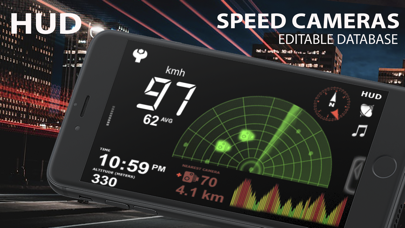
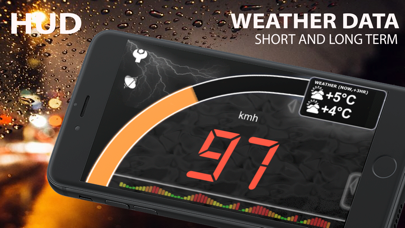
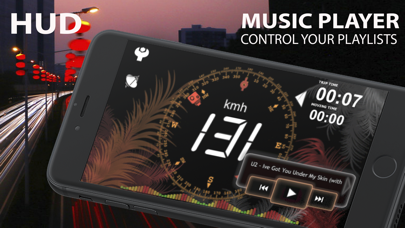
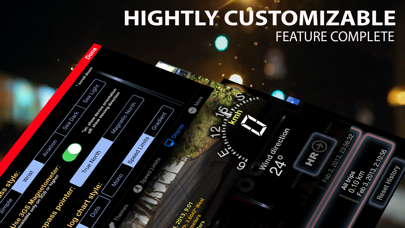
aSmart HUD + is simple and clear vehicle digital dashboard featured by - HUD mode - SHORT TIME WEATHER FORECAST - IPOD PLAYLIST REMOTE CONTROL - ADJUSTABLE TRANSPARENCY APPLE MAPS SCREEN - EDITABLE FIXED SPEED CAMERAS DATABASE - EDITABLE RED LIGHT CAMERAS DATABASE for USA, Australia and Canada - PHOTO CAMERA WITH IMAGE MARKING SUPPORT It visualizes your - current speed - average speed, - time, - heading, - altitude, - trip elapsed time, - distance/time/direction to stored Home location, - weather forecast for nearest 48 hours the with 3-hour time interval, - maximum reached speed (during the current trip or all your trips), maximum altitude and maximum distance to the starting point of your trip. Also it shows - color coded distance to the nearest known fixed speed camera; - it's speed limit (if known); - it's position, relatively to your moving direction, what gives you an idea is the camera in front or behind you; The fixed cameras database includes an information about speed cameras in - Europe (whole EU) - USA - Canada - Australia - New Zealand - Brazil - South Africa - Singapore - United Arab Emirates - Taiwan - HongKong, - Kuwait, - Russia, - Thailand. You can edit the database by adding or removing the speed cameras. Also you can change the camera speed limit. On approach aSmartHUD will give you sound and visual warning. NOTE: It's not guaranteed all speed cameras in your area are included into the database. However, we will release database updates right after the new information will become available. - Tapping the "HUD" icon mirrors all the text, so if you position the iPhone horizontally under your car's windscreen you can see perfectly readable half-transparent reflection of the picture displayed. Note: this mode works pretty well at night time and twilight, but on direct sunlight the screen brightness can be insufficient. - aSmartHUD can keep track on 4 speed limits, giving a warning (sound and visual) each time you crossing it. Normally, it's legal speed limits within cities, local roads and high-speed motorways. "Never exceed speed" is the speed you should not exceed under any conditions. Like technical limit of your vehicle or the point where government can arrest your driving license. - You can quickly take a photo of what's going on the road. Photo will be automatically saved into the Photos Album. The speedometer image, map and a some of other useful information will be placed over your photo. - 6 functionally different screen themes. - Apple maps screen with adjustable transparency. Street, Satellite and Hybrid modes with all standard gestures (zoom, pan, etc.) support. - Landscape and portrait screen modes. - 5 different compass styles, 6 color themes, 3 sound themes, etc. - Speed fullscreen mode (tap the speed indicator to switch into). - Weather forecast time intervals and temperature units (C, F) are selectable in Preferences. - Speed history log chart is placed on the bottom of the screen. - "Records" screen (left upper button on the Location Info screen), with maximum reached speed (during the current trip or all of your trips), maximum altitude and distance from start. - Different measurement units (km/h, mph, knots and meters per second), display color scheme, log type, sounds and more. - You can pause, play, skip or rewind the music item in your current iPod playlist. - Location Info (longitude and latitude, GPS measurement precision) and some more data. IMPORTANT: this features list in not complete. Please visit the product page for more info! Limitations: On iPad 3G application runs only in "double pixel" mode. No iPod Touch or 1st-generation iPhones supported. Thanks to everyone for your suggestions about additional functionality! THE BEST AND FASTEST WAY TO CONTACT US IS SENDING YOUR REQUESTS AND BUG REPORTS to support@atoll-ordenadores.com.
What's New
-Changed weather API -Tested on latest iOS
Details
- Developer
- Atoll Ordenadores
- Main Category
- Navigation
- Version
- 12.1
- Version Release
- 2025-01-13
- Initial Release
- 2009-02-11
- Size
- 11 MB
- Age Rating
- 4+
- Price
- USD 0.99
- Languages
- EN
- Bundle ID
- com.atoll-ordenadores.smhudpl
- Version Rating
- ★ 1.33 (3)
- First Seen
- 2026-05-28
Metadata updated 2026-07-19
Rank History
Free · Max 90 days · Top 5 categories shown (Y-axis: rank, lower is better)
No rank history data
Free Rankings
No rankings
Paid Rankings
No rankings
More by This Developer


User Reviews
바늘로된 속도계가 싫어서 유료/무료 가리지 않고 수많은 HUD앱을 써봤지만 이게 제일 낫다. 검은 배경이라 밤에 화면을 어둡게 하지 않아도 되고 큼직하게 속도 나오고 여러가지 자잘한 정보들도 한눈에 볼 수 있음. 단, 해상도가 좀 떨어지는듯한 느낌이 드는데 좀 더 깔끔하고 세련된 화면으로 개선했으면 좋겠다.
환불해주세요
이거 다운받았는데 제로 셋팅을 어떻하는거죠 아이폰을 제부팅하기힘들고...
다 좋은데 과속카메라 정보없음
마음에 쏙드네요 차량속도랑 비슷하게 나오네요~
앞유리에 반사되어 나오는 기록들이 참 차탈맛나게 해주네요. 낮에는 잘 안보이나 밤에는 아쥬 잘보임 간지남
Reviews are collected only for apps with detected changes (new entries or sharp risers).