

Screenshots

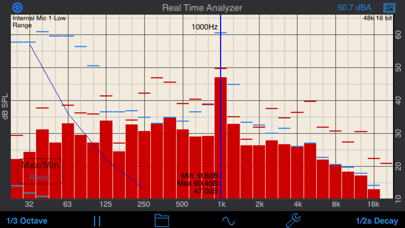


Description
A Real Time Analyzer for the iPhone, iPad and iPod Touch. Test your speakers, tune your room, do acoustical analysis work or just have a better understanding of audio frequencies. RTA is a professional-grade acoustical analysis tool. All filters meet or exceed ANSI and IEC Class 1 specifications. Includes Octave and 1/3 Octave modes, with selectable decay times, as well as Peak Hold and true linear Average mode. *** iOS Microphones We have analyzied every iOS device, including all of the iPads, all iPhones, and iPod touches, and have created microphone compensation files that are applied automatically. You can trust the results you are getting, often within just a few dB of a far more expensive analyzer. Calibration is updated regularly, automatically, from our cloud-based calibration database. Upgrade to our iTestMic or iAudioInterface2 to bring your system up to full professional specs. *** Save and Recall Graphs You can save and recall graphs, marked with the GPS location, date & time, and your comment, as well as store the image to your photo roll. Export the data as an XLS formatted file to your computer for inclusion in reports or further analysis. *** Max and Min Bars You can also turn on resettable Max/Min bars (see image #4) to capture peaks. Double-tap to reset the bars. *** Specifications and Devices The internal iPhone mic has a noise floor near 30 dB, and if your are running iOS 6, clips around 120 dB. *** Touch GUI Fully interactive touch GUI features includes scroll up/down, pinch to zoom or compress the vertical dB scale, or swipe horizontally to get a cursor that reads out the exact dB level and frequency across the screen. To make the cursor disappear, swipe it off the graph to the left. The landscape-mode display flips 180 degrees so that you can face the internal mic in either direction. *** Overlay Curves Also included are optional noise curve overlays, in NCB, RC, PNC, NC, X-Curve and NR mode. See picture #2 for an example. Use this feature to get a quick reading on the noise levels in a room. Also includes the cinema large-room X-curve overlay. *** Calibration RTA can be fully calibrated, whether you are using it with the internal iOS microphone, or one of our professional test & measurement mic solutions. And, if you are using iTestMic, the mic calibration is transmitted directly to the app, so you are always calibrated. *** RTA or FFT? If you are wondering if you should download this app or our FFT app, check out our website, we have a page devoted to this topic. See our other acoustics and audio apps, including AudioTools.
What's New
-Bug fixes and stability improvements
Details
- Developer
- Andrew Smith
- Main Category
- Music
- Version
- 11.8
- Version Release
- 2025-12-22
- Initial Release
- 2008-12-14
- Size
- 21 MB
- Age Rating
- 4+
- Price
- USD 4.99
- Languages
- EN, FR, DE, JA, PL, ZH and 2 more
- Bundle ID
- com.studiosix.RTA
- Version Rating
- ★ 3.96 (25)
- First Seen
- 2026-05-28
Metadata updated 2026-07-18
Rank History
Free · Max 90 days · Top 5 categories shown (Y-axis: rank, lower is better)
No rank history data
Free Rankings
No rankings
Paid Rankings
No rankings
More by This Developer


User Reviews
Used with iPad mini. Ran pink noise to do the best I could to flatten the sound. What a difference this made! I can see areas that need improvement but I need DSP. For now this works! Thank you
The app keeps saying “Accessory found iTestMic 2” then “Accessory removed iTestMic 2” and repeats until the mic is removed from my iPad Pro. Sometimes it just crashes or freezes on my iPhone 12. Both have latest IOS.
Simple to use and it provides all the info that I need. Works fine on my iPhone 15 Pro.
I normally use smaart to tune but I’ve had this app for a long time and I still use it in a pinch. I’ve checked out some of the other RTA apps and overall I have to say this one. Straightforward, no unnecessary bells and whistles. Highly likely built by someone who actually works in the industry
Ignore all of the rest of them because this one is actually calibrated for your iOS device. I tried other apps setting up my vehicle and this one is obviously accurate. After about 10 minutes of tweaking the EQ on my head unit my new speakers sound 1 million times better. If you have a hard time setting your EQ to sound good this one will get you there.
How accurate is this compare to a calibrated measuring mic? My goal is to EQ my room to have a flat response. I have an iPhone XS Max.
I just purchased because I was referred to purchase it to help cal my room. Opened the app and the view only displays half of the app, please fix the view in OS 13.
I use this app at least 8 days a week! When the new iOS update came out the app was having problems fitting the screen. Everything still worked as expected, just smaller. I emailed the developer about the issue and had a response in 5 minutes! That is customer support if over seen it. In the response I was assured the new update is awaiting approval from Apple. Thanks Andrew for keeping us all afloat.
Not working properly with iOS 13.0 on iPhone XS.
Use to be the best RTA app out but have been having a lot of issues with it lately. Most recent problem is that the screen won't expand now.
측정용 마이크 연결후 칼 파일 로딩후 적용이 안 됩니다. 해결 부탁 드립니다.
アナライザーとしてはよいですが、値段のわりに機能は少ない気がします。 また、画面保存がうまくいかず、呼び出し画面でプログラムが落ちます。
Reviews are collected only for apps with detected changes (new entries or sharp risers).