

LCD Clock
🇯🇵 JP LocalizedLCD Clock - Clock & Calendar
forYou inc.Screenshots



Description
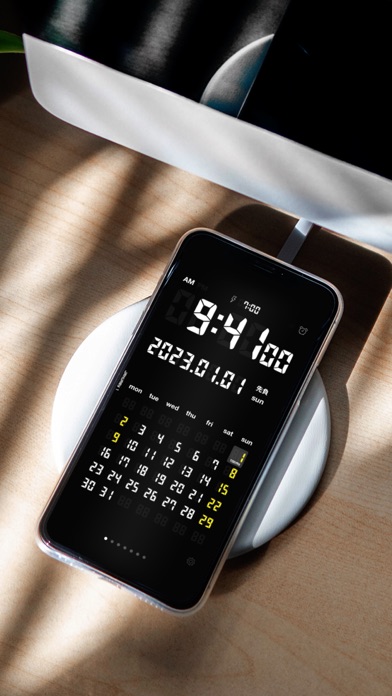
LCD Clock(シンプルな時計とカレンダー) LCD Clock は、デジタル時計とカレンダーをひとつにまとめた、レトロで美しい液晶デザインの置き時計アプリです。 充電ドックに立てるだけで、卓上がシンプルで見やすい時計&カレンダーに早変わり。 仕事場のデスクやリビング、就寝時の枕元など、あらゆる場所で生活に便利さと心地よさをプラスします。 主な機能 ・大きく見やすいデジタル時計(12/24時間表示) ・月めくりカレンダー(最大7ヶ月分を表示) ・世界各国の祝祭日をカレンダーから自動取得して色分け表示 ・地域を指定した天気予報の表示(現在地にも対応) ・和暦(令和)・六曜の表示 ・週の開始曜日を自由に設定 ・8色のカラーテーマ+ランダムテーマ ・画面の明るさ調整、振ってバックライト点灯 ・横画面のフルスクリーン時計表示 アラームが本格進化(iOS 26 以降) 最新の iOS アラーム機能(AlarmKit)に対応し、アラームが大幅に強化されました。 ・アプリを閉じていても、ロック中でも、フルスクリーンのアラームが鳴ります ・消音モード・集中モード中でも確実に鳴り、止めるまで鳴り続けます ・STOP / SNOOZE(5分)ボタンですばやく操作 ・音量はアプリ内で調整可能。音量を無音にすれば、音を鳴らさず画面表示(アプリ起動中はバイブ)でお知らせ ご注意 ・天気予報の表示には位置情報の利用許可、祝日の取得にはカレンダーへのアクセス許可が必要です ・iOS 25 以前の端末では、アラームは通知としてお知らせします(消音モード中は音が鳴らず、通知音は一定時間で停止します) ・アラームが正常に動作しないことによるクレームはご遠慮ください
What's New
・新しいカラーテーマを追加しました。開発サポートで、さらに多くのテーマをお楽しみいただけます。 ・天気の地域設定をわかりやすくしました。現在地のオン/オフが直感的に操作できます。 ・購入まわりやシェア画面など、細かな表示と操作性を改善しました。 いつもLCD Clockをご愛用いただきありがとうございます。
Details
- Developer
- forYou inc.
- Main Category
- Utilities
- Version
- 26.3
- Version Release
- 2026-06-26
- Initial Release
- 2008-12-05
- Size
- 47 MB
- Age Rating
- 4+
- Price
- USD 1.99
- Languages
- EN, JA
- Bundle ID
- foryou.LCDClock
- Version Rating
- ★ 4.67 (12)
- First Seen
- 2026-05-28
Metadata updated 2026-07-19
Rank History
Free · Max 90 days · Top 5 categories shown (Y-axis: rank, lower is better)
No rank history data
Free Rankings
No rankings
Paid Rankings
No rankings
User Reviews
" 令和xx年 aaa " と、その下に表示される " 'yy mm " の消し方をお教えください。お手数ですがよろしくお願いいたします。
横置きにしても横表示にならず、iPadのUSB端子のある方を上向きにして置いても上下逆に表示される。 実質1方向しか対応していない。使い物にならない。
iPhone16 Pro下で、iPhone15 Proよりも画面が全体的に上な気がします。もう少し下に下げていただけると幸いです。
Please add a "Korean holiday"! '대한민국 휴일" 세팅 추가해주세요~ 이것만 되면 최고의 앱!
いつの間にか六曜が表示されなくなり設定変更でONにしても反映されなくなりました ver22.0.0
オシャレだし、ほぼ完璧です。ただ、iPhoneを横置きにした時に時刻とカレンダーも同時に表示する機能が欲しいです。
よくありそうだけどなかなか無いので助かります 在宅勤務ですと時計とカレンダーがすぐに確認したいので使っています。 横にしたとき時計だけではなくカレンダーも欲しいところですね。期待します。
デザインが気に入りました! 皆さんがおっしゃっている通り、横でもカレンダー表示されるとより良いです!
時計アプリでデザイン性とカレンダー表示出来ものがあまり無いのでシンプルで評価の高い このアプリを購入しましたが スマホを横にするとカレンダーが表示されなくなり本来の良い機能が制限されるのはなぜ? 縦同様に横表示でもカレンダー表示出来る様に設定切り替え出来ると星5つ以上のアプリです。
this has been my desk clock since i bought iPhone 3G and been using until my iPhone Pro.. can't imagine my phone without this app. Thank you for always updating this app to the latest version! hats off to the developer!
インストール当初は、カレンダーに六曜の表示が出来ていたが、いつのまにか出来なくなった。 設定を見るとoffになっていたので、onに変更しても表示されない。 もう一度設定を見るとoffに戻っている。
but it's a battery killer^^; there is one thing that lets me a little down- I hightly expected i could see the same feature of the screen as when my pod lay on its side but i cann't. I want to get rid of the calender in optional way, instead, I hope i could see bigger texted clock. it would be better when I mount iPod on kind docking systems such as speakers or other charging devices because on the docking system, ipod is often required to secure more conspicuous visibility. given my experience, the calendar indicator on the screen is not necessarily essential in normal time. on the contrary some times the calendar is nothing but a barrier to confirming time. i hope u can make it possible soon cann't you? u can put this as an optional function anyway this is one of my favorite APPs
Reviews are collected only for apps with detected changes (new entries or sharp risers).