
Signal GH
Screenshots


Description
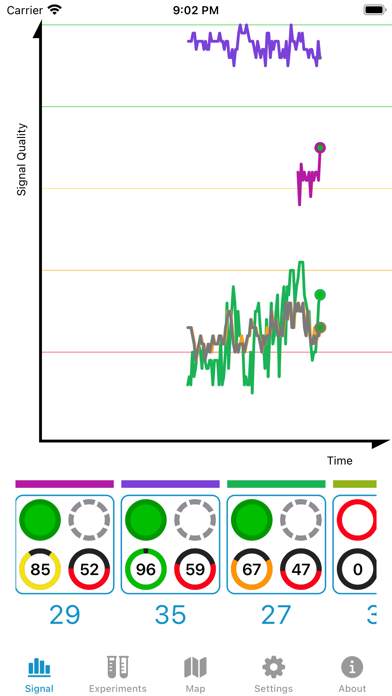
Signal GH is a tool for users of the HDHomerun networked digital TV tuner who want to monitor and improve their Over The Air (OTA) reception quality. It graphs signal quality from multiple channels simultaneously, allowing a user to more rapidly adjust and upgrade OTA receiving hardware, i.e., cables, connections, splitters, pre-amps, and antennas. Snapshot the state of your system using the Experiments tab to keep track of what worked and what didn't work. United States users also have the benefit of a map of digital television broadcasting towers. Depends on the accuracy of your device's compass. If you don't have an HDHomerun, you don't need this product. If you do have an HDHomerun, and use it for over the air reception, you will likely find it useful. If the automatic scan does not find a station you expect, tap on the station's real digital channel in the unused channel column under Settings. Signal GH does not support QAM (digital cable) Please make sure your HDHomerun is set to use a broadcasting channel set and not a cable channel set. You cannot use this software to watch video on your iOS device. This is a diagnostic tool.
What's New
• Location button in map tab needed to be updated • Updated the map data • The tinted icon was not drawing as expected.
Details
- Developer
- Generally Helpful Software
- Main Category
- Utilities
- Version
- 3.0.8
- Version Release
- 2025-09-22
- Initial Release
- 2019-02-14
- Size
- 10 MB
- Age Rating
- 4+
- Price
- USD 2.99
- Languages
- EN
- Bundle ID
- com.genhelp.SignalGH
- Version Rating
- ★ 4.58 (537)
- First Seen
- 2026-06-08
Metadata updated 2026-07-02
Rank History
Free · Max 90 days · Top 5 categories shown (Y-axis: rank, lower is better)
No rank history data
Free Rankings
No rankings
Paid Rankings
No rankings
More by This Developer

User Reviews
I rarely spend the time to write a review, but this is the app that convinced me to spend the time. I was trying to use the HDHomeRun-supplied tools to tune the antenna and test reception and just found it totally inadequate. I read some online forms of people having similar issues and they recommended this software. I couldn’t be happier. It gave me everything that I needed in a quick simple easy to use interface that I needed to optimize my reception
I joke about over-the-air TV being a hobby. Years back I had mixed luck and was constantly tinkering to improve marginal reception. At his point tinkering is minimal and I’m lucky to have very good reception. This utility has been essential to getting my antenna optimized and signal stable. One nit. My one ATSC 3 station seemingly takes a bit of time for my hdhr box to lock the signal. The experiments feature maybe samples a bit too short a time showing randomly 0% or 100% for a signal that in reality is a solid 100%. I bet increasing the experiments sample time a bit would eliminate this false alarm.
Completely non functional. Can’t detect HDHomerun unless IP manually entered. Then it promptly forgets it. If you do manage to get the scan to run it promptly freezes the app. Don’t waste your money. There is a reason there is no free trial.
Does what it says on the tin. Hint: if you aren’t able to see your HDHR, make sure you granted Local Networks permission when it asked during startup. I’ve used this to verify my setup is doing the best it can to cope with passing aircraft and to verify the cables and connectors are behaving themselves (with a shake test). I have just a few minor suggestions that would make the app even better: * an option to keep the screen on in the graph view * a “passive” mode so it only graphs what the tuners are actually doing (without turning on any tuners beyond what’s active) * allowing tuners to be enabled and disabled for graphing right from the graph screen Overall quite a time saver and well worth the price.
Based in all the reviews I thought I found Gold! Unfortunately the software can’t find my HDHomeRun 4k Flex - neither with auto discovery nor IP address. The HDhomeRun app in my phone finds it just fine and I can stream channels. Can’t find support to see how to fox - seems like I am out $2.99 - maybe this only supports older devices…
I have hd pbs on channel 2.1 (and many others like it) but it isn’t able to support/find them.
This was a VHF station on ch. 11 (displayed as 13). Now they are a UHF station on ch. 35. Much better signal. WVEC 35.1 - 35.8 (displays as 13.1 - 13.8). Old FCC data is used in the app.
This is a great App. Instead of running “Detect Channels” in HDHomeRun after redirecting the antenna in order to determine signal strength, this App will allow you to do so for all active HDHomeRun Tuners second by second so you can easily determine the best direction for your antenna.
Doesn’t work for channels 4 and 5 (NBC and FOX) in the DC area. This was very confusing until I double checked the frequencies being dialed in on the tuners and they were off by >400MHz.
Tyler (The Antenna Man) referenced this application and I quickly found it and purchased it. Signal GH fills a missing void in the HDHomerun software and it works like a dream. I had previously been using a Samsung TV for OTA tuning and it was a very sensitive tuner. The HDHomerun is decent but not nearly as sensitive and I needed to move my antenna to restore some of the stations I used to get with my Samsung TV. This app is CRUCIAL to anyone trying to fine tune antenna placement with any HDHomerun.
Reviews are collected only for apps with detected changes (new entries or sharp risers).