

Photo Widget — The Best One
🇯🇵 JP LocalizedScreenshots
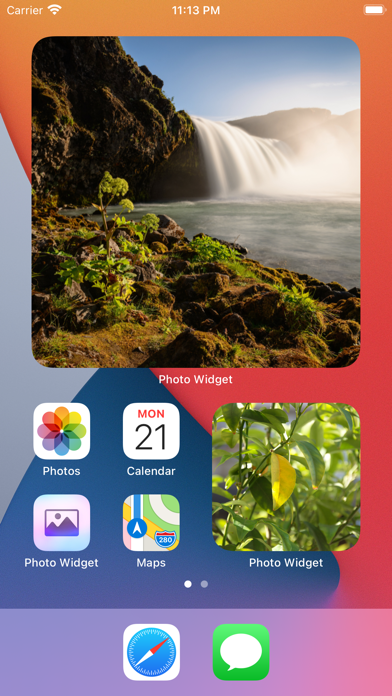
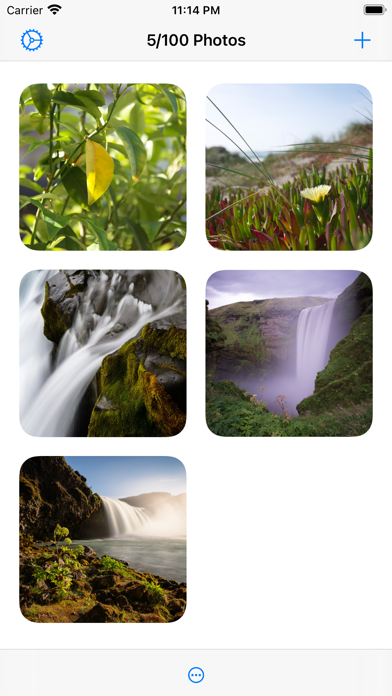
Description
Put photos on your home screen using widgets. It also works great with StandBy. Create as many photo widgets as you like with one or more photos per widget. If you choose more than one photo, it will change photos on a time interval (which can be customized in the settings). Each widget can have separate photos. You can also show photos from an album in your photo library. ■ Features - Widgets with a single photo. - Widgets with multiple photos that change on an interval (slideshow). - Widgets showing photos from an album in your photo library (slideshow). - Three widget sizes. - Import photos from the photo library or the file system. - Tapping a widget can either show a larger preview of the photo, open a URL, or run a shortcut. - The “Album” widget has a setting to show a random photo only from the most recent `n` photos in the album, where `n` is the number you choose. ■ How it works First, decide whether you want to select the individual photos to show (1) or just choose an existing album from your photo library (2). 1. Add photos to the app which you can later choose from in a widget. Then add the “Photo Widget” widget with the “Photos” type and edit the widget to pick the photos to show. 2. Add the “Photo Widget” widget with the “Album” type and edit it to choose the album. ■ Limitation If you make two or more widgets of the same size where all of them are set to show all the photos or the same album, they will show photos in the same order. This is a limitation in the iOS widget system. You can work around this by giving the widgets unique names in the widget configuration. ■ Tip If you have a widget that cycles between photos and you want to force it to skip to the next photo, long-press the widget, select “Edit Widget”, and then close the edit view. The widget should now have a new photo. ■ FAQ 〉 How do I add a widget to the home screen? When on the home screen, long-press on the background (not on any icons), press the top-left “+” button, and select “Photo Widget”. 〉 How do I edit a widget? When on the home screen, long-press on the widget, and select “Edit Widget”. 〉 Why can I only add 100 photos to the app? This is because of a technical limitation in the iOS widget system. Hopefully, it can be increased in the future. It should be enough for most users though. If you use the “Album” widget, there’s no limit to the number of photos. 〉 How can I hide the name of the app shown below the widget? This is not possible. App developers have no way to hide it. 〉 How is this different from the built-in “Photos” widget? The built-in widget only shows photos from “Memories” and “Featured Photos” in your photo library. There is no way to customize it or pick the photos to be shown. 〉 Can I show an animated GIF in a widget? This is not possible.
What's New
- Bug fixes.
Details
- Developer
- Sindre Sorhus
- Main Category
- Lifestyle
- Version
- 2.3.2
- Version Release
- 2025-12-07
- Initial Release
- 2020-09-21
- Size
- 7 MB
- Age Rating
- 4+
- Price
- USD 6.00
- Languages
- EN
- Bundle ID
- com.sindresorhus.Photo-Widget
- Version Rating
- ★ 4.63 (682)
- First Seen
- 2026-06-21
Metadata updated 2026-07-16
Rank History
Free · Max 90 days · Top 5 categories shown (Y-axis: rank, lower is better)
No rank history data
Free Rankings
No rankings
Paid Rankings
No rankings
More by This Developer





User Reviews
日本語対応にしてください 設定方法がわけわかりません あと1分間隔に設定したのに いつまでもおなじ写真。意味ない。
公式の写真アプリだと『For you』にある写真が自動的に選ばれるだけだったけど、このアプリの場合は自由に写真が選べるのでサイコー! The apple photo app cannot select the picture, its select automatically. However, this app can select my favorite pictures. Very good !
I enjoy it a lot. You can pick any pictures what ever you want, You can change it anytime, and the pictures were beautiful and clear
Reviews are collected only for apps with detected changes (new entries or sharp risers).