

GoodReader Pro PDF Editor
🇯🇵 JP LocalizedScreenshots
Description
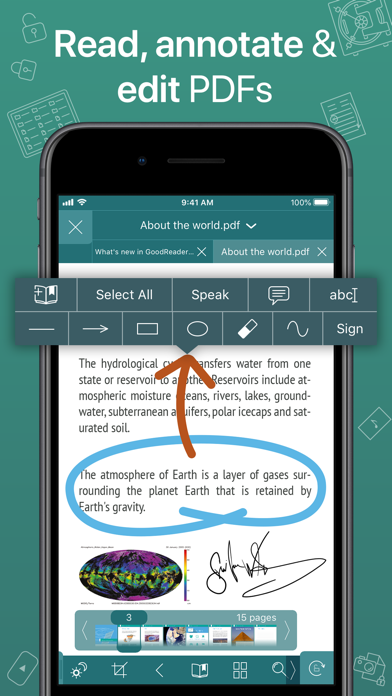
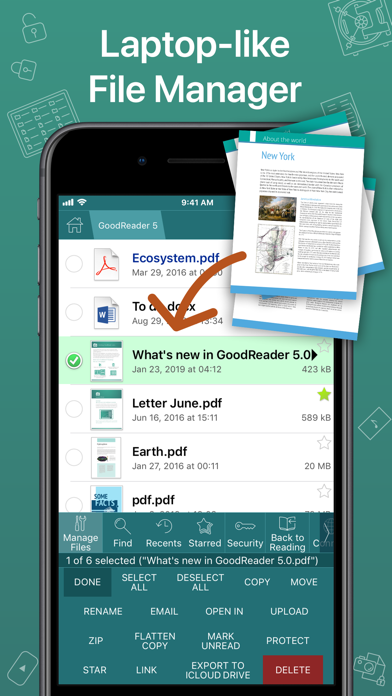
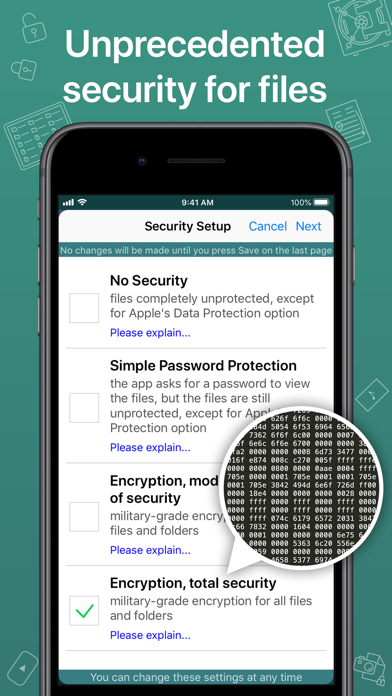
GoodReader® Pro and our famous classic GoodReader app are essentially the same app, but this one comes with Pro Pack® pre-activated, no subscription or in-app purchase needed. First released in 2009, GoodReader is truly a veteran of the App Store. In the modern app business, it's not easy to stay relevant that long. We're proud to say that after 12 years and counting, we've been delivering wonderful updates with extraordinary new features. And we're going to keep doing that! GoodReader is a perfect combination of document-reading and file-managing capabilities. It's your one-stop shop for all your document needs when you're on the go with your iOS device. Use the app once, and you'll be hooked. Soon you'll be wondering how you ever managed to work without it. -= File Reading =- PDF, TXT, MS Office, iWork, HTML, pictures, music & audio-books, videos. This is what you can view in GoodReader, plus you can also annotate PDF files and edit TXT files. -= PDF Reading and Annotating =- PDF files is where GoodReader truly shines. Reading experience is so superior, it's hard to describe. To rephrase one of our customers' review, "try it, and you'll see." While you're at it, give our PDF Reflow feature a try. You'll be surprised how much better PDF reading goes when you don't have to scroll left/right all the time, for every single line of text. Annotating PDFs is another star feature of our app. Adding notes and drawings, highlighting text, and then sharing your annotated files or annotation summaries will be your main productivity and collaboration asset. -= File Management =- While reading files is a big part of GoodReader, it's not all it can do. It can also serve as a central hub for all your files, even those that can't be opened by GoodReader itself. It's like bringing your personal computer experience to your mobile device — easily managing huge collections of files and folders will make you forget you don't have your laptop around. -= Connecting =- Dropbox, OneDrive, Google Drive, Box.com, WebDAV, SMB, AFP, FTP, SFTP — these are all accessible from inside GoodReader. Download, upload, and sync individual files or huge folder collections. -= Security =- With GoodReader, your data security steps up to the level previously only dreamt of. With GoodReader Pro, you'll get AES-256, a military-grade encryption, for all your data. And it's completely independent from the built-in Apple's Data Protection, so even if a hacker steals and unlocks your device, your data will still be protected by another strong layer of security, our own. -= Split-Screen =- This wonderful feature allows you to split an iPad screen in half, to read two files side-by-side. And even two different parts of the same file!
What's New
• New way of adding OneDrive shares. • Fixed a Widgets bug.
Details
- Developer
- Good.iWare, Inc.
- Main Category
- Productivity
- Version
- 5.19.1221
- Version Release
- 2025-11-29
- Initial Release
- 2019-03-09
- Size
- 49 MB
- Age Rating
- 4+
- Price
- USD 79.99
- Languages
- EN
- Bundle ID
- com.goodiware.grpro
- Version Rating
- ★ 4.69 (268)
- First Seen
- 2026-06-17
Metadata updated 2026-07-14
Rank History
Free · Max 90 days · Top 5 categories shown (Y-axis: rank, lower is better)
No rank history data
Free Rankings
No rankings
Paid Rankings
No rankings
More by This Developer

User Reviews
I’ve been using this app on and off since it’s inception. With “Pro” in the name, it implies you can edit PDFs as you wish. A simple edit feature is CROP. This app, esp for what it costs and calls itself, needs the ability to crop a PDF, not just appear as cropped within the app. I emailed their support asking for how to apply a CROP to a file, and their reply was “it only appears cropped in the app.” Thanks. I found a roundabout workaround to save the crop as a new file, but it’s not intuitive AT ALL. To the Devs: fix this and I will revise my review.
It is an extraordinary filing cabinet and very accessible for retrieving documents
I bought goodreader app months ago and I added bookmarks to the files. Now I purchased this expensive app and I cannot move bookmarks from old goodreader to this pro version. WTF! You need to enable bookmark sharing featuring from the same app.
Well it is a great app. I paid for the pro version as a good gesture of support. It was tedious moving data from old Godreader to the pro version. There was not a lot of room left on the iPad. This was very disappointing, as I thought GoodReader would simply upgrade to the new version without having to transfer data. I also see very little difference between the regular and pro version. I thank the developer for adding a one time pay option as I do not subscribe to software, but I am glad to support developers with a one time fee. However, as far as features are concerned, it feels like throwing away money. Again, it really is a five star app. I use it daily. I gave it four stars only because, I don’t see much of any advanced features.
I use this app nearly every day for saving, viewing and editing PDF documents. Support is great and they reply quickly to my support requests.
Really enjoy the service as it has many additional features which are great but my personal favorite thing regarding this application is that it is really great for its purpose of viewing pdfs, searching albeit the annotation tools could be better but still it is unparalleled for its purpose.
For the past several years, I have been unable to access files through dropbox using the GoodReader app. I don’t know what happened because in the past, I was able to do that. For the past two or three years, I have been unsuccessful in accessing dropbox. Each time I get an error note that says we would to investigate the issue. Well I’m still waiting.
I use this app literally every day. It’s quick, organized, and has good features. I love the fact that I can mark up a document on one of my iDevices and the annotations will automatically show up in a different iDevice. I just wish they had a PC version of the app, which I’d happily pay for!
Goodreader is my most used app for storing PDF and other file types. I’d be digitally lost without it. I forget how many years ago I bought the app; however, I do know that I was one of the early users. My advice: study and get to know and use the app’s features. You’ll come to rely on it as I have.
設定変更すればバックグラウンド再生できるが、次の曲にはいかない。
No longer syncs with OneDrive or Dropbox. FIX IT PLEASE.
Reviews are collected only for apps with detected changes (new entries or sharp risers).