

eDrawings Pro
🇰🇷 KR 현지화스크린샷
설명
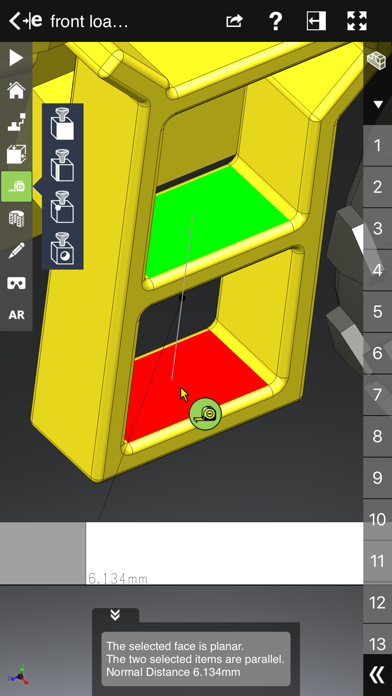
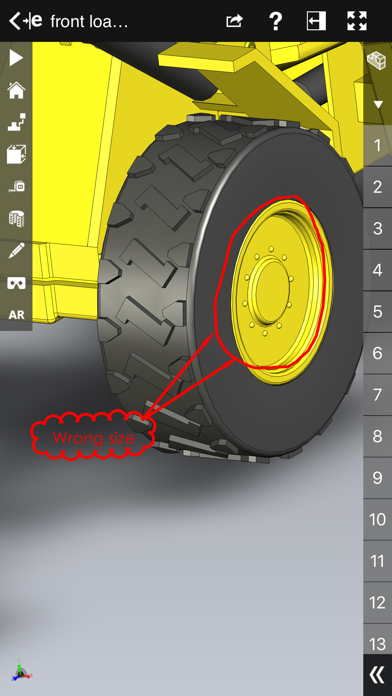
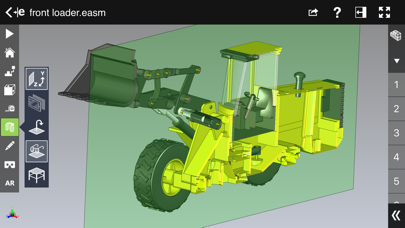
eDrawings® Pro is the professional 2D and 3D CAD collaboration app for the iPad, iPhone and iPod Touch that can view native SolidWorks® files (part, assembly, drawings), eDrawings files and DraftSight® (DWG™, DXF™) files. You can easily view models and access configurations, drawing sheets, and exploded views for eDrawings files published from SolidWorks and all other supported CAD software. Markup! Measure! Section! eDrawings® Pro takes you to the next level of 2D and 3D collaboration with more functionality, including dynamic cross section views, measurements, markups & annotations and the unique ability to share it all by email! eDrawings includes Augmented Reality (AR). This allows you to view your 3D models in 1:1 scale into the real world. By simply activating the device’s camera, you can bring your virtual 3D designs in a real context and see them in situ, sitting on your desk or on your conference room table or even in the palm of your hand, through your iPad, Pad mini, iPhone or iPod Touch’s screen. Move around the room and see your design from any perspective. With an intuitive user interface, eDrawings® Pro enables you to dynamically view cross sections of your models in XY, YZ, or ZX directions from both sides and easily drag the cross section plane on screen or with a convenient slider. You can also measure distances in your designs, with easy-to-use selection filters for faces, edges, vertices and holes. With eDrawings® Pro you can create markups on your drawings, including text notes, freehand notations, dimensions, cross-section views, photos and camera snapshots. You can share your marked up eDrawings files with others for review and further comments. All markups with history are saved within the eDrawings file. Features: * Intuitive and easy-to-use user interface * Visualize your 3D models in real context with Augmented Reality (AR) * Open 3D (EASM, EPRT, SLDASM, SLDPRT, IGES, IGS, JT, STEP, STP, IFC), 2D (EDRW, SLDDRW, DWG, DXF) and associated files from any source: email attachments, cloud storage services (Dropbox™, SkyDrive®, Google Drive, YouSendIt®, and others), web and FTP sites, networks, and iTunes® File Sharing. * Zoom, pan, and rotate your 3D and 2D CAD data using multi-touch * Browse your assembly components tree, model configurations and drawing sheets * Hide, show, or make components transparent * Select View mode: standard orthogonal views, shaded with edges, perspective view * Play animated 3D standard views as well as 2D drawing views * View your designs in full screen and double tap to fit it on screen * Double tap zooms to drawing views * Markup your designs and send to others and read others’ markups * Measure your design data * View cross sections of your 3D designs, even in AR mode * Adapt the scale of your 3D model in AR mode * Freeze the background in AR mode with viewpoint lock to prolong AR experience without holding up your device. * Sample files included For more information, visit: http://www.edrawingsviewer.com
새로운 소식
Bug Fixes
상세 정보
- 개발사
- Dassault Systemes SolidWorks Corporation
- 주 카테고리
- Productivity
- 현재 버전
- 34.2.0057
- 버전 출시일
- 2026-04-16
- 최초 출시일
- 2012-08-31
- 용량
- 193 MB
- 연령 등급
- 4+
- 가격
- USD 9.99
- 언어
- EN
- 번들 ID
- com.solidworks.edrawingspro
- 현재 버전 평점
- ★ 2.08 (25)
- 첫 수집
- 2026-05-28
메타데이터 갱신 2026-07-19
순위 히스토리
무료 기준 · 최대 90일 · 상위 5개 카테고리 표시 (Y축: 순위, 낮을수록 상위)
순위 히스토리 데이터가 없습니다
무료 순위
순위 없음
유료 순위
순위 없음
이 개발사의 다른 앱

유저 리뷰
I would love to have motion studies like the desktop version does. Please add this functionality if possible.
eDrawings Pro still crashing. Does the latest iPad version go hand in hand with the WIN version that was released on 27 February 2024? My WINDOWS Laptop was crashing prior to installing the 27 February 2024 release. Now if you could get the iPad version stable I would be extremely grateful. Update December 2025- just purchased a new iPad Pro with M5 processor, 256Gb. Had high hopes this app would finally work without crashing. Well it still doesn’t work. You ought to just remove it from the app stop before disappointing more people. I’d like to help you fix it if you’re interested. Update February 2026. Still not usable. What’s ironic is I can open my 500Mb step files with the free 3D PDF Reader app from Tech Soft 3D. I also have a paid eDrawings Pro W11 that it opens with as well. Please fix this or remove it from the App Store.
I’m not sure how this app is considered a “Pro” app. All I wanted to be able to do was to open Solidworks assemblies and be able to take measurements from surfaces of different components. It appears this app cannot even handle that simple task. There is a measurement tool, but it is nearly impossible to use. I also don’t see any settings menu. Where am I supposed to change the units of measurement? Sorry, but this is not worth the money for me.
Been using iPad version to review a job created on Solidworks with no problem. My draftsman updated to latest SW and text is jibberish when viewed on eDrawingsPro until Dassault updates this, if ever.
The app is not helpful at all
Only useful for general viewing of parts. Measure feature is broken which was my main use. Overall app layout is meh, not many options or settings for customization, if I could get my money back I would.
All devices running eDrawings Pro version 32.0.5027 can no longer open STEP files (other formats have not been tested). —> devices that still run version 31.4.0030 have no issue. UPDATE: as instructed, I contacted support on the same day - that was 11 days ago - so far I haven't even received an answer :-(
Any model that I try to render over 10MB won’t load. I have an iPad Pro with 1TB of storage and 16GB of ram. It’s disappointing that I paid for Edrawing pro and I’m having these issues
Have tried many ways but still cannot open any solidworks files, this is a scrap
The App needs to improve. When opening a big STP file, 60M around, it sticks in Rendering, and then crashes.
변동(신규 진입·급상승) 감지된 앱에 한해 Apple RSS 최신 리뷰를 수집합니다.