
스크린샷
설명
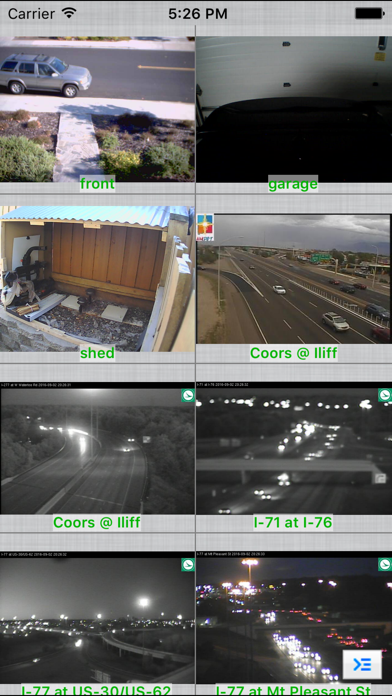
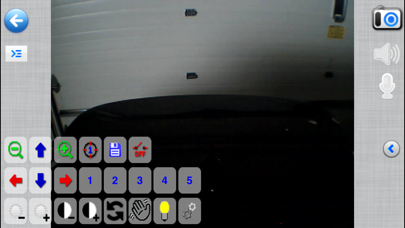
Remotely view, control and record your IP camera, webcam, DVR and NVR using your iOS device. Written by Robert Chou Use as a baby monitor with 2-way audio support for Foscam / clone, Axis, Panasonic, Trendnet and many more cameras. Record Mode turns any spare iOS device into a tiny solid state, battery backed, network video recorder to record your cameras 24x7 with search, playback, export capabilities, in-app motion detection, and motion email notification. Supports: - RTSP, ONVIF, H.265, H.264, MPEG4 - Pinch to zoom (digital zoom) - optical pan tilt zoom and preset recall - SSL and custom functions per camera model - 1 way and 2 way audio for many cameras - grouping of cameras - auto sequence mode (auto rotates cameras and groups) - Record Mode for 24x7 recording - import/export and email sharing of cameras - in-app motion detection - motion email notification Over 1600+ devices supported, some brands include: 3SVision 3xLogic 7Links A-Link A.V. Sistemi AbelCam ABUS ACESEE Acromedia ACTi Active Vision AData Afreey AgileMesh Airlink AirLive Airship Alien Alinking Allnet Amcrest Amovision Annke Apex Apexis Aposonic Appro ArcVision Arecont Argus Surveillance arlotto Arm Electronics Asante ASIP Asoni Astak Avermedia Avigilon AVIOSYS AVS AVTECH Axis Basler Bensoftware Bewan Beward Blue Iris Bluecherry BlueJay BluePix Bosch Brickcom BVUSA Canon CCTVFACTORY CCTVHotDeals Celius Cisco Clas Ohlson Clinton Electronics Cohu Compro Comtrend Conceptronic COP CPCAM Dahua Dali DBPOWER Dedicated Micros Defender Defeway Dericam Digicom Digimerge Digital Watchdog Digitus DigiVue Digix DiVis DLink DoorBird Dropcam Dtt DVRUSA DynaColor EasyN EasySE Edimax Elmo Elro Eminent Encore eneo Escam Etrovision Everfocus eVigilo EvoCam ExacqVision Exelon EYEMAX EyeSpy247 Falcon Fitivision FlexWatch FLIR Floureon FoodTec Solutions Foscam FUHO Fulix Gadspot GE Gembird Genius Geovision Gigamedia GlobeTeck GOING GoPro Goscam GrandSec Grandstream Grandtec Grundig GTEC GVDigital Hawking Tech Heden HeeToo HeiTel Hesavision Hikvision hiQview HiSilicon Histream HISUNG Honeywell HooToo Hunt Electronics I-View ICam ICAMView ICanTek iCatch ICRealtime Icy Box IDS Security IGuard Imogen imotion Inscape Data INSTAR Insteon Integra Intellinet Interlogix INVID IPCC IPS IPUX IQinVision iSpy iTech Digital ITX iVigilo Jetview JVC KGuard KMW Kodicom LevelOne LG Linksys Loftek Logilink Logitech Lorex LTS Lumenera Lupus Luxriot Maginon Mammoth Technologies Marmitek MaxSecure MayGion Merit LILIN Messoa MicroDigital Micronet Microseven Milesight Milestone Mitsu Vision Mobotix Monacor MonoPrice motionEye Motorola Nadatel NeoVista Nest netatmo Netcam Studio Netgear NetMedia Night Owl NOVUS NuSpectra NUUO Nuvico OnSSI ONVIF OpenEye Optica Opticam Optiview Optivision OvisLink Panasonic Pelco Pinetron Pixord Planet Planex Plustek Polaroid Power Telecomm PROCCTV ProTalk Provideo PTZOptics PY Software Q-See QNAP QVIS RapidOS Raspberry RaySharp Rayvision Remote Eyes Reolink Rifatron Robox Rosewill Samsung Sanyo Savitmicro Secom Secubest Security Labs SecuritySpy Sensormatic Sercomm Seteye Sharx Shixin Siemens Sitecom Smart Witness SmartEye SmartIndustry Snooperscope Solwise Sony SparkLan Speco Tech Spy Cameras Sricam StarDot Sumas Sumpple Sunba Sunell SunEyes SuperCircuits Surveon SVAT Swann Synology Talon Talos TechVision TecVoz TELCA Telefonica Teleste TelView Tenvis Tibetsystem Timhillone TomTech Topica Toshiba TP-Link Trek TRENDnet TriVision True-H TVT Digital Ubiquiti UNIMO Unitek Uniview UniVision USAG Ustream UTC Vantage Veo/Vidi Video Insight VideoIQ Videoswitch Vidi Vigilant Vilar/Vipcam VisionGS Visionhitech VISIONxIP VisorTech Visualint Vitek Vivotek Vonnic Vstarcam Wanscam Wansview WatchNET Wavestore WebcamXP Wodsee WowWee X10 XTS Y-Cam y3k Yawcam Yoics Yoko Tech Zavio ZiLink Zmodo Zoneminder Zonet Zoneway Zosi ZyXEL
새로운 소식
Bug fixes and more drivers.
상세 정보
- 개발사
- NibblesnBits
- 주 카테고리
- Utilities
- 현재 버전
- 4.0.5
- 버전 출시일
- 2024-02-04
- 최초 출시일
- 2010-11-26
- 용량
- 30 MB
- 연령 등급
- 4+
- 가격
- USD 4.99
- 언어
- EN
- 번들 ID
- com.nibblesnbits.ipcamviewer
- 현재 버전 평점
- ★ 3.43 (227)
- 첫 수집
- 2026-05-28
메타데이터 갱신 2026-07-19
순위 히스토리
무료 기준 · 최대 90일 · 상위 5개 카테고리 표시 (Y축: 순위, 낮을수록 상위)
순위 히스토리 데이터가 없습니다
무료 순위
순위 없음
유료 순위
순위 없음
유저 리뷰
It works but is very dated with graphics and function. There is zero swipe function which is not intuitive at all, you would think that swipe when on camera would go to next camera as the layout dictates. And a up or down swipe would go back to thumbnails. All the icons need updating, AI could create those in a few minutes. Outside of that it shows cameras, many different brands.
I’ve used IP Cam Viewer Pro for years and it was one of the best universal IP camera viewers on iOS — great RTSP/ONVIF support, lots of camera drivers, and the developer used to be very responsive. Unfortunately, the last update was February 2024 (version 4.0.5). Since then: • No new camera support • The support forum is gone/404 • No replies to support emails • Patreon and website are quiet The app still works fine for the cameras it already supports, but if you have newer hardware, need iOS 18/19 compatibility fixes, or run into any bugs, you’re on your own. It feels like the developer has moved on without any notice. If you only need basic viewing of older cameras it’s still usable, but buyers should know active development and support have stopped. Would happily go back to 4–5 stars if the developer returns and updates it.
I have a mix of Tapo & Amcrest webcams. 16 at home & 10 on the RV when I travel. Using a home VPN, I can look at any or all of the cameras when I’m traveling. Easy to use and easy to set up groups for cameras that are used for security purposes. Please make an app for Apple TV like this one!
This app works well with all my Amcrest and Dahua ip cameras and it does not collect any data which in this day and age is important.
10年以上使ってますが、どのメーカーのカメラもこのアプリで一覧できるので便利です
Terrible UI, and incredibly slow connection to all sources. Wish I could return
The best app to see you up camera and easy to setup !!
App takes a long time to load cameras recently and sometimes never does without restarting app and/or iphone.
Update: 07/7/24 its been at least three years since I wrote the below review and my opinion hasn’t changed at all. It wrks 100% every time I use it. Even my suggestion to add real time picture control adjustment. If you’re having issues seeing or controlling a camera the issue is most likely something is set up incorrectly on the camera or app (operator error) or the camera is not listed in the tested known to work camera list. I’ve been using this app for nearly 10 yrs. and have never had an issue. it’s connected to any camera I’ve throw at it & simply works. If I had any suggestions to improve the app I would say (if it’s technically possible) interface the camera picture controls of the cameras allowing the user to adjust brightness, contrast, etc. would be helpful. Aside from that I will continue to know whenever i need to monitor my property this app will preform every time.
Multicam view frame rate is very slow. I am not sure if the app uses hardware decoding or not but my hikvision app displays 16 cameras at once with 15fps each. It would be nice if the multicam view frame rate could be improved.
Until recently, this worked great. Now every time I try to move the camera lens I receive a pan/tilt failed. What has changed? How can this be corrected?
モバイル通信からipv6接続が不安定。camera / feed not availableと表示され接続されない。 wifiでは問題無く接続出来るが、一度上記の表示になると再接続までかなりじかんが掛かる。 onvif、rtspに関わらずアプリ側で勝手に画質を落とされて再生される。
변동(신규 진입·급상승) 감지된 앱에 한해 Apple RSS 최신 리뷰를 수집합니다.