

스크린샷



설명
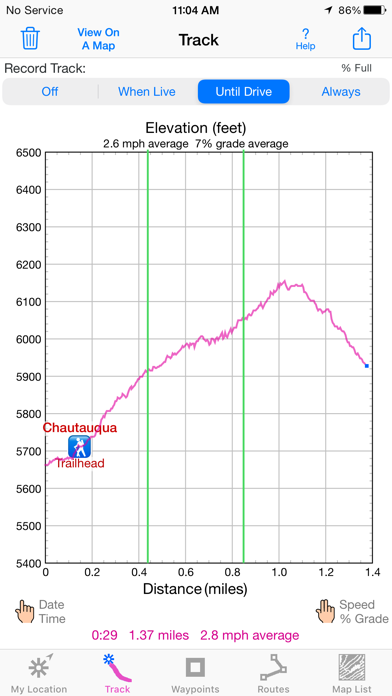
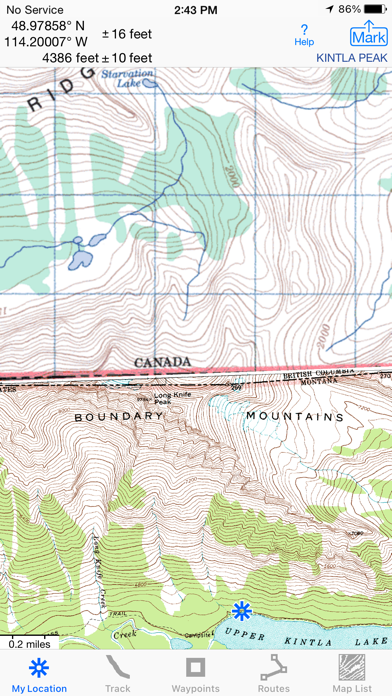
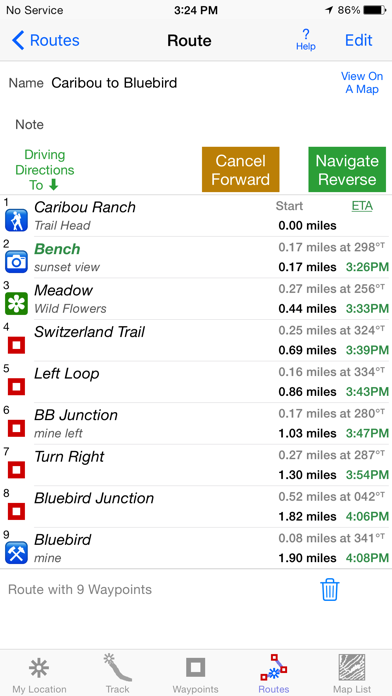
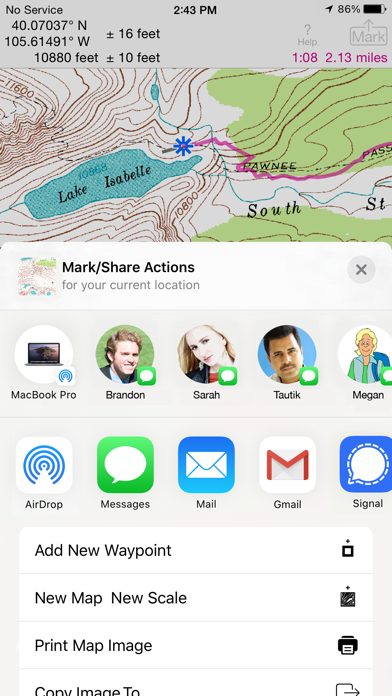
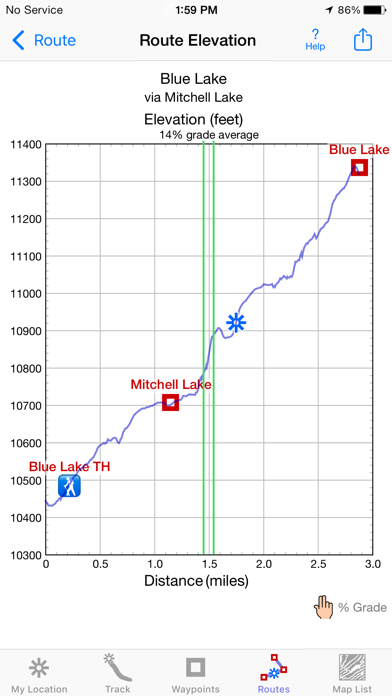
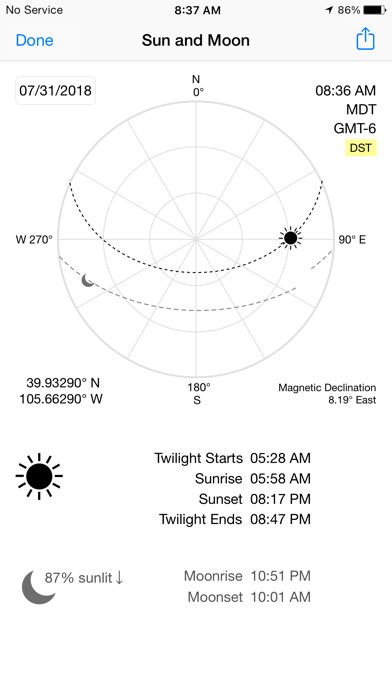
Unleash the navigation potential of your iPhone or iPad with iHikeGPS! Turn your device into a high-performance GPS receiver equipped with USGS, US Forest Service & Canadian topo maps. These Classic topo map quads often have valuable back country details that vector maps in other hiking apps don't show. Even in remote areas with no cell signal, iHikeGPS ensures you always know where you've been, where you are, and where you’re going. Experience the ultimate hiking companion, offering unparalleled Track recording, Route navigation & accurate Estimated Time of Arrival. One Low Price! Everything included. No sign-ups, ads, subscriptions or in-app purchases. Completely respects your privacy. Discover the limitless possibilities of iHikeGPS while hiking, backpacking, biking, geocaching, camping, sightseeing, 4 wheeling, skiing & hunting. Recommended as the top choice in “Essential Gear for Safe Hiking”, it's a must-have for outdoor enthusiasts. TRACKS, WAYPOINTS & ROUTES Record Tracks as you hike, even in the background. View them on the map with a Trip Timer & Odometer. View elevation graphs of your Tracks & Routes. Show date, time, % grade, average speed and the area inside a closed path. Mark Waypoints precisely using topo or satellite maps, place names or addresses, geotagged photos, or by projecting from a known point. Get the elevation from a Digital Elevation Model database. Set a quick GoTo Waypoint or a full Route to see the heading, direction, distance, elevation change & Estimated Time of Arrival at your destination & intermediate Waypoints along the trail. Be warned when you leave a Route you were following. Create customized Routes using Waypoints, recorded Tracks, or imported GPX, KML or TCX files. Advanced Route editing. Send Waypoint, Route, Track & Map List files to other apps and other people via AirDrop, eMail, Messages or iCloud Drive. View the sun & moon positions and rise & set times for any date & place. TOPO MAPS AT NO EXTRA COST US Forest Service FSTopo 24K maps USGS 24K maps for all states, Guam, Puerto Rico & the US Virgin Islands USGS 250K & 100K (63K for Alaska) maps for all states National Resources Canada 50K maps for all areas south of 50° latitude. For Alberta, British Columbia & Newfoundland coverage extends to 54°. Download using WiFi or cell service. Our maps are optimized to download faster & use less storage memory. Store up to 2200 maps to use in the wilderness without cell service. These beautiful richly detailed offline topographic map images stitch together for seamless coverage across map boundaries. Print & Share map images overlaid with Waypoints, Routes & Tracks. Measure distance and direction between any 2 points. USE THE UNITS YOU PREFER Miles, Nautical miles or Km Feet or Meters Degrees, Degrees/Minutes, Degrees/Minutes/Seconds, UTM or USNG-MGRS °True or °Magnetic SUPPORT Comprehensive Help in the App Online Manual on iHikeGPS.com Email developer: lwjames@iHikeGPS.com WHAT OTHERS SAY “I am VERY impressed!!!…It pretty much blows…, my previous fave GPS app, out of the water. Your track recording features, fast map downloads, and well thought out interface make it a real winner.”-John in OR “Perfect for anyone camping, fishing & hiking, it'll provide great detail when you need it the most…for anyone who takes the great outdoors seriously”-David's review "iHike is the best user interface ever."-Larry B “Thanks for a wonderful and inexpensive app! I see my climbing buddies using expensive subscription apps that don't seem to be better.”-Charles DEVICE REQUIREMENTS Use iHikeGPS on any iOS device even if you don't have a cellular data plan. iPhones & WiFi+cellular iPads support full navigation. WiFi-only iPads can view maps, but require an iOS-compatible external GPS receiver to show your location & record tracks. Join thousands of satisfied users who rely on iHikeGPS for their outdoor adventures!
새로운 소식
Improved wording on some Alerts and Notifications. What's new in iHikeGPS compared with other available USA topo map apps? • Real Navigation Power: Unlike other apps that simply display waypoints and routes on a map, iHikeGPS empowers you to do real navigation to those waypoints and along those routes while receiving crucial information such as Estimated Time of Arrival, current bearing, and remaining distance and elevation gain to intermediate and final destinations. Use iHikeGPS when you are on the trail and away from cell service. For your safety on the trail it always works no matter where you are hiking without requiring an Internet connection. • You can view elevation graphs of your Tracks and Routes with Waypoints, speed and % grade shown on them. • You can create, import, edit, and navigate both on routes based on a recorded or imported path, and on routes based on a series of waypoints. • There is never any confusion over what maps you have available offline. They are clearly listed and shown on an overview map. • iHikeGPS's code size is kept very small by efficient programming so in an emergency, you can download it easily even over a weak cell connection. • The current version of iHikeGPS runs on the latest devices and also on older devices with older versions of iOS , all the way back to devices such as the iPhone 6. • Check the App Privacy section. We don't know who you are when you are using iHikeGPS. We never send your current location or your recorded track to our servers. Hence we cannot and don't use your location data. We cannot and don't provide your location data to anyone else. Unlike other mapping apps that profit from using your location data in ways that do not keep it private, iHikeGPS maintains the highest level of data confidentially. Posted on YouTube: "On that day I was using iHikeGPS app to track… When I'm doing any exploration hike, this is the app I would always use to make sure I will be able to return to my car. I've encounter dead zone areas where there's no internet signal, some apps will freeze and stop working… I would not rely on using those … apps for exploration hikes. As basic iHikeGPS appears to be, it continues to work flawless without internet. To this day I continue to use iHikeGPS for certainty and survival." - Carlos in California
상세 정보
- 개발사
- James Associates Inc.
- 주 카테고리
- Navigation
- 현재 버전
- 9.6.9
- 버전 출시일
- 2026-04-24
- 최초 출시일
- 2010-02-12
- 용량
- 12 MB
- 연령 등급
- 4+
- 가격
- USD 4.99
- 언어
- EN
- 번들 ID
- com.macgpspro.iHikeGPS
- 현재 버전 평점
- ★ 4.39 (59)
- 첫 수집
- 2026-05-31
메타데이터 갱신 2026-07-18
순위 히스토리
무료 기준 · 최대 90일 · 상위 5개 카테고리 표시 (Y축: 순위, 낮을수록 상위)
순위 히스토리 데이터가 없습니다
무료 순위
순위 없음
유료 순위
순위 없음
이 개발사의 다른 앱


유저 리뷰
It is easy to configure and use. I have used it over 15 years. Solid and dependable. Internet is only needed to download USFS and/or USGS topographic maps of your choice, which are stored on your iPhone. All operating features are completely useable in Airplane mode. Waypoints, GoTo, Tracks, Routes. Multiple Waypoints shown on your map screen. Help info is stored on your device. ihikeGPS is the Winner!
Why would all my downloaded maps disappear in a fall? Seems pretty strange, I’m hiking, phone thinks I fell and my maps are deleted. That needs a fix.
This app allows you to do many different things. The help menu that’s available in the app can be confusing, at least for me, however in you look up the app in your browser, then you can scroll through the menu and find what to do. I wanted to delete some track segments and using the info in the browser version I was able to remove just the segments I wanted and not the whole track.
Have used this in the backcountry with 24k USFS maps with great results. There is one feature that I wish this app had: Folder structure for Routes and Waypoints. Dealing with dozens of GPX files and Waypoints would be easier if there was the ability to create folders/subfolders for organization instead of the current flat file system.
Good screenshots but bad resolution. Not good for hiking or anything else.
I downloaded this app based on favorable reviews. But so far it’s confusing. I’m a GIS professional and programmer so don’t think it’s just me. I downloaded a few 24K maps near me, then downloaded a few 100K maps surrounding those. Then I wanted to download some 24K maps within the areas of the 100K maps. So far I have not found a way to do so. Tried various taps and buttons but no luck. Maybe once you’ve downloaded a coarser scale map you cannot also download a finer scale map of the same area. I also can’t zoom out very far— pinching out only zooms out to a pretty local scale, so can’t see the context. EDIT: I see the developer wrote a rather snippy reply to my review. Guess I must have touched a nerve. I'll admit that I did not thoroughly read all the Help material before posting the review, though I did consult it more than the average user would have. I mentioned that I hadn't found a way to download a 24K map in an area where I had already downloaded a 100K map. That was based on the instructions to tap the page in order to download a map. Subsequently I did find how to download the 24K map after you have another map for the same area. But it's not obvious: click the "Map List" tab along the bottom, then click the "+" icon at top left, then tap "Satellite Map Locator", then zoom/pan to where you want the new map, then tap the "+" in upper right, then tap the "Add USA 24K USGS Map". Whew. The approach for maps here is completely different (not "a little different") from any of the other GIS/GPS apps I've used (which is quite a few). It's not because it's raster vs. vector based, since other GIS/GPS apps also use raster/tile based maps. I guess my bottom line is that if you're willing to put in some time to learn the quirky interface, the app can be useful for limited areas of travel. I still wonder about zooming out, though--I can't zoom out beyond a radius of about 3 miles with the 24K map view enabled, or around 20 miles with the 250K map view.
Have used a variety of GPS apps. This is best for US and Canada users because it’s easy to import/export GPX and other common formats, it uses the very familiar USGS/USFS topo maps at all scales (1/24K to 1/250K), and once the needed maps are downloaded it needs no mobile data connection. It also has no subscription fees and no strange proprietary maps. It would be nice if it also took geolocated PDFs, but so far so good.
This is one of my first apps. I was just beginning to understand the ropes of navigating with a hand held gps. They were fascinating to me. Then I discovered IHikeGPS. Works offline, download and store USGS and USFS maps, create waypoints, no hassles with subscriptions or purchases. One inexpensive payment and actual product support from the author. There is a learning curve. It’s not steep. It is important to read the instructions and not assume to much. Works on the ground, in a plane or car. This app shows me where in at and where I’m going.
I can’t get it to track. I want an app to leave a trail; breadcrumbs. Even on the blank page it left a straight line. Downloaded a map and nothing. Press the track button and it stays on off.
It’s a great app. I like how as you scroll it moves from one contiguous map to another. How hard would it be for you to change the map title to reflect the new quad it’s on? Thanks.
변동(신규 진입·급상승) 감지된 앱에 한해 Apple RSS 최신 리뷰를 수집합니다.