

스크린샷


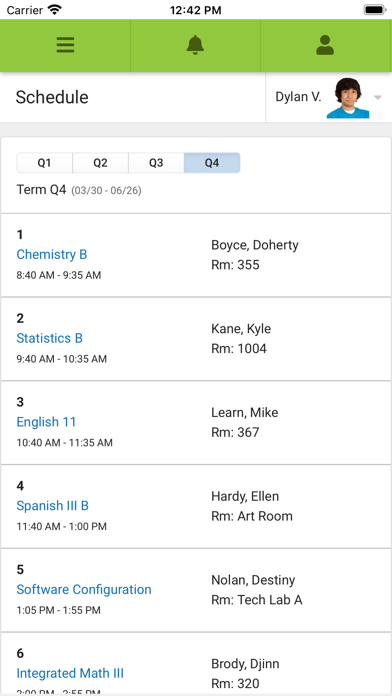
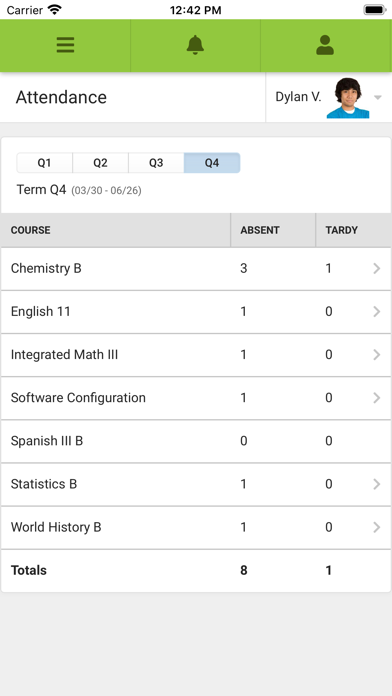
설명
Stay connected to your student’s school life anytime, anywhere. Campus Parent puts important academic information at your fingertips, with real-time access to announcements, assignments, attendance, grades, schedules, and more. TO LOGIN: 1. Download the app 2. Search for your District Name and State – select your district from the list 3. Enter your Username and Password, provided by your school 4. If using a secure, private device, mark Stay Logged In to receive mobile push notifications, if enabled by your school 5. Click Log In! NOTIFICATIONS: Parents and guardians can set and receive alerts for grades, assignment scores, attendance changes, and more. SUPPORT: Due to privacy concerns, Infinite Campus does not maintain individual login information. Contact your school or district if changes are needed. For other questions, visit https://www.infinitecampus.com/support/parents-and-students. PLEASE NOTE: Your district must use the Infinite Campus Student Information System, and an active Infinite Campus account is required.
새로운 소식
Various bug fixes.
상세 정보
- 개발사
- Infinite Campus, Inc.
- 주 카테고리
- Education
- 현재 버전
- 1.12.3
- 버전 출시일
- 2026-06-30
- 최초 출시일
- 2018-09-22
- 용량
- 33 MB
- 연령 등급
- 4+
- 가격
- 무료
- 언어
- EN
- 번들 ID
- com.infinitecampus.parent.campusportalhybrid
- 현재 버전 평점
- ★ 1.88 (2,550)
- 첫 수집
- 2026-05-28
메타데이터 갱신 2026-07-19
순위 히스토리
무료 기준 · 최대 90일 · 상위 5개 카테고리 표시 (Y축: 순위, 낮을수록 상위)
무료 순위
유료 순위
순위 없음
경쟁 벤치마크 — Education Top 10
이 앱을 이기려면 무엇이 필요한가 — 같은 카테고리 상위권과의 비교입니다. 주황색 행이 현재 앱입니다.
| # | 앱 | 가격 | 평점 | 리뷰 수 | 언어 | 최근 업데이트 |
|---|---|---|---|---|---|---|
| 1 | Duolingo: Language Lessons | 무료 | ★ 4.73 | 5,330,298 | 30 | 2026-07-13 |
| 2 | Speak & Learn English: Learna | 무료 | ★ 4.65 | 328,270 | 19 | 2026-07-13 |
| 3 | PictureThis - Plant Identifier | 무료 | ★ 4.81 | 1,096,653 | 28 | 2026-07-15 |
| 4 | ParentSquare | 무료 | ★ 4.61 | 74,826 | 2 | 2026-07-10 |
| 5 | Toca Boca World: Game & Play | 무료 | ★ 4.28 | 850,750 | 21 | 2026-07-13 |
| 6 | Deepstash: Smarter Every Day! | 무료 | ★ 4.64 | 53,306 | 1 | 2026-07-15 |
| 7 | StudentVUE (New) | 무료 | ★ 2.38 | 205 | 1 | 2026-05-04 |
| 8 | Imprint: Visual Micro Learning | 무료 | ★ 4.76 | 49,526 | 1 | 2026-07-16 |
| 9 | IQ Boost: Brain Trainer, Games | 무료 | ★ 4.49 | 7,647 | 15 | 2026-06-23 |
| 10 | Vocabulary - Learn words daily | 무료 | ★ 4.78 | 208,911 | 6 | 2026-07-17 |
| 77 | Campus Parent | 무료 | ★ 1.88 | 2,550 | 1 | 2026-06-30 |
이 개발사의 다른 앱

유저 리뷰
1 Star — Absolute garbage. Forced to use it, and it fails at every single thing it claims to do. Our school district (WCPSS) just forced all parents to switch from PowerSchool to this train wreck, and it has been nothing short of a nightmare. I've read through dozens of other 1-star reviews and every single complaint is valid. This app is fundamentally broken and the developer clearly does not care. 1. Push notifications are completely useless. The red notification badge has NEVER worked — not once. I have to physically open the app and navigate to each section to see if anything has changed. I've gone into settings, turned every notification toggle on and off repeatedly, reinstalled the app three times, and nothing helps. Push notifications for grade changes, attendance, or new announcements arrive randomly — sometimes 24 hours late, sometimes not at all. What's the point of a "real-time" parent portal if I have to manually check it every hour? Other parents in our district are having the exact same issue. This is not a settings problem — it's a broken app. 2. Email alerts are delayed by weeks. The app claims to send "real-time" email notifications about missing assignments, grade drops below passing, and attendance changes. In reality, I receive these emails 2-3 weeks after the teacher actually made the update. My daughter got a zero on an assignment, the teacher entered it on a Monday, and I got the email on a Friday two weeks later. By then the zero had already tanked her average and there was almost no time to fix it before the grading period closed. Parents are missing critical windows to help their kids because this app cannot do the one job it was designed for. Multiple reviewers have reported the same multi-week delays. 3. Settings silently change themselves without any user action. I never touched my notification preferences, yet somehow the system silently flagged my account to not receive ANY email communications. I only discovered this after realizing I hadn't heard from the school in months. When I checked my Campus Parent settings, sure enough — email notifications were mysteriously toggled off. This has happened to countless other parents based on the reviews. The app is arbitrarily changing user settings behind the scenes, which means you could be missing critical school communications and have no idea until it's too late. 4. The interface is clunky, confusing, and feels ancient. For a company that powers student information systems for thousands of school districts across the country, this app looks and feels like a beta prototype from 2012. Navigation is confusing — nothing is where you'd expect it to be. Loading times are painfully slow even on gigabit WiFi. The app frequently freezes, crashes to the home screen, or gets stuck on a blank loading spinner. On an iPhone 16 Pro, an app that just displays grades and attendance should not struggle this badly. It's embarrassing that taxpayers are paying for this. 5. The transition from PowerSchool has been an unmitigated disaster. Our district used PowerSchool for years and it worked. Not perfectly, but it was functional and reliable. WCPSS forced this switch with minimal communication to parents, no training, and no grace period. We were just expected to figure it out. The activation process alone was a mess — I received four copies of the same activation email over three weeks, the unique link had to be used "immediately" once clicked, and the account creation flow asks for your email and password multiple times in confusing succession. It feels designed by people who have never actually used their own product. 6. Customer support is a brick wall. The app says "contact your school" for every single issue. The school says "contact the developer." Infinite Campus support says "we don't maintain login information for privacy reasons" and kicks you back to the school. So when something breaks — which is constantly — you get bounced between two parties who both refuse to take responsibility. There is no phone number, no live chat, no email address that actually leads to a human who can help. Just an endless loop of deflection. 7. The app is missing basic features that PowerSchool had. PowerSchool let me see detailed assignment descriptions, teacher comments on graded work, and historical grade trends. Campus Parent strips all of that away or buries it behind five extra taps. The calendar view barely works. The "Message Center" is a joke — half the time messages from the school never show up in the app at all. I have to use the web portal on a desktop computer to do basic things that should be available in the app. 8. Frequent bugs that never get fixed. Every update's release notes just say "Various bug fixes" but the same bugs persist version after version. The app logs me out randomly. Sometimes it shows no students linked to my account even though I clearly have one. The grade display sometimes shows the wrong term's grades. These are not edge cases — they are widespread issues that have been reported hundreds of times in reviews stretching back years. 9. Wastes parents' time every single day. I shouldn't have to jump through hoops just to check my child's grades and attendance. Parents are busy. We have jobs, other kids, and lives. An app that was mandated by our school district should work reliably out of the box, not require daily troubleshooting and workarounds. Every minute I waste fighting this app is a minute I'm not spending actually helping my child with their education. 10. The 1.9-star rating says everything. 2,500 ratings and it's sitting at 1.9 out of 5. That's not a fluke or a few disgruntled users. That
It worked great for years and now it can’t connect to the district. Can’t login anymore. It’s been months. I’ve deleted it and reinstalled it and nothing
It has just stopped allowing me to check my child’s grades and such.
I can’t even log in. Every attempt I enter my info and hit log in and it just refreshes the page. Useless don’t waste time downloading.
This whole app is trash. It’s buggy, hard to navigate, kicks you out, makes you change your password way too much, doesn’t hold login information, etc. it’s absolutely garbage.
Everytime I try to login after resetting the password, it forgets my password and tells me incorrect login. Then I reset it save the username and password on IOS and it won’t remember it then it tells me the login is incorrect, I got for a second time in one session and reset the password and it says my password was involved with a breach. trash app….
If I could give this app negative stars, it would be more a more accurate review. Complete waste of time and resources for the school district to use this app.
It’s telling me to put in the state of school district however when I do and it loves me to the next page, nothing is popping up, making me unable to login. I would love if you could reach out to me to help me resolve this issue.
This is the second time it has kicked me out and the school has had to start my account again. I’m so over having to email and talk to the school about this app.
For whatever reason, I continue to keep getting signed out when I click the option to continue to stay signed in. It’s such an inconvenience.
변동(신규 진입·급상승) 감지된 앱에 한해 Apple RSS 최신 리뷰를 수집합니다.