

스크린샷


설명
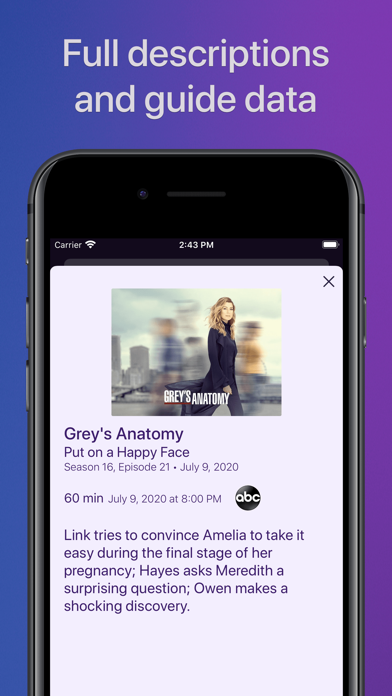
Watch live TV, right next to your apps. Channels lets you play, pause, and rewind local or cable TV directly on your Apple TV with your HDHomeRun TV tuner. If you are a Channels Plus subscriber with DVR Service, search for the free app: Channels: Whole Home DVR. Channels requires an HDHomeRun networked TV tuner to watch live TV on your iPhone, iPad, or iPod Touch. Learn more about how this works below. • Pause, rewind, and fast forward live TV • Guide Data • Full grid guide • Full HD streaming (bandwidth permitting) • 5.1 Surround Sound • Closed captioning • Full support for VoiceOver • Channel favoriting • Jump back to last channel • Auto Discovery • Browse what's on other channels while watching TV • Manage your HDHomeRun devices from Channels "If you’re a cord cutter, then Channels coupled with an HDHomeRun and antenna is one of the best purchases you can make." — 9to5mac "If live television has been a missing or irritating-to-use piece for your viewing pleasure, Channels plus a networked tuner pulls it neatly into your iPhone, iPod touch, or iPad." — Macworld Channels requires modern iOS devices and 802.11AC wireless for HD streaming. But as usual, your milage may vary. Supported devices: All iOS devices with an A7 chip and up. Note: Channels does not support Picture in Picture mode on the iPad or AirPlay on any device due to the video format provided by the HDHomeRun tuners. This is an iOS limitation. -- Why Use Channels? -- Channels is the missing piece of your puzzle. If you already watch everything through streaming apps, Channels lets you finally watch sports, award shows, local news, and other live events on your same device. • Watch live primetime TV, local news, and sports on your Apple TV. • Netflix, Hulu, Movies, Games, AirPlay, and now live TV on the same device. • Already using antenna for live TV? Channels lets you use one antenna to watch TV on all the devices in your home. • Want sports on your porch? News in the kitchen? Channels lets you watch these anywhere in the home. Let your TV watching follow you around the house. -- How Does It Work? -- An HDHomeRun is a simple TV tuner that can broadcast television over your home network. Channels streams that video directly to your device. 1. Plug an HD antenna or your cable into your HDHomeRun. 2. Plug your HDHomeRun into your router. 3. Watch live TV via the Channels app. -- How Do You Use It? -- Here's some protips on how to get the most out of Channels. • Pick your favorite channels by selecting your HDHomeRun device in the Settings tab and tapping on a channel. • See quickly what’s currently on your favorite channels with the On Now tab. • Tap on a channel to view more info about it (or just 3D Touch it). • Live TV buffer works for ~90 mins or less depending on how much storage is available on your device. • Skip ahead 30s by swiping right. Skip back 7s by swiping left. • Double-tap with 2 fingers to switch to the previous channel. • Swipe up/down on the Quick Guide to see what else is on your favorite channels. Tap it to change to that channel. -- HDHomeRun Device Support -- All HDHomeRun devices are supported by Channels. • HDHomeRun PRIME • HDHomeRun EXTEND • HDHomeRun EXPAND • HDHomeRun CONNECT • HDHomeRun CONNECT DUO • HDHomeRun CONNECT QUATRO • HDHomeRun DUAL • HDHomeRun ORIGINAL (blue and white tuners) Learn more about HDHomeRun tuners on silicondust.com. Simply plug a compatible tuner into your home network router and start watching Live TV with Channels today! • DRM protected streams are *not* currently supported. • Channels does *not* work outside of your home. It only works when connected to the same network as your HDHomeRun Device For questions, concerns, bug reports, and feature requests, contact us on twitter @getchannels or via email support@getchannels.com. You can talk about everything Channels on our community site at: https://community.getchannels.com.
새로운 소식
• NEW: downloads now display a Live Activity on iOS 26+ to provide progress while downloading • IMPROVED: reduced app install sized • IMPROVED: Massive reduction in memory usage • IMPROVED: TMDB identifiers are returned in the identifiers object of the Channels API on Apple TV (when they exist) • FIXED: Video was not being displayed over HDMI or via AirPlay from an iPhone or iPad • FIXED: No recordings would be displayed after switching DVRs under some circumstances • FIXED: Crash that could happen during data loading • FIXED: Crash that could happen with certain ATSC3 content
상세 정보
- 개발사
- Fancy Bits, LLC
- 주 카테고리
- Entertainment
- 현재 버전
- 7.1.1
- 버전 출시일
- 2026-06-29
- 최초 출시일
- 2016-07-30
- 용량
- 108 MB
- 연령 등급
- 12+
- 가격
- USD 9.99
- 언어
- EN
- 번들 ID
- com.getchannels.ios
- 현재 버전 평점
- ★ 4.46 (1,377)
- 첫 수집
- 2026-05-28
메타데이터 갱신 2026-07-19
순위 히스토리
무료 기준 · 최대 90일 · 상위 5개 카테고리 표시 (Y축: 순위, 낮을수록 상위)
순위 히스토리 데이터가 없습니다
무료 순위
순위 없음
유료 순위
경쟁 벤치마크 — Entertainment Top 10
이 앱을 이기려면 무엇이 필요한가 — 같은 카테고리 상위권과의 비교입니다. 주황색 행이 현재 앱입니다.
| # | 앱 | 가격 | 평점 | 리뷰 수 | 언어 | 최근 업데이트 |
|---|---|---|---|---|---|---|
| 1 | Blower | USD 1.99 | ★ 4.51 | 1,335 | 1 | 2026-01-07 |
| 2 | Pocket God | USD 0.99 | ★ 4.30 | 2,751 | 1 | 2015-08-20 |
| 3 | Cozmo Robot | USD 2.99 | ★ 3.51 | 88 | 1 | 2025-07-17 |
| 4 | Ghost Science M3 | USD 10.99 | ★ 4.63 | 2,582 | 1 | 2026-05-28 |
| 5 | iSTB | USD 14.99 | ★ 4.57 | 1,692 | 9 | 2025-12-19 |
| 6 | StbEmuTV (Pro) | USD 8.99 | ★ 2.39 | 216 | 18 | 2022-09-18 |
| 7 | Stick Nodes Pro - Animator | USD 3.99 | ★ 4.80 | 6,492 | 1 | 2026-05-30 |
| 8 | Folium | USD 2.99 | ★ 2.40 | 833 | 1 | 2026-03-18 |
| 9 | FlashFace Full | USD 3.99 | ★ 2.28 | 25 | 1 | 2016-11-22 |
| 10 | Plezy for Plex & Jellyfin | USD 5.99 | ★ 4.44 | 90 | 1 | 2026-07-13 |
| 88 | Channels for HDHomeRun! | USD 9.99 | ★ 4.46 | 1,377 | 1 | 2026-06-29 |
유저 리뷰
If you are in the OTA tv space, this app is the missing piece of your setup. Works seamlessly and the developers are constantly updating it.
Really solid simple app. All i can recommend is adding a dark mode theme for the phone and apple tv app would be so cool especially when watching at night. Anyways thanks for the great app!
This app is so clean and well designed. I absolutely love the hidden channel surfing feature! It’s fast and really a reminder of how channel surfing old school tv. Also love the 2 hour recording/rewind. This app paired with an HDHomeRun is an absolute must for your Apple TV box!
Video replay via Channels is full of jitter, audio/ video out of sync and yet they still take your money? I’d reconsider.
With a recent iPhone upgrade & update, my iPhone volume slider that used to appear on the screen has disappeared! It’s quite an inconvenience to adjust the volume using the phone controls on the side of the iPhone vs the screen itself; I have to turn the phone sideways to adjust the volume. I can still adjust the volume on my iPad screen by using the slider. Please fix this feature with your next update.
Multiview is missing on all my Apple TV and iPad
Used to be a great app. Since the new update, all my streams buffer and get pixelated on iOS. This happens despite my TV app doing just fine. Terrible.
Installed on iPhone 16 and Apple TV 4K devices. Clean, easy to use interface. Designed for use with HDHomeRun products from Silicondust. This version of the app allows you to watch broadcast TV anywhere you have a WiFi signal in your home. There’s another Channels app (DVR) that allows you to record shows and view TV anywhere, not just your home. But it requires additional hardware (computer server). I have the Flex 4K tuner, which is capable of receiving the newest generation ATSC 3.0 broadcasts. But most of the local TV stations are encrypting their signals with DRM, except for the local PBS station. Not sure WHO needs to do WHAT to start watching the shows on the DRM encrypted ATSC 3.0 channels. Not currently an issue for me. The SD and HD channels look great. And I’ve read no TV stations in the Boston area are actually transmitting shows in 4K quality on the ATSC channels. They are sending SD or HD quality programs. Which makes sense, as there aren’t many shows that were created at 4K quality.
Like it very very much ,
Best UI and guide out there currently for watching live TV via HDHomeRun
Tremendous app, utilizes the HDHomerun more efficiently by allowing multiple users to watch the same channel while only using 1 tuner. Better video quality than the regular HDhomerun app, and the amazing PNP that allows for background audio while locked, a feature so good I bought another HDHomerun for my workplace.
변동(신규 진입·급상승) 감지된 앱에 한해 Apple RSS 최신 리뷰를 수집합니다.