

스크린샷

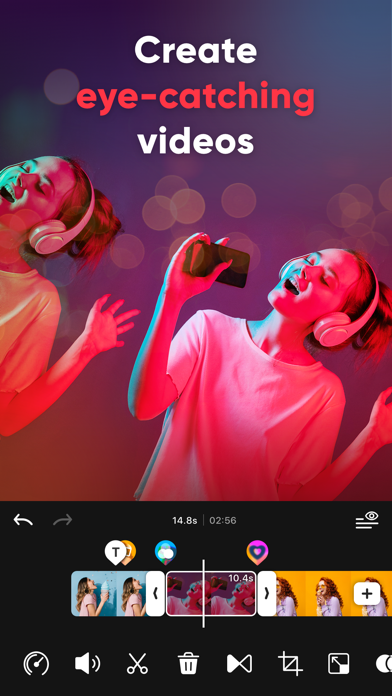


설명
Easy-to-use Video Editor for Creators! Create extraordinary videos for TikTok, Reels, and Shorts easily while using your creative ideas. Tired of editing on such a small screen? Create eye-catching Social Media videos using intoLive, optimized for creating vertical videos (9:16 aspect ratio). intoLive offers various features for video editing ranging from basic to professional. Video Editor for Social Media - Optimized Canvas Ratio for creating vertical Videos (9:16 aspect ratio) - Various canvas formats optimized for Social Media (TikTok, Reels, and Shorts) - Share directly to TikTok, Instagram, YouTube and other social media Easy VIDEO EDITING - Video editor for iPhone - Optimized editor to merge multiple video clips - Combine photos, videos, Live Photo, and GIFs - Compatible with every media format available on iPhone - Auto-save videos as drafts and resume editing anytime - Unlimited Un-do & Re-do functions Add Effects, TEXT and STICKERS with a few taps - 50+ different effects - 100+ text styles - 35+ different text animations - Downloadable various Fonts - Fun animated stickers and emojis - GIPHY stickers for decorating videos Background MUSIC to jazz up videos - 100+ different special royalty-free soundtracks - Add music from your iTunes Library or upload your own music file - Volume control and mute for the original video - Fade in and out background music - Extract audio from your video Detailed editing for each clip - Trim, split, copy and remove clips - Crop, rotate, and flip videos - Adjust speed for fast or slow motion - Make an awesome slideshow with Clip Motion(Ken Burns effect) - Various frame designs, edit your video even more professionally Various Color Adjustments - Apply artistic filters for cinematic effects - Adjust brightness, contrast, saturation, warmth, and sharpness for color correction Make smooth TRANSITIONS - Add transitions easily - 35 different video transitions - Add color backgrounds between clips SAVE and SHARE video quickly - Save video in SD, HD, FHD or 4K quality (Depending on the device model, 4K may not be supported.) - Save video at 24, 30 or 60 FPS (Frames Per Second) - Customize live wallpapers using the live Photo With the intoLive subscription, you can have unlimited access to all features of intoLive. - Subscriptions are billed weekly, monthly, or annually depending on the subscription plan selected. - Subscription fees will be charged to your iTunes account upon confirmation of purchase. - Your subscription will renew automatically unless you turn off auto-renew at least 24 hours before the end of the current subscription period. - You can manage or cancel your subscription from your Account Settings after your purchase. - You can turn off auto-renewal from your Account Settings during your free trial. - When canceling your subscription, the subscription will stay active until the end of the period. Auto-renewal will be disabled, but refunds will not be given for any unused portion of the subscription term. If you are enjoying intoLive, please leave us reviews. We always love to hear from you to continue to improve our app for you! Email: intolive.ios@imgbase.me Terms of Use: https://www.imgbase.me/intolive/terms/termsofuse.html
새로운 소식
- Improved free trial guidance for new intoLive Pro users - Improved the user ad experience - Bug fixes and usability improvements intoLive is continuously improving to provide a better editing experience and stable service. If you have any feedback or issues, please contact us anytime via [intoLive FAQ > Contact Us].
상세 정보
- 개발사
- ImgBase, Inc.
- 주 카테고리
- Photo & Video
- 현재 버전
- 4.4.0
- 버전 출시일
- 2026-06-08
- 최초 출시일
- 2015-12-04
- 용량
- 203 MB
- 연령 등급
- 17+
- 가격
- 무료
- 언어
- EN, FR, DE, IT, JA, KO 외 7
- 번들 ID
- me.imgbase.intolive
- 현재 버전 평점
- ★ 4.60 (112,010)
- 첫 수집
- 2026-05-28
메타데이터 갱신 2026-07-19
순위 히스토리
무료 기준 · 최대 90일 · 상위 5개 카테고리 표시 (Y축: 순위, 낮을수록 상위)
무료 순위
유료 순위
순위 없음
경쟁 벤치마크 — Photo-Video Top 10
이 앱을 이기려면 무엇이 필요한가 — 같은 카테고리 상위권과의 비교입니다. 주황색 행이 현재 앱입니다.
| # | 앱 | 가격 | 평점 | 리뷰 수 | 언어 | 최근 업데이트 |
|---|---|---|---|---|---|---|
| 1 | Twitch: Live Streaming | 무료 | ★ 4.72 | 2,753,564 | 28 | 2026-07-13 |
| 2 | CapCut: Photo & Video Editor | 무료 | ★ 4.62 | 1,115,327 | 20 | 2026-07-14 |
| 3 | 무료 | ★ 4.69 | 29,277,967 | 31 | 2026-07-13 | |
| 4 | YouTube | 무료 | ★ 4.67 | 48,142,765 | 72 | 2026-07-12 |
| 5 | Snapchat | 무료 | ★ 4.51 | 5,871,779 | 35 | 2026-07-15 |
| 6 | Google Photos: Backup & Edit | 무료 | ★ 4.83 | 1,439,915 | 39 | 2026-07-16 |
| 7 | Canva: AI Video & Photo Editor | 무료 | ★ 4.88 | 3,450,878 | 83 | 2026-07-15 |
| 8 | KICK - Live Streaming | 무료 | ★ 4.65 | 128,873 | 1 | 2026-07-17 |
| 9 | Edits: Video Editor | 무료 | ★ 4.78 | 68,945 | 31 | 2026-07-13 |
| 10 | PhotoCircle | 무료 | ★ 4.87 | 117,709 | 1 | 2026-07-16 |
| 81 | intoLive - Live Wallpapers | 무료 | ★ 4.60 | 112,010 | 13 | 2026-06-08 |
이 개발사의 다른 앱


유저 리뷰
👎
SO GOOD U WILL LOVE IT
i really like the moving thing
Always have a like this with a potential for everybody to use cause that’s how you guys are winning
It’s so easy to make live wallpapers and do all of the stuff that you would want to do if you want a live wallpaper
the amount of waiting that i need to do as my video exports is insane. the bar wasn’t even moving at all and my video was a 2 second clip, ive tried everything to make it load faster but nothing worked. i know for sure im never downloading this app again this is crazy.
I waited a whole hour and still haven’t been able to export the live wallpaper
It didn’t work at first but with a bit of tinkering it worked perfectly. Easy 10 out of 10. I have an apple and apparently its sensitive when it comes to Live Photos. So to save you time: Make a new project, trim your video to 4 seconds or less (be sure to have the part you want to be live in it). Then got to the Live Photo and put that edited video and trim it again. And boom it works. If you dont make a new project and just do Live Photo for some reason it will turn it into a live photo but you cant use it as your wallpaper. My phone wouldn’t recognize it. But do my method and it works like a charm. Good app!
直接跳转订购移动业务,可以给负颗星
…
It’s the number 1 app an service wow
It’s a small water mark so I gave it a 4
변동(신규 진입·급상승) 감지된 앱에 한해 Apple RSS 최신 리뷰를 수집합니다.