

스크린샷

설명
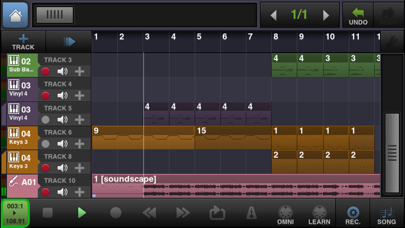
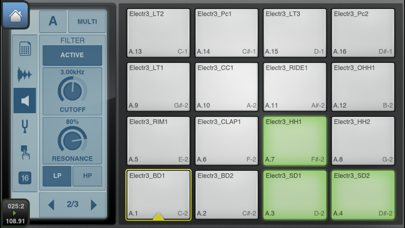
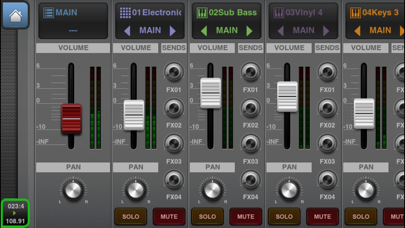
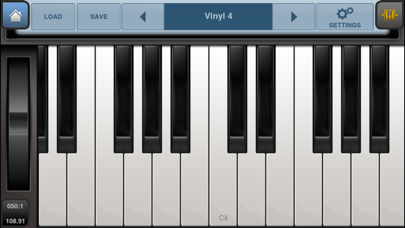
*** BEATMAKER 3 IS AVAILABLE NOW ! *** BeatMaker 2: Advanced mobile music workstation. Combining music production tools that were behind the success of countless artists, BeatMaker 2 is a powerful, easy-to-use composition interface for amateurs and professionals alike. Build your own virtual home-studio, create multiple instruments and connect them to a full-range of audio effects. Compose, record, arrange and transform your ideas into complete songs, ready to be shared with others. Import your own sounds or use the sound library provided: more than 170 high-quality instrument and drum presets from synthesizers to realistic orchestral sounds. You can even import songs from your iPod library! Connect your MIDI accessories for an external control of BeatMaker's instruments, effects and mixer, ideal for home-studio productions and live performances. Compatible with audio interfaces with the Camera Kit (iPad only). Works on all iPhone, iPod and iPad models starting with third generation devices (iPhone3GS, iPod3G 32GB, iPhone 4/4S/5, all iPads). * STUDIO: - Create multiple instruments with Drum Machine, Keyboard Sampler, Audio Tracks - 11 effects: Reverb, Compressor, Filter, Delay, EQ, Flanger, Chorus, AutoPan, BitCrusher, Overdrive, 6-Band Parametric EQ - 3 effect slots for each instrument - CoreMIDI support: connect your MIDI accessories to control instruments, effects and mixer. * DRUM MACHINE: - 128 trigger pads: 16 pads over 8 banks - Chop Lab: Slice audio loops to automatically create new sound presets - Control sound parameters on individual pad: volume, pan, mute, output bus, semitone, fine tune, reverse and autoscaling - Low/high pass filter per pad - Pad trigger modes: one-shot, hold & loop - ADSR Envelope ADSR control for each pad - Exclusive groups and polyphony management - "Live" modes: trigger, mute, reverse, velocity and tune spreading. - Pad copy & paste * KEYBOARD SAMPLER - 128-key keyboard with pitch wheel, double keyboard mode, note display and zoom controls - Easily create your own instruments from any sample combination with the keygroup editor - Volume and filter ADSR envelopes - Low/high pass filter with key tracking - 2 LFOs to control volume, pitch and filter parameters - Polyphony control, up to 32 voices - Legato play mode with glide - Velocity layers * AUDIO TRACKS: - Add audio tracks for recording and sample playback directly on the sequencer - Record multiple audio tracks simultaneously - Gain and noise gate on audio inputs - Support for disk streaming to load samples without consuming RAM * MULTI-TRACK SEQUENCER - Create unlimited instrument, audio and FX tracks - Automations: Record, edit and replay instrument and effect parameters - Record, draw, arrange and resize patterns along the timeline to build your song - Compose and modify patterns with a piano-roll interface. Edit notes, parameters and automations. - Instrument and effect recording options: Quantize, take or partial undo, pre-roll, Overdub, note erasing. * WAVE EDITOR - Full-fledged wave editor with intuitive interface for manipulating samples - Basic edition tools: trim, cut, copy, paste, with undo/redo - High quality time-stretching and pitch-shifting algorithms - Audio tools: normalize, silence, reverse, fade in and out, cross-fade - Record new samples from microphone or instruments - Loop points and tempo/signature editor * MIXER CONSOLE - Realistic multi-track mixer with level meters - Edit volume, pan, solo, mute and bus routing features for each track - Four sends available for each instrument/audio tracks * LARGE SOUND BANK INCLUDED * SHARING & GLOBAL OPTIONS - MIDI files import/export - MIDI Out, Sync, Thru support - Virtual MIDI support - Korg's WIST support - Transfer files from/to your computer via iTunes or FTP - Import songs from your iPod library to create new remixes - Upload songs to your SoundCloud account - DropBox support - Share audio content via iOS pasteboard
새로운 소식
This update from Apple will improve the functionality of this app. No new features are included. • Dropbox is back! • Added Bluetooth MIDI support • Fixed iPhone 8/8+ UI glitches • Compatibility with iOS11 • Older (32-bits) iPad/iPhones/iPod Touch support is back • Fixed the Bluetooth MIDI panel glitch • Small improvements around the app
상세 정보
- 개발사
- INTUA
- 주 카테고리
- Music
- 현재 버전
- 2.6.4
- 버전 출시일
- 2017-10-19
- 최초 출시일
- 2011-02-06
- 용량
- 745 MB
- 연령 등급
- 4+
- 가격
- USD 11.99
- 언어
- EN
- 번들 ID
- net.intua.beatmaker2
- 현재 버전 평점
- ★ 3.44 (232)
- 첫 수집
- 2026-05-28
메타데이터 갱신 2026-07-19
순위 히스토리
무료 기준 · 최대 90일 · 상위 5개 카테고리 표시 (Y축: 순위, 낮을수록 상위)
순위 히스토리 데이터가 없습니다
무료 순위
순위 없음
유료 순위
순위 없음
유저 리뷰
아이패드미니 구매후 설치하였으나 사운드스토어가 뜨질 않습니다 구매한 악기들을 재다운로드 하지 못하고 있는데 이거 계속 이러려는지 모르겠네요
I wanna get a refund cause this app doesn't work well on my phone
언제해쥬는거에요
ios8 올린뒤 오류남 업데이트언제됨
19.99달러보고 샀는데...오늘 30.97달러결제됐다고 문자왔는데...다시 결제확인해주시고 결제승인해주세요!!!
진짜로 좋음
모바일로 19.99에 이정도 퀄리티의 샘플링, 시퀀싱 이용할 수 있다는걸 잡스신께 감사해야함. 최적화도 잘되어있어서 아이패드1, 아이폰4 에서도 무리없이 돌아감. 이거보다 편하고 좋은게 필요하면최소 랩탑에 큐베이스나 맥북에 로직정도 써야함. 돈아깝지 않으니 믿고 지르세요.
에프엘, 큐베이스, 개러지밴드, impc 다 써봣지만 힙합 비트 찍는데에는 이 어플이 제일 입니다. 샘플링 부터 미디작업까지 손에만 익으면 심플하고 쉽게 비트를 찍을수 잇습니다. 한가지 아쉬운건 전체적으로 소리가 플랫하게 출력되네요
사용하기 굉장히 편합니다. 심심할때 음악그리기에 좋아요. 내장인스트로먼트효과음이 좀 아쉽긴한데 전체적으로 좋음. 다만 다른어플에비하면 가격에비해 별로인듯.
첨엔 좋은줄알고 사서 썼었는데.. 이거 사지마세요 일단 악기들 음 퀄리티가 싸구려같고 인터페이스 개같아요 이와우돈주고 살거면 music stuio 나 개러지밴드 나 FL studio 나 nanostudio사세여 전 다 결제해서 써봤는데 뮤직스튜디오가 짱인듯 소리가 정말 퀄리티 쩔음 개러지는 너무 밴드스타일이고,,암튼 이거쓰다 위에꺼 암거나 써보면 소리가 다른게 확 느껴짐
변동(신규 진입·급상승) 감지된 앱에 한해 Apple RSS 최신 리뷰를 수집합니다.