
스크린샷

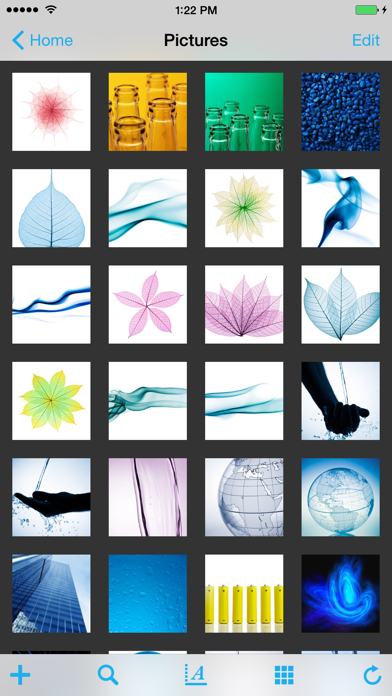
설명
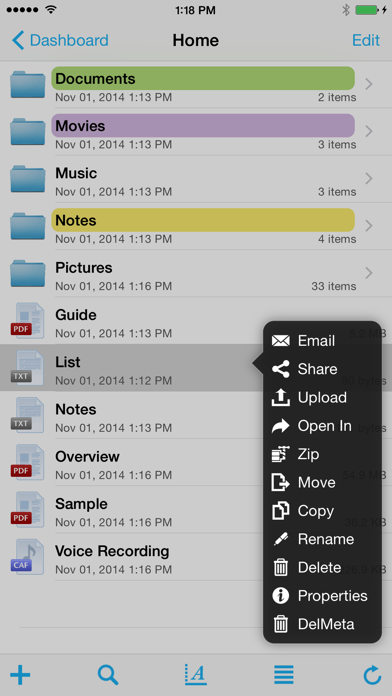
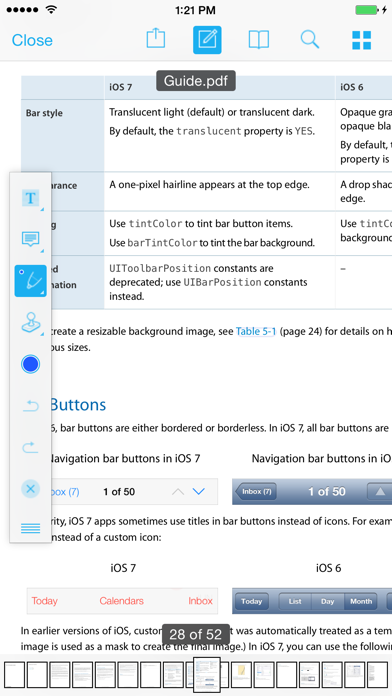
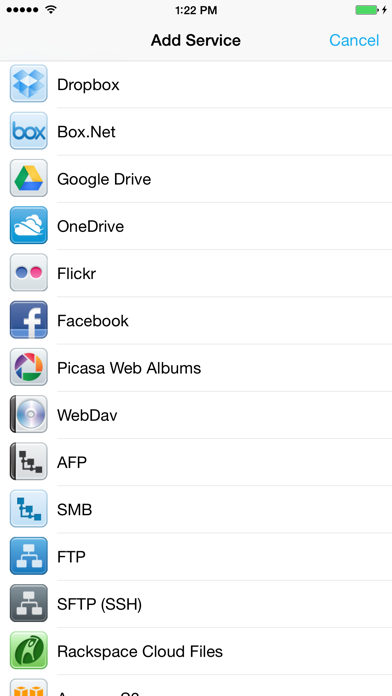
iFiles 2 is now available, this application is here to support legacy users. iFiles is the most intuitive file manager for iOS with features like connectivity to many file cloud services, transferring files between computer or cloud services, ability to view many file formats (PDF viewer now supports annotations, search and more), voice recorder, web downloader, text file editor and more. Supported Online Cloud Services and Protocols: Dropbox, Google Drive, iCloud, Box.net, SkyDrive, SugarSync, AFP (Mac Shares), FTP/FTPS, SFTP, Flickr, Picasa, Facebook, Rackspace CloudFiles, CloudApp, PogoPlug, WebDav, Amazon S3, Ubuntu One Files, ownCloud, 4Shared, also using Amazon S3: DreamObjects and UltiCloud. Key Features: • WEB DOWNLOADER - Download files from the web using the build in Web Browser or Safari using iFiles Bookmarks. (HTML5 Videos are now supported) • EMAIL - Send documents as email attachments directly from iFiles using iPhones email accounts or links to files stored in the cloud. (given service supports this feature) • VOICE RECORDER - Use iFiles build-in voice recorder to create voice notes. • POPUP MENU - Tap and hold on file to display context popup menu with file operations. • PROPERTIES -View and change folder and files properties: color label, icon, and rename. For services with supported API you can edit: comments, description, tags/keywords, privacy, copy/generate links. • SHARE FILES - Share files with other iOS users of iFiles over Wi-Fi or Bluetooth. • PDF VIEWER - Viewer now supports annotations, full-text search, bookmarks, highlighting, saving directly to a cloud service and more. • SECURE - If cloud services uses username and password they are stored using iOS Keychain, Remote access to your device can be secured with password, and device can be locked using passcode. (Your information is never send to any outside service) • FILE OPERATIONS - Move, Copy, Rename, Delete, and create New Folders (Operations are supported for all cloud services given that service API supports it) • ZIP/EXTRACT - Create archive files and unarchive many common archive formats: Zip, RAR, 7-zip, Tar, Gzip, and Bzip2. • TRANSFER MANAGER - Download, upload and transfer files directly between services without required to first download then upload files. Transfers support background mode and will resume if application is closed. • EASY UPLOAD - If your creating voice recording, importing photos or creating a text file, iFiles will automatically upload to the current location no matter if its local or remote. • CLIPBOARD PASTE - Paste text and photos/images directly to current folder. • OPEN IN - Open files in apps that support those file types. • PRINT - Print files using AirPrint. • TEXT FILES - Create and edit plain text files. (Locally or directly in the cloud) • PHOTO IMPORT - Take Photos, record movies or import from your Photo Library. (Multiple selection support is coming in next update) • MEDIA PLAYER - Playback audio and video files. • THUMBNAILS - Thumbnails are generated for local files: photos, videos and pdf files, thumbnails are displayed for cloud service if its supported. File Formats • iWorks (Pages, numbers, Keynote) ’08 and ’09 (with or without Preview) • Microsoft Office (Word, Excel, PowerPoint). • HTML web pages and Web archives (web pages downloaded by Safari) • PDF Documents. • RTF (Rich Text Format) and RTFD. • Plain text with auto-detection of character encoding. Text files can also be edited. • Movies (supported file formats by iPhone: MP4, MOV, MPV, 3GP, M4V) • Audio (WAV, MP3, M4A, CAF, AIF, AIFF, ACC) • Images (JPG, PNG, GIF, BMP, TIF, TIFF, ICO, CUR, XBM) Requirements A Wi-Fi connection is required to transfer files between home computer. ------------------ We're always excited to hear form you! If you have any feedback. questions, or concerns, please emails us at: support@imagam.com or visit http://www.ifilesapp.com or follow us on twitter: @ifilesapp
새로운 소식
- UI updates for all new versions for iOS - Bug Fixes
상세 정보
- 개발사
- Imagam.com
- 주 카테고리
- Productivity
- 현재 버전
- 1.18.0
- 버전 출시일
- 2020-11-25
- 최초 출시일
- 2009-12-05
- 용량
- 38 MB
- 연령 등급
- 17+
- 가격
- USD 3.99
- 언어
- EN
- 번들 ID
- com.imagam.ifiles
- 현재 버전 평점
- ★ 3.17 (75)
- 첫 수집
- 2026-05-28
메타데이터 갱신 2026-07-19
순위 히스토리
무료 기준 · 최대 90일 · 상위 5개 카테고리 표시 (Y축: 순위, 낮을수록 상위)
순위 히스토리 데이터가 없습니다
무료 순위
순위 없음
유료 순위
순위 없음
이 개발사의 다른 앱

유저 리뷰
Very light, however still the best file explorer for basic files management including text editor and others. I really wishing this app supports forever.
I thought it works for AFP, but when i turned on this app and set up about AFP, I got a message that is called kFPUserNotAuth , i don’t know what that means . Please refund it ASAP. Thanks, 환불 부탁드립니다 AFP 기능만보고 구매했는데 전혀 안되네요
구글 드라이브 로그인이 안됩니다. 구글 드라이브를 추가하면 에러 메세지가 나옵니다. 해결좀 부탁드립니다.
에어포트 타임캡슐 연결해서 사용하고 있는데... 폴더 내의 사진이 미리보기가 안되고 폴더 이름도 표시가 안되고 폴더 안에 폴더를 몇개 만들어 놓으면 폴더 수가 많아서 그런지 보여주지도 못하고 애러가 나내요 ifises2 에서는 그런 문제점이 개선이 됬는지 .... 기능은 좋은데 사용을 못하고 있으니....구입을 할 수도 없고.... 누구 아시는분 계신가요???
스트리밍도안되고 한글도 깨집니다. 클라우드내에 음악이나 동영상 스트리밍재생이 안되고 어플다운 먹네요. 환불요청했는데 환불도안되구요. 구매 비추합니다
타임캡슐 저장된 내용물이 부분적으로 안보이며 실행이 안됩니다 폴더이름도 부분적으로만 보입니다 무엇이 잘못되었는지요?
부탁드립니다
2014년 11월 이후로 업데이트 안되네요. iOS9 대응도 전혀 안됩니다. 앱 개선이 이루어지지 않습니다.
잘못 눌렀어요...ㅠㅠ 환불해주세요
아이패드2 사용자 입니다. 그동안 아주 유용하게 잘 사용해 왔는데, ios9으로 업그레이드 이후부터 상위폴더로 이동시 앱이 먹통이 됩니다.
변동(신규 진입·급상승) 감지된 앱에 한해 Apple RSS 최신 리뷰를 수집합니다.