

스크린샷
설명
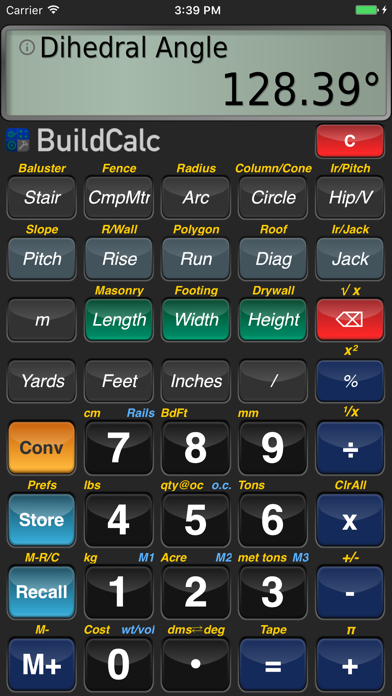
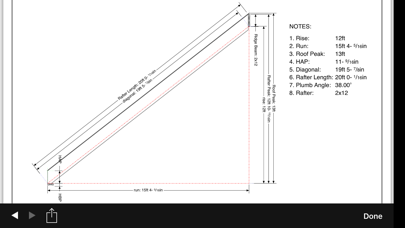
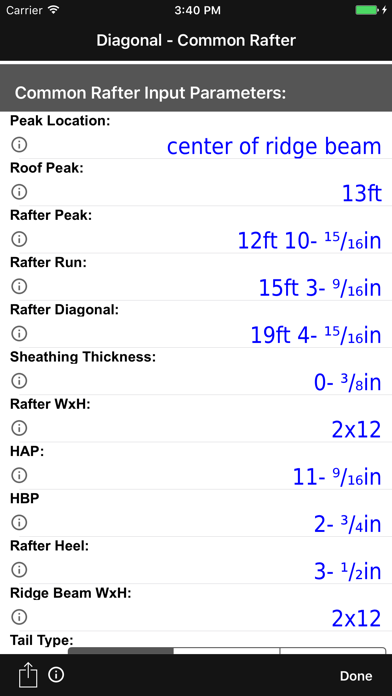
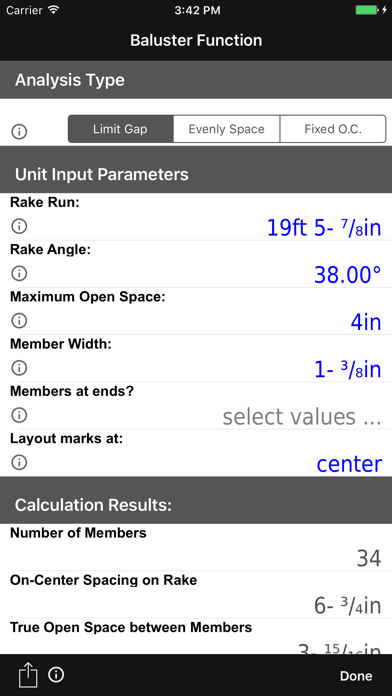
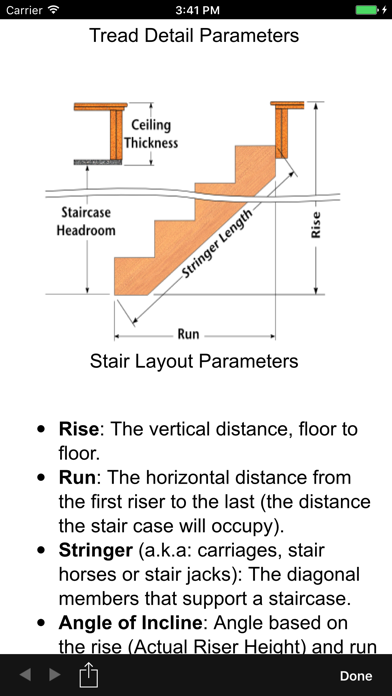
What if you could take the best construction calculator and fix it. That’s right ... you love it, it has served you well, and you stand by it ... but could it do more? Could it be easier to use? After testing by pros from around the world, BuildCalc is ready to give you more - more function and more answers with less complexity, less hassle, and less confusion. MORE FUNCTIONALITY: • Advanced Baluster Function: Complete layout of railing and staircase balusters with less guess work - and with all the flexibility you need for every custom job. • Advanced Stair function: Stair layouts for professional results - including dimensioned drawings of your Stringer, Stringer Installation, and Finished Staircase. And you can email a PDF of these drawings right from BuildCalc so you can print them or share them. • Fence Function: Give BuildCalc a fence row length and it will tell you how many posts, rails, pickets, and or panels you need. • Interactive Functions: The Stair, Baluster, Compound Miter, and Rafter functions are now fully interactive. Want to change input values? Change the Run? Switch between Regular and Irregular Hip Roof analysis? You can do this and your results will be updated automatically - without you needing to remember what key to press. MORE ANSWERS: • You are no longer tied down to: only one brick, block or tile size for the masonry function; a fixed number of drywall sheet sizes; only one footer cross sectional area; or one size of shingles and sheathing. If you don’t see the size you want, you can add as many as you need. And for area input, you can store your custom sizes in Length x Width format, so you won’t have to do mental gymnastics to figure out what was the dimensions for that last size you stored. • Want to cut your hip roof rafter using a miter saw ... or a circular saw using a hand-held protractor? With a tap of a button, BuildCalc will automatically switch between Miter Saw and Protractor results. BuildCalc can do this for Compound Miters, too. • Sheathing Angles, Purlin Angles, Gable Area, Backing Angles, Plan Angles, Rough vs. Finished Stair Layout Dimensions, Stringer Throat, Stringer installation dimensions ... and a lot more not found on other construction calculators. LESS COMPLEXITY AND LESS HASSLE: • Tired of having to press and press and press buttons to get the results of a calculation? BuildCalc puts an end to this. For all advanced functions, you get ALL of your results in list form with just one or two key taps. • And, rather than having to write down those results, all advanced functions allow you to save your results - as many times as you want with a label you choose - so you can recall the complete results at your convenience. Now you can do a calculation today and two days, two weeks or two years later, it is there for you. • Less “quirks”. Have you been annoyed by arcane key stroke sequences on other construction calculators? We are too. BuildCalc 2.1 streamlined the keystrokes to do a better job of giving you less “errors” and more results. Don’t remember what you have to enter before a Hip Rafter or Stair calculation? Well, now you don’t have to. BuildCalc will provide you with a check list of inputs and on-the-spot help to get it right. • Drywall and Masonry “Room Mode”: If you have stored a Length, Width and Height for a room, BuildCalc will give you the Drywall or Masonry required for the walls and the ceiling / floor - with only a tap of the Drywall or Masonry button. No more pondering over complex key sequences ... it just works. NOW WITH ADVANCED STAIRS, BALUSTER, AND HIP/VALLEY FUNCTIONS Get more results than you ever could before - including dimensioned Stringer, Stringer Installation and Finished Staircase Drawings. Drawings can then be emailed to others or printed at your convenience. Email us and we'll send you an example!
새로운 소식
FIXED: - Factory reset not working - Common Rafter inputs changing when changing "measured-to" and "birds-mouth" values
상세 정보
- 개발사
- 42nd Parallel
- 주 카테고리
- Utilities
- 현재 버전
- 2.15.4
- 버전 출시일
- 2026-05-01
- 최초 출시일
- 2009-10-14
- 용량
- 15 MB
- 연령 등급
- 4+
- 가격
- USD 24.99
- 언어
- EN
- 번들 ID
- com.buildcalc.BuildCalc
- 현재 버전 평점
- ★ 4.68 (69)
- 첫 수집
- 2026-05-28
메타데이터 갱신 2026-07-19
순위 히스토리
무료 기준 · 최대 90일 · 상위 5개 카테고리 표시 (Y축: 순위, 낮을수록 상위)
순위 히스토리 데이터가 없습니다
무료 순위
순위 없음
유료 순위
경쟁 벤치마크 — Utilities Top 10
이 앱을 이기려면 무엇이 필요한가 — 같은 카테고리 상위권과의 비교입니다. 주황색 행이 현재 앱입니다.
| # | 앱 | 가격 | 평점 | 리뷰 수 | 언어 | 최근 업데이트 |
|---|---|---|---|---|---|---|
| 1 | Shadowrocket | USD 2.99 | ★ 4.48 | 12,076 | 7 | 2026-07-07 |
| 2 | FORScan Lite - for Ford, Mazda | USD 6.99 | ★ 3.02 | 192 | 7 | 2026-05-09 |
| 3 | Wipr 2 | USD 4.99 | ★ 4.69 | 1,225 | 1 | 2026-07-07 |
| 4 | Goblin Tools | USD 2.99 | ★ 4.77 | 2,951 | 1 | 2023-06-23 |
| 5 | Necrophonic | USD 9.99 | ★ 3.75 | 532 | 1 | 2022-06-19 |
| 6 | Noir - Dark Mode for Safari | USD 2.99 | ★ 4.56 | 1,339 | 2 | 2026-06-29 |
| 7 | Stash - Rule Based Proxy | USD 5.99 | ★ 4.36 | 1,196 | 9 | 2026-07-16 |
| 8 | Necrometer | USD 9.99 | ★ 2.75 | 265 | 1 | 2024-11-02 |
| 9 | IONIQ 5 Companion | USD 12.99 | ★ 4.74 | 47 | 9 | 2026-07-09 |
| 10 | Just Press Record | USD 6.99 | ★ 4.25 | 1,519 | 13 | 2026-05-05 |
| 47 | BuildCalc | USD 24.99 | ★ 4.68 | 69 | 1 | 2026-05-01 |
유저 리뷰
This is the only app I use every day. Solid performance.
Better than the rest
I’ve been a subscriber to BuildCalc for many years, maybe as many as 15 but I honestly can’t remember. The software and app performs as it should but the advanced features is what sets this product apart. It’s difficult to put into words as there are too many to list. If I’m performing a calculation that I haven’t completed in a long time or if it’s a new calculation I’ve never attempted the app/software has a function that allows you to hold down any desired key and it will open a background to explain the function and its uses. When this doesn’t work I have reached out on a few occasions and I was always answered promptly with a solution to my problem. I recently found a bug (as all apps have) and the owner reached out for a meeting in which we shared screens and attempted to replicate the problem. This shows the amount of buy-in the company has in their product and customer service as well as their desire to continue to be THE platform for job site calculations.
I work in the film and movie industry and have been using Build Calc for over 13 years. Some your favorite movies like Spider-Man, Guardians of the Galaxy, Vennom, Black Panther and many many more have benefited from the use of this app. I have made several recommendations to the developers for improvements and additions and they add them. Hands down, you want professional results, use the apps that the Pros use.
Been using this for about 13 years now. Never disappointed
It’s a great app, can you add haptic feedback to the buttons
When I try to change any value for switch pitch roof, it automatically erasers whatever I type to make it fit its prefilled other values.
I rarely write reviews but after using this app for years and recommending it to someone today I felt the need to. I’ve been a professional carpenter for 34 years now and mainly build high end decks. As others have said, the stair function is amazing. What I’ve been most grateful throughout the years though is the baluster function. One of the best tools I’ve ever purchased to say the least. A sincere thank you to the developer from an aging and increasingly aching carpenter. You’ve made many a day easier and more profitable.
Great calculador for construction! I recomend
Switched to iOS and can no longer use the other companies calculator without paying a subscription. I will not pay for greed, however I will pay for a great product. And this blows the other company out of the water. They kept the same great layout but added the most tasteful features. My favorite is long press for info on that function. Great! No more going through the menu to figure out how to do an irregular calculation! Buy it now! You won’t regret it. Developer, thank you.
변동(신규 진입·급상승) 감지된 앱에 한해 Apple RSS 최신 리뷰를 수집합니다.