

스크린샷
설명
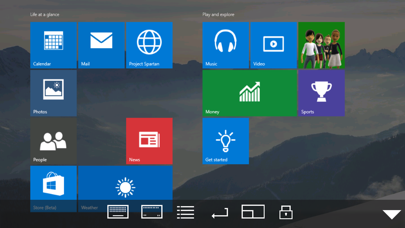
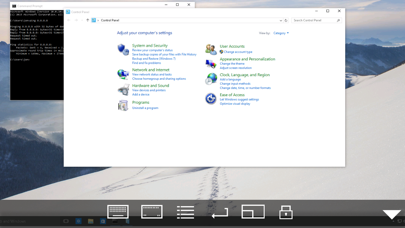
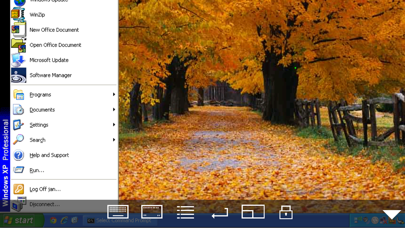
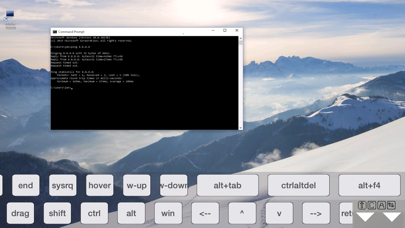
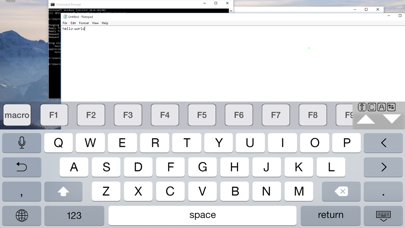
Using your iPhone or iPad, you can connect to your Windows Workstation Computer and see the files, programs, and resources exactly as you would if you were sitting at your desk, just on a smaller screen. Mocha Remote Desktop (RDP) provides access to a PC running Windows XP Professional or Windows 7/8/10. HOME edition or Windows 200x Servers cannot be supported. Before buying, please try our free Lite version. FEATURES - Standard RDP protocol. - 8/16 bit color mode for faster screen updates. - Zoom and scroll as the Safari Browser. - Landscape mode. - View only mode. - Mouse left/right click, drag , hover and wheel. - Support for Swiftpoint GT hardware mouse. - Support for a Bluetooth mouse, when using an iPad. - Support for Mouse Easy. Use an iPhone as a bluetooth trackpad. - WOL (Wake on LAN). - Printing. - Barcode scanner. - NETBIOS name support for easy configuration - Banners with extra keys (ctrl, alt,shift, arrows f1 f2...). - Stylus pen - Unicode keyboard support (any keyboard type) - Have patent license for the RDP protocol from Microsoft. LIMITATIONS - Windows HOME edition cannot be used, as it does not include the RDP protocol. - Support for Windows XP Professional or Windows 7/8/10. We cannot offer Windows 200x Server access, as it will require another patent license from Microsoft.
새로운 소식
Minor bug fixes
상세 정보
- 개발사
- MochaSoft
- 주 카테고리
- Business
- 현재 버전
- 6.3
- 버전 출시일
- 2025-08-10
- 최초 출시일
- 2019-02-12
- 용량
- 2 MB
- 연령 등급
- 4+
- 가격
- USD 5.99
- 언어
- EN
- 번들 ID
- dk.mochasoft.rdp
- 현재 버전 평점
- ★ 3.32 (22)
- 첫 수집
- 2026-05-28
메타데이터 갱신 2026-07-19
순위 히스토리
무료 기준 · 최대 90일 · 상위 5개 카테고리 표시 (Y축: 순위, 낮을수록 상위)
순위 히스토리 데이터가 없습니다
무료 순위
순위 없음
유료 순위
경쟁 벤치마크 — Business Top 10
이 앱을 이기려면 무엇이 필요한가 — 같은 카테고리 상위권과의 비교입니다. 주황색 행이 현재 앱입니다.
| # | 앱 | 가격 | 평점 | 리뷰 수 | 언어 | 최근 업데이트 |
|---|---|---|---|---|---|---|
| 1 | HotSchedules | USD 2.99 | ★ 4.60 | 67,209 | 3 | 2026-07-17 |
| 2 | Jump Desktop (RDP, VNC, Fluid) | USD 14.99 | ★ 4.50 | 1,653 | 9 | 2023-10-30 |
| 3 | ecMobile | USD 9.99 | ★ 2.11 | 211 | 0 | 2026-05-19 |
| 4 | Voice Recorder - Audio Record | USD 5.99 | ★ 4.71 | 16,805 | 10 | 2026-04-24 |
| 5 | TurboScan™ Pro: PDF scanner | USD 9.99 | ★ 4.92 | 294,942 | 10 | 2026-04-14 |
| 6 | FileBrowser Professional | USD 14.99 | ★ 4.68 | 1,498 | 9 | 2026-06-29 |
| 7 | TapeACall Pro: Call Recorder | USD 10.99 | ★ 4.52 | 18,452 | 24 | 2025-02-13 |
| 8 | ScanBizCards | USD 0.99 | ★ 4.58 | 13,765 | 5 | 2026-06-02 |
| 9 | Payrollguru | USD 4.99 | ★ 3.21 | 39 | 1 | 2026-01-08 |
| 10 | Contacts2XL | USD 0.99 | ★ 4.52 | 304 | 1 | 2025-07-16 |
| 62 | Remote Desktop - RDP | USD 5.99 | ★ 3.32 | 22 | 1 | 2025-08-10 |
이 개발사의 다른 앱


유저 리뷰
For users that are having trouble connecting, including if RDP “used” to connect and stopped after an update (for Windows or RDP). Generally, using your Microsoft account email and password will correct it. (instead of your windows hello pin). The one off time that doesn’t work, the fix is also simple. In windows user account settings go back to password and email login. (don’t worry you can reenable window hello again after). Sign out of windows sign back in, then launch RDP again. (you can then enable Windows Hello and use a pin). Hope this helps because it took me a lot of troubleshooting to get to this simple solution.
Doesn’t work with Windows 11. Is there a fix/update coming soon?
I have been working on getting this going on my Vision Pro to access my Windows PC. It works fairly well but pointing and click can be tough using vision and fingers. I have to aim very carefully. I can put the window right in front of my face and use the “touch screen” like capability but clicking is a little tricky. Today I tried using my Logitech Bluetooth keyboard that is attached to my Vision Pro. It works in all Vision Pro apps but nothing when in this program. I have tried to tweak configuration to no avail. The ideal setup would be if the PC could retain mouse and keyboard functionality then I can use Vision Pro as large monitor with PC across the room. Sooooo close!
I have a few xrdp hosts that this app is unable to work with due to the connection being dropped shortly after connecting. Fiddling with the NLA / TLS / other settings doesn’t fix this, these xrdp hosts work fine from Microsoft Remote Desktop on Windows and rdesktop on Linux. It works fine connecting to Windows hosts though.
This is the ideal replacement for actual Remote Desktop and I operar two computers entirely from this mobile RDP app. I like it better than teamviewer.
Does not connect. Does not say why. No support. No troubleshooting. A refund would be nice.
Wake on LAN used to work on this app, but I have not been able to make it work anymore. I know it is not my PC on the network because I can wake it from my laptop. Please look into why it doesn’t work anymore on IOS 13.2.3.
Have been using it for a good amount of time now and this is a great app. Wish the google remote app I use when not on the same network worked even half as good as this one.
Microsoft client works just fine with tat host. This bug has never been fixed, totally worthless for me now
This is the best remote desktop, no other RDP works like this, even the one from Microsoft is difficult to move around the screen and select things. This new version fixed the connection issues for me by selecting TLS 1.0
변동(신규 진입·급상승) 감지된 앱에 한해 Apple RSS 최신 리뷰를 수집합니다.