

스크린샷


설명
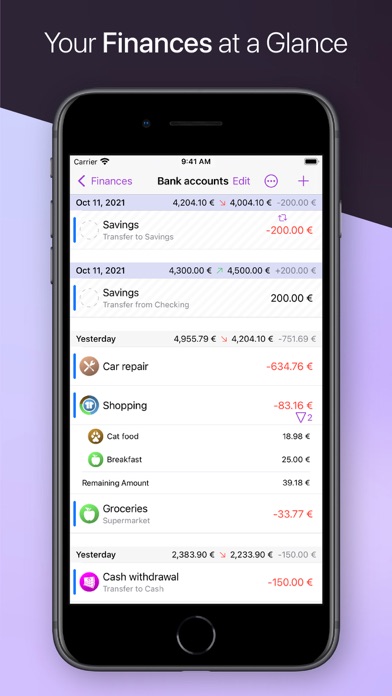
iFinance helps you keep track of your income and spending in the most convenient and fastest way. iFinance's convenient evaluations and charts provide an at-a-glance overview of your income streams and expenditures so that optimizing your finances becomes a breeze. The app's automatic category assignment, tags, budgets, and analytics tools help turn your account history into much more than just a list of bare numbers. Want to find out how your assets are performing? Or why you keep maxing out your bank account each month, leaving you to wonder where your salary actually goes? Is it current expenses such as rent, insurance, food or loans? iFinance has all the answers. It can analyze your finances and helps you identify your biggest spending items and any categories with saving potential. iFinance 5 – Highlights: – Retrieve your account transactions – now available for banks in the US, Canada, and several European countries (requires a paid subscription) – Encrypted database – Password protection – Categories (including automatic assignment) – Contacts (including contacts' bank details) – Analyze expenses, income, losses, and profits – Charts (2D & 3D) – Reports – Budgets – iCloud and WiFi sync – Reconcile transactions – Handle different currencies in one database – VoiceOver support – Supported file import formats: CSV, OFX, QIF, MT940 – Multiple databases – Retrieve stock prices – Add file attachments to specific transactions Charts, Reports, Budgets, and Budgets Analysis iFinance offers a broad range of easy-to-customize charts and reports. Review your financial goals using the app's actionable budgets. How much money is there left for you to spend today or this month without stretching your budget? How much more do you need to earn in order to hit your monthly income target? Comprehensive Search Options Want to look up how much you paid for your TV four years ago, and find the corresponding invoice? If this type of task requires you to get up and browse through folders or boxes full of paperwork, you'll love iFinance's integrated search tool. Want to confirm whether the standing order for your rent payment was executed two months ago? Use iFinance 5 to find out in the bat of an eye! App Bundle for Mac, iPhone, and iPad iFinance 5 is available for Mac, iPad, and iPhone. When you buy the Mac version, you automatically get the iOS and iPadOS versions with your purchase – and vice versa. Please note: iFinance 5 is no longer available for Apple Watch. NEW IN IFINANCE 5 • Completely redesigned user interface now supporting dark mode • Account retrieval now also available for banks in the US and Canada (requires a paid subscription) • Annual budgets for year-round financial planning • Improved stock and portfolio management • Specify a custom storage location for databases and backups • Improved iCloud sync • You can now create rules for category assignment Terms of Use: https://syniumsoftware.com/terms
새로운 소식
Improvements and bug fixes.
상세 정보
- 개발사
- Synium Software GmbH
- 주 카테고리
- Finance
- 현재 버전
- 5.5.7
- 버전 출시일
- 2026-05-04
- 최초 출시일
- 2022-07-18
- 용량
- 61 MB
- 연령 등급
- 4+
- 가격
- USD 19.99
- 언어
- CS, NL, EN, FR, DE, IT 외 4
- 번들 ID
- com.syniumsoftware.ifinance5
- 현재 버전 평점
- ★ 4.39 (136)
- 첫 수집
- 2026-05-28
메타데이터 갱신 2026-06-08
순위 히스토리
무료 기준 · 최대 90일 · 상위 5개 카테고리 표시 (Y축: 순위, 낮을수록 상위)
순위 히스토리 데이터가 없습니다
무료 순위
순위 없음
유료 순위
순위 없음
이 개발사의 다른 앱

유저 리뷰
I had a file with my finances that I usually edited from my Mac. When I accessed it from my phone, I lost all my data for the month. Fortunately, there's a backup feature that allowed me to restore the previous month, but the current month's information was lost. Terrible syncing.
It can make combined transactions - transfer between accounts. List of transactions is pure mess - i list transactions sorted by date from the newest on the top, but in case where there are few transactions the same day - they are sorted in opposite order in that day.To find account balance in this mess is almost impossible. It can export data but only in cvs mode, buggy but it can. Debit and credit transactions are exported in the same column - difficult to import to other program. I requested to separate columns by colon, it used semicolon. Reports - forget this part. Absolutely useless. Simply can not generate report comparing incomes and expenses for specified account.
When I have repeating entries (like a credit card). I like to add/split the transactions. It gets annoyying answering every click "do this to all transactions?". Also, the database isn't uploading smoothly from phone to macbook. I click, "keep new version" and it loads an older one???? It may be something I'm doing wrong but dang it......how am I supposed to know?
I’ve been using iFinance for maybe 10 years or so and over a few upgrades. None were perfect but about the only decent register for a Mac. I usually don’t buy upgrades when I’m satisfied with what I have but this time I decided to give it a spin. Boy was that a mistake. Version 5.5 is about as confusing and non-functional as they get. Not sure what country these developers are in or if the even know anything about finances. When you enter a payment you’d think it would be the “title” for the transaction but you’d be wrong. The title is now entered into the “Purpose” field which most people would think that would be a comment on what the transaction is for. Syncing between an iPhone and the laptop is impossible for me. The migrating notice displays and never ever does anything after an hour. Want to reconcile your account? You can forget that too. There is no place to enter your banks beginning and ending balance. How do you reconcile without that little piece of information. Glad some of you had good luck but for me this one is going in the trash and going back to version 4. A true waste of $20
It sounded good, but this is an OLD and Outdated App. Even worse, it charges an additional monthly or annual subscription FEE if you want to connect to your banks to download transactions. If I knew that I would never have purchased it!! AVOID this App.
While they think they have improved things, for those of us used to having an area for reconciling and balancing accounts, by eliminating that function, I missed several critical entries that were not posted. You need the amounts (especially for bank accounts) across the top to make sure everything gets entered. It also is much harder to find the key to make new entries.
Although this might be good to organize a budget, unless you want to pay $50/year to sync your accounts, thereby making it more user friendly and accurate (instead of doing everything manually), then I would avoid it. I discovered the fee after purchasing as the sync popup didn’t mention that initially (just wanted me to create an account - which I didn’t do as I was demoing it). If I had, I would have seen this and never purchased the app.
There’s several little bugs with iFinance 5, even though we choose to wait a long time before upgrading from 4. It’s disappointing that the software group hasn’t ironed these out just yet. Hopefully they will at some point.
I’ve tried other apps for my finances and I always come back to iFinance. It just works. I manage my family and my in-laws accounts and iFinance has helped tremendously. Only one thing I would like to see added is the ability to clear the cache. For example in the Purpose field. Everything I type is cached, including the things I misspelled. Now if I start to type a common purpose I get all the misspellings with it. Same issue for Tags and Comments. I wish I could wipe it out and start fresh.
I have enjoyed the I-Finance application for many years. No complaints. However, I forgot the database password because I have had the application so long. This prevents me from using the mobile app. On the iPhone.
변동(신규 진입·급상승) 감지된 앱에 한해 Apple RSS 최신 리뷰를 수집합니다.