

스크린샷
설명
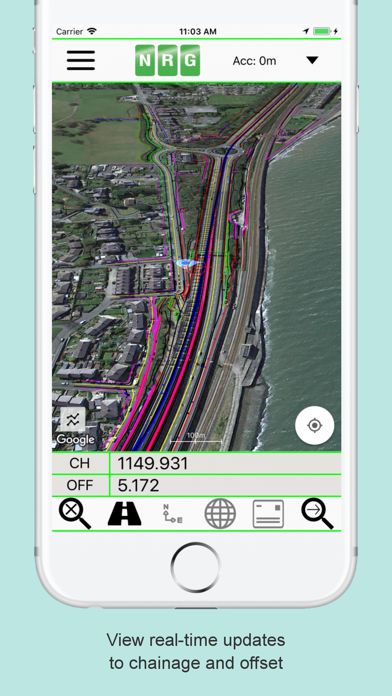
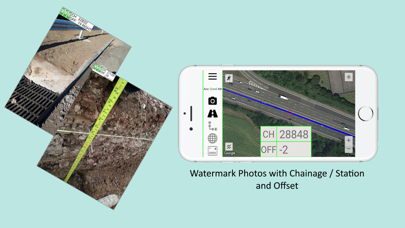
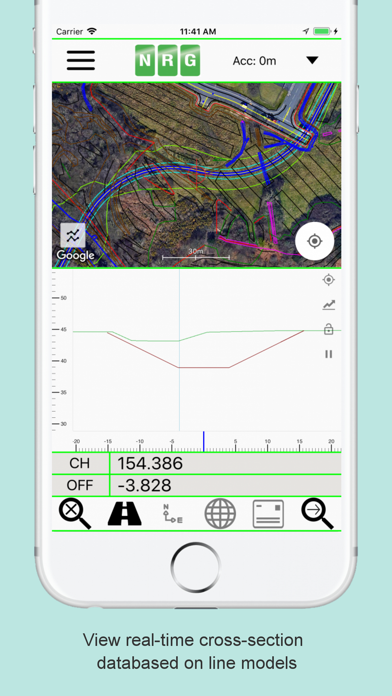
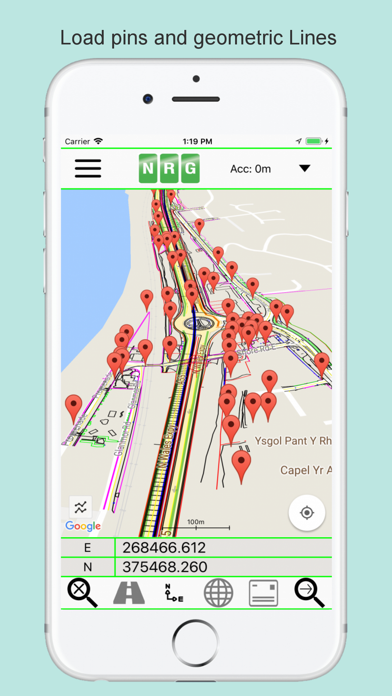
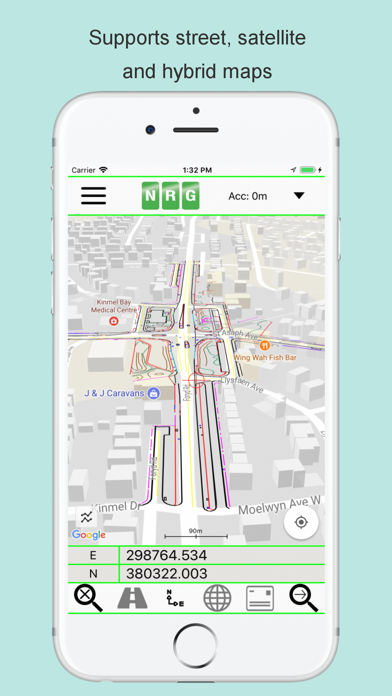
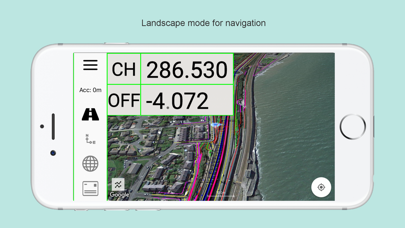
NRG Alignment Viewer is a Civil Engineering tool that allows the display of Geometric alignments, lines, points, cross sections, and the creation of photos watermarked with chainage / station and offset. Designed to assist highway and railway construction/maintenance the NRG Alignment Viewer allows the conversion between Geodetic WGS84/ETRS89 World coordinates (Latitude Longitude) to Cartesian Easting Northing and Geometric Alignment coordinates based on a given transformation. By default Alignment Viewer supports hundreds of different coordinate transformations and allows users to load custom transformations. **Geometric Alignments** Alignments can be loaded by the following methods: Loading an NRG Alignment file(.nst). Importing a LandXML file (.xml) to NRG Alignment file. NRG Alignment Viewer provides support for Geometric Alignments incorporating Curves, Spirals, Clothoids, Parabolas and Straights. Provides support for Alignments using Chainage/Station/Meterage and Offset. **Geometric Pins/Points** Allows the import of pins from Google earth files (.kml), NRG Pin files (.gpf) and ASCII/CVS files (.txt). Pins can be manually placed based on Geodetic, Cartesian EN or Geometric Alignment coordinates. Allows for editing of imported pins. Allows for the export of new Pin files(.kml, .gpf or .txt). **Geometric Lines** Lines can be imported from Google Earth files (.kml). Lines can be loaded to the map, loaded to the cross section or loaded to both. Cross section display colour can be selected for each line file. Provides support for loading multiple line files at once. **Watermarked Photos** Photos can be taken which will then be watermarked with the coordinates of the current location. Watermark coordinates can be displayed in Chainage/Station and offset, Cartesian East North or Latitude Longitude depending on user preference. **Cross sections** Allows the creation of a cross section perpendicular to a given geometric alignment. Cross section can be updated in real-time (Track mode) or on demand (Search mode). Cross section mode supports pausing updates, locking scale / transformation and importing ground elevation data. **Landscape mode** Perfect for placing on your vehicle dashboard NRG Alignment Viewer landscape mode provides clear and real-time updates to the device position in terms of WGS84, Cartesian EN and Geometric Alignments (Chainage/Station/Meterage) coordinates. NRG Alignment Viewer provides many user defined preferences to customise your use of our tool. **Geometric Alignment Configuration Options** Offset display format: -/+ or Left/Right. Alignment distance: Change/Station/Meterage. Alignment format: 10000/10+000. Decimal places display for Alignment/EN. **Map Configuration Options** Enable / Disable real-time map scrolling. Street, Satellite and Hybrid map types. Enable / Disable centre point Crosshair. Enable / Disable distance scale bar. Select scale bar unit of measurement: Imperial/Metric. **Cross Section Configuration Options** Cross section centre Mid-Point or user defined Offset. User defined scale section / Cross section distance. Vertical Exaggeration. Google Elevation segments distance. Enable / Disable Scale bars. **Manual** NRG Alignment Viewer manual can be found at: http://www.nrgsurveys.co.uk/downloads/alignmentviewer.pdf It is strongly recommended that new users view the manual to make full use of the NRG Alignment Viewer.
새로운 소식
Improved app performance for a smoother and faster user experience.
상세 정보
- 개발사
- NRG Surveys Ltd
- 주 카테고리
- Navigation
- 현재 버전
- 3.55
- 버전 출시일
- 2024-10-16
- 최초 출시일
- 2018-01-22
- 용량
- 104 MB
- 연령 등급
- 4+
- 가격
- USD 16.99
- 번들 ID
- com.nrgsurveys.alignmentviewer
- 현재 버전 평점
- ★ 3.71 (7)
- 첫 수집
- 2026-05-29
메타데이터 갱신 2026-06-09
순위 히스토리
무료 기준 · 최대 90일 · 상위 5개 카테고리 표시 (Y축: 순위, 낮을수록 상위)
순위 히스토리 데이터가 없습니다
무료 순위
순위 없음
유료 순위
순위 없음
유저 리뷰
NRG created Alignment Viewer years ago and long before OnStation came onto the market. At an incredible price with no subscription fees, Alignment Viewer provides extremely accurate Station & Offset information from either your location or wherever you place the crosshairs on the screen. This allows you to get the exact same Station/Offset that a GNSS rover would resolve. For example, you can select the end of a nearby pavement marking skip and wheel from there and you’ll be easily within the nearest foot or decimeter. Simply create a project, import your .xml file (the worldwide file format for alignments), choose which alignment you want to work from and you’re ready to go! Another incredible feature is the ability to export your project’s line-work to a Google KML file and load that into your Alignment Viewer project(s) as well. It’s like having a data collector in your pocket. I also love the fact that you can explore a project from the office right on your phone - simply shut off the GPS button on the main screen and use the crosshairs to navigate to a specific station/offset. Alignment Viewer supports projects in what seems like thousands of of coordinate systems including the State Plane systems used in the US. I just finished the oversight of a $160 million roadway project and had all 30 of our inspectors up and running with this app after sending out a single email. This resulted in the projects thousands of daily work reports having incredibly accurate and repeatable location data which made project closeout a breeze. Part of this project included 30 miles of concrete patching. When I compared the concrete patching logs against my Leica GS18 Base/Rover I found his log to be accurate the nearest foot on a vast majority of the 3000 concrete patches we performed. I recall the days when it was hard find “where you were” on a patch log because the stationing was all off by +/-50 Ft and am so glad that headache is a thing of the past. With modern iPhone’s having dual-frequency GNSS, I only need to pull out the survey gear for high precision sub-centimeter work. For everything else Alignment Viewer works just as good. Lastly, keep in mind that OnStation stole this idea from NRG and is charging $1000/year for the same capability with some added gimmicks. Give this app a try before falling into OnStation’s aggressive advertising and sales team’s efforts to significantly overcharge your firm. Support NRG, who in my view is providing this app as a public service. Thank you to NRG for the years of value you have provided to the world’s construction industry!!
This app was phenomenal 4 years ago. But now it crashes continuously. Resulting in deleting the app and uploading the files again and again. It’s a tool I use daily and thankful for when it works. Just very inconvenient. If the app is updated and stops crashing my review will change to a 5 star.
변동(신규 진입·급상승) 감지된 앱에 한해 Apple RSS 최신 리뷰를 수집합니다.