

스크린샷



설명
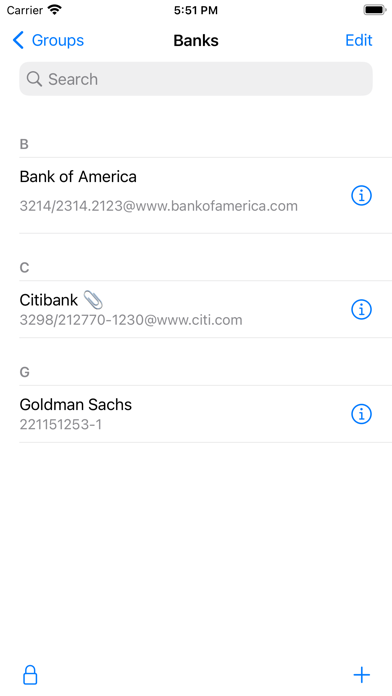
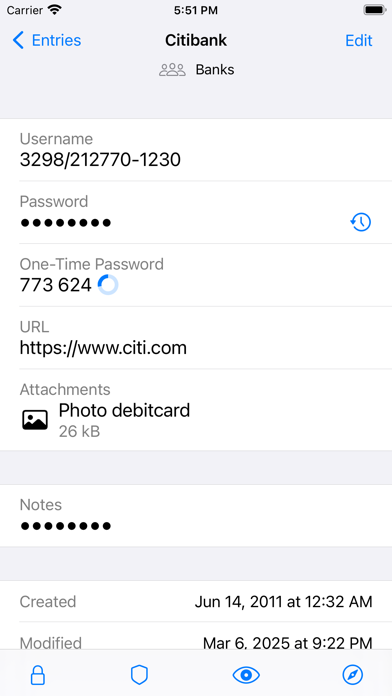
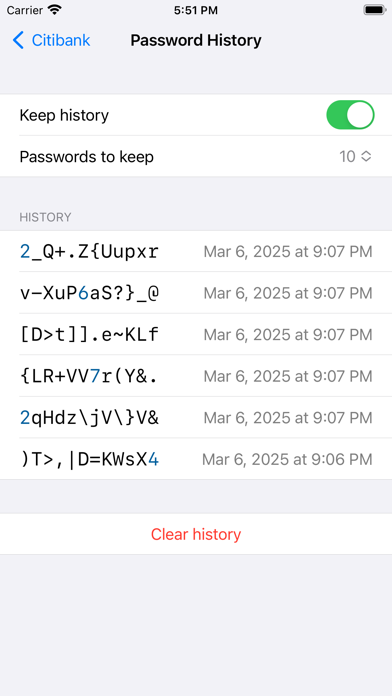
pwSafe 2 offers Dark Mode, Touch ID, Face ID, Safari and apps autofill, iPhone landscape mode, adaptive text, a new design and much more on top of pwSafe 1. Easy, secure and full featured password management across devices and computers. pwSafe uses iCloud or Dropbox to keep your password databases backed-up and synced between your iOS devices and computers. It is compatible with open source Password Safe. No in-app purchases are needed for unlimited usage, including iCloud sync (see below). Now available for the Mac with iCloud Sync - https://itunes.apple.com/us/app/pwsafe-password-safe-compatible/id520993579?mt=12 This application is not related to any application developed and/or marketed by PSafe Tecnologia S/A, including PSafe Total. == What people are saying about pwSafe: ***** "Brilliant! - Passwords in sync at last!" -- Daddio1946 from Australia ***** "Great integration and support - PasswordSafe is great and this app makes it even better! Easy to setup and use. Their support for big fixes is great and the turn around time is short." -- Joeartz from the USA ***** "Very good, better than it's rivals, does what it's supposed to do AND the copy-feature is EX-CELLENT!" -- WaiWera from New Zealand ***** "I highly recommend this app for anyone who has a large number of usernames or hard-to-remember passwords." -- razor11401 from Canada ***** "Excellent tool for multiplatform password storage - Excellent tool that enhances my online security by creating complex and long passwords without the inconvenience of retyping them time and time again." -- AmberTiara from Neaderland == List of features: - TouchID unlocks - Safari and apps autofill (extension) - Smart Pasteboard: tilt your device face down to switch between username and password when using other apps - Can open safes from any cloud service with an iOS 8 Storage Provider Extension - Print a hardcopy of your data - New iPad with Retina display & iPhone 5 support - iCloud sync, realtime and bi-directional - Dropbox sync**, fully automatic and bi-directional - Password generation - Passcode protection - Universal binary - iPad, iPhone and iPod Touch optimized - Compatible with the famous open source Password Safe desktop app - Search all fields - Organize entries in groups - Single tap password copy to clipboard - Single tap password copy to clipboard and open website - Clear password from clipboard after one minute - Multiple fields (title, username, password, URL, email and notes) - Define custom fields - Full unicode support - iTunes file sharing - Receives safes as e-mail attachments (please name your safes with a .psafe3 extension) - Opens safes from Dropbox (free without sync, paid otherwise) - Export to PDF (encrypted, of course) - Password history (per safe and per entry settings) - Named password policies - Fully compatible with Password Safe version 3.31 file format - Multiple safes - Unlimited passwords - Unlimited password groups - Two-factor authentication using YubiKey security token - Generate TOTP authentication codes (two-factor authentication) - Create and use Passkeys for password-free authentication ** Syncing via Dropbox is an In-App purchase. Instead of trusting on a single developer security knowledge, pwSafe borrows all its encryption code directly from the famous Password Safe open source password manager (https://pwsafe.org). Password Safe has been originally created by security guru Bruce Schneier and nowadays is maintained by Rony Shapiro. Since it has been around as an open source project for more than two decades now, it has been extensively reviewed by many experts. Apple’s standard end user license agreement (EULA) applies to the pwSafe app (https://www.apple.com/legal/internet-services/itunes/dev/stdeula/) The (optional) services provided by pwSafe Cloud are subject to our Terms of Use (https://pwsafe.app/terms-of-use/)
새로운 소식
- Fixed a Cloud Memory crash when restoring remembered safe passwords. - Localization improvements.
상세 정보
- 개발사
- Huvisoft B.V.
- 주 카테고리
- Utilities
- 현재 버전
- 12.4.5
- 버전 출시일
- 2026-07-07
- 최초 출시일
- 2014-11-28
- 용량
- 36 MB
- 연령 등급
- 4+
- 가격
- USD 2.99
- 언어
- NL, EN, DE, PT, RU, ES
- 번들 ID
- com.app77.ios.pwsafe2
- 현재 버전 평점
- ★ 4.75 (5,111)
- 첫 수집
- 2026-05-30
메타데이터 갱신 2026-07-19
순위 히스토리
무료 기준 · 최대 90일 · 상위 5개 카테고리 표시 (Y축: 순위, 낮을수록 상위)
순위 히스토리 데이터가 없습니다
무료 순위
순위 없음
유료 순위
경쟁 벤치마크 — Utilities Top 10
이 앱을 이기려면 무엇이 필요한가 — 같은 카테고리 상위권과의 비교입니다. 주황색 행이 현재 앱입니다.
| # | 앱 | 가격 | 평점 | 리뷰 수 | 언어 | 최근 업데이트 |
|---|---|---|---|---|---|---|
| 1 | Shadowrocket | USD 2.99 | ★ 4.48 | 12,076 | 7 | 2026-07-07 |
| 2 | FORScan Lite - for Ford, Mazda | USD 6.99 | ★ 3.02 | 192 | 7 | 2026-05-09 |
| 3 | Wipr 2 | USD 4.99 | ★ 4.69 | 1,225 | 1 | 2026-07-07 |
| 4 | Goblin Tools | USD 2.99 | ★ 4.77 | 2,951 | 1 | 2023-06-23 |
| 5 | Necrophonic | USD 9.99 | ★ 3.75 | 532 | 1 | 2022-06-19 |
| 6 | Noir - Dark Mode for Safari | USD 2.99 | ★ 4.56 | 1,339 | 2 | 2026-06-29 |
| 7 | Stash - Rule Based Proxy | USD 5.99 | ★ 4.36 | 1,196 | 9 | 2026-07-16 |
| 8 | Necrometer | USD 9.99 | ★ 2.75 | 265 | 1 | 2024-11-02 |
| 9 | IONIQ 5 Companion | USD 12.99 | ★ 4.74 | 47 | 9 | 2026-07-09 |
| 10 | Just Press Record | USD 6.99 | ★ 4.25 | 1,519 | 13 | 2026-05-05 |
| 91 | pwSafe 2 - Password Safe | USD 2.99 | ★ 4.75 | 5,111 | 6 | 2026-07-07 |
유저 리뷰
Mar. 27, 2026 update: Over seven years later and still the best. Forget all the details below as it’s gone above and beyond. The new features don’t really jump out — I missed one like Custom Fields until it put up a tip. So seek out the documentation and see why pwSafe 2 is still the best and safest. Oct. 17, 2018 update: The best authentication/secret numbers manager just got even better! Check out the new auto fill capability in iOS 12. Wow. It now sits parallel to Keychain, and in settings you can choose either or both. It now works seamlessly with apps, and even better than using the extension for web sites. It recognizes the app or web site, and recommends a username/password (which is easily changed if you have multiple logins at the same site). Tap once, enter your pwSafe passcode, and sit back as pwSafe auto fills your unique username and your 24-character customized randomly generated password. One more tap and you are logged in. I've tried a lot of the other password managers and this is absolutely the best of show. - - - I used pwsafe on Unix for years, and was very happy to find this file-compatible app for my iPad. Just to compare, I tried about 10 other apps and found none that had the ease of use, the flexibility or the security of pwSafe 2. This app has just the right features — easily defined custom password creation, password history (wonderful when an app refuses your new password) and sufficient fields to enter every situation I have come across with 140 saved password sites. It's also easy to use to securely save credit card or driving license numbers and then paste them instead of typing them. The Notes field is terrific. Groups are very useful. I use the Safari extension to directly fill usernames and passwords into web sites. Fill-in for apps works as well, but very few of them support the emerging de facto method. It's good that it is easy to use because the one thing lacking is respectable documentation. Most of the other password manager apps are lacking here as well. I am very confused by the comments about Dropbox sync not working. I am here to tell you that I use it every day and it works just fine. It is good to not make a subsequent edit until the current one has synchronized. Keep an eye on the network activity spinner. Love this app!
Used to be, you could open up a copy of your database using local file now you can’t now you have to pay and store it on a cloud for a monthly fee zero stars
I filled in an issue and a new update came out in a few days. Great support considering the process of releasing app via App Store. Thank you Richard!!
This is by far the best password program. Runs on many platforms (Windows, Mac, etc) and is easy to use. Been using it for over 2 decades. Would hate to be without it.
Don't waste your money
Have been using PWSafe since the 1st version, both desktop and iOS versions, and at one point, was using DropBox sync until dev added iCloud support and works beautifully accessing between 5 iOS and 6 MacOS. Developer is also super responsive. Any bugs we encounter, we just contact them and either walks us through the problem or publish a bug fix quickly. Love it! Also as a longtime user I really appreciate the fact that the dev has not morphed it into subscription only model like so many other “pro” version apps I purchased, forcing me to abandon and find another. I don’t understand some of the negative reviews commenting on monthly subscriptions, etc since you don’t need to do that at all. Dev is also the most responsive ever since the original dev passed the torch to the new. So take all the negatives with a grain of salt since I suspect they may be confusing with some other app or just assuming without understanding. This is a no-frills Pw manager app. And SIMPLE to use. But supports multiple safes, in addition to categorizing within a single safe file, etc for various use environments as well as generating random codes, simple clipboard pasting, etc. I use it to track my passwords as well as separate safe file to store all my software/app registration keys so I only need to type the 32 character registration codes once and never lose the hard copy and be stuck trying to activate after an SSD crash. I have used this between Mac and Windows PWSafe via Dropbox and works flawlessly (much more difficult if using iCloud.. but that is Apple issue and not PWSafe issue). I am also happy that the app does not force me into using a built in browser…just simple copy onto clipboard with a simple click and go to your favorite browser! My whole family uses it including elderly parents and a 10yr old, who just need something simple to replace all the post-it pads they scribble and try to remember the passwords that frequently get lost. It definitely beats trying to track hundreds of passwords on encrypted spreadsheets, etc thanks to its simple search/copy paste functions. Files are easily accessible in iCloud Drive, so I just routinely back it up along with any other computer files, etc. love it for its simplicity.
When I go into edit mode and copy/paste, it freezes up. Have to force close and the next time I launch it it won’t open. Just sits there with the logo. Have to wait…then open again. This is happening regularly recently. For example, if I want to temp copy a password to the notes field as I am updating information..it happens a lot.
Sometimes it will open my safe in my OneDrive, many times not. Works on iPad but not iPhone. I upgraded to iOS 18.3 and the app is working now.
I’ve been using pwSafe for several years now. We used it to securely share our administrator passwords when I worked IT. I retired, but I hung on to pwSafe. I suggested the username dropdown, it sure makes life easier!
After the update, the app looks and feel incomplete. I have been using this app for a long time. Noticed that I am unable to change the group within the entry, or anywhere else. Does not feel like I have the paying version anymore. If someone from customer support could reach out, that would be greatly appreciated.
변동(신규 진입·급상승) 감지된 앱에 한해 Apple RSS 최신 리뷰를 수집합니다.