

WebComm
🇰🇷 KR LocalizedScreenshots
Description
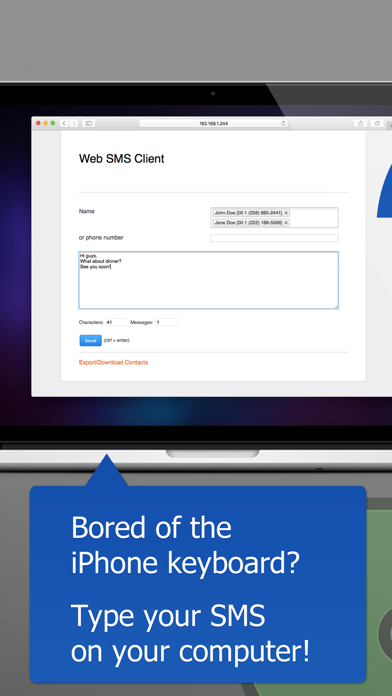
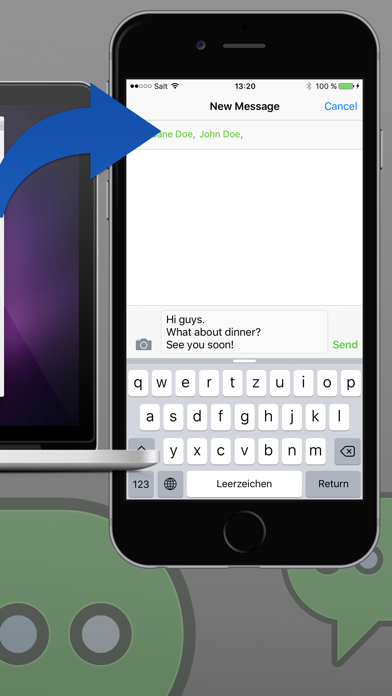
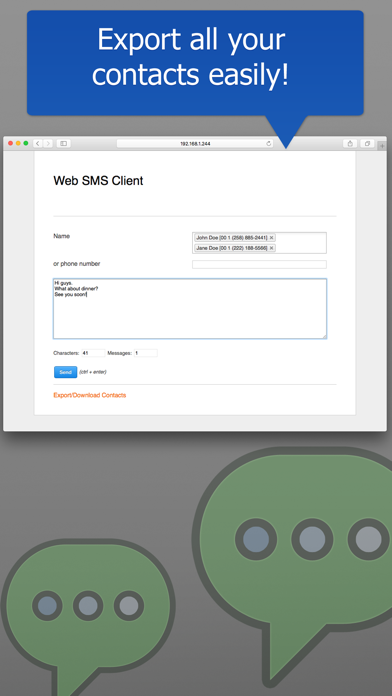
Access your iPhone photos, contacts, and messages from any web browser. Full control of your iPhone data from your Mac or PC. Tired of being tethered to your iPhone screen? Get complete web-based access to your photos, contacts, and text messages - all from the comfort of your computer's browser with a real keyboard. Photo Library Access --------------------------- ▶ Browse your entire iPhone photo library from any web browser: view albums, thumbnails, and full-resolution images. Download photos and videos with custom size and format options (JPEG/PNG). Filter by album and date. Your photos, accessible anywhere. Contact Management --------------------------- ▶ Full web-based access to your iPhone contacts: view, search, add, edit, and delete contacts directly from your browser. Update contact photos with an easy-to-use cropping tool. All changes sync instantly with your iPhone. Export all your contacts to CSV. SMS & Email from Your Browser --------------------------- ▶ Compose and send text messages and emails using your computer's keyboard through your web browser. Access your full address book - no typing phone numbers or email addresses. Send to multiple recipients. No character limit, with message count display for fee control. Your iPhone data is just a browser away. Connect via WiFi and manage everything from your computer. Note: WiFi connection required. SMS sent via your iPhone - standard carrier fees apply.
What's New
● NEW: Calendar & Events - Manage your calendar from your computer View, create, edit, and delete events in month, week, or day views. Access all your iPhone calendars, set event details, locations, and notes. All changes sync instantly with your iPhone calendar. Enable the Calendar feature in Settings for secure access (off by default). ● Photo Browser - Browse and download your iPhone photos from your computer Access your photo library wirelessly from the web interface. Browse albums, view thumbnails and full-resolution images, and download photos to your computer. Choose download size (original, large, medium, small) and format (JPEG/PNG). Videos are supported too—watch in the browser or download. Filter by album and date, use the lightbox for full-screen preview. Enable the Photo Browser in Settings for secure access (off by default). ● Voice-to-Text - Dictate messages using your iPhone's microphone Speak your messages naturally and watch them appear in real-time on your computer. Your iPhone acts as the microphone, so you can dictate from anywhere in the room. Choose from over 100 supported languages, and switch languages even while recording. Perfect for hands-free messaging and multilingual conversations. ● Contact Management - View, edit, and manage your iPhone contacts from your computer Manage all your contacts directly from the web interface: search, add, edit, delete, and update contact photos. All changes sync instantly with your iPhone address book. Enable this feature in Settings for secure access. Thank you for all your feedback! If you miss something, don't hesitate to contact us. Do you like the app? Please leave a review in the app store.
Details
- Developer
- Raphael Odermatt
- Main Category
- Social Networking
- Version
- 2.4
- Version Release
- 2026-02-08
- Initial Release
- 2011-10-13
- Size
- 22 MB
- Age Rating
- 4+
- Price
- USD 4.99
- Languages
- EN, FR, DE
- Bundle ID
- ch.bitcommander.websms
- Version Rating
- ★ 3.75 (8)
- First Seen
- 2026-05-28
Metadata updated 2026-07-19
Rank History
Free · Max 90 days · Top 5 categories shown (Y-axis: rank, lower is better)
No rank history data
Free Rankings
No rankings
Paid Rankings
Competitive Benchmark — Social-Networking Top 10
What it takes to beat this app — comparison with the category's top apps. The orange row is the current app.
| # | App | Price | Rating | Ratings | Langs | Last Update |
|---|---|---|---|---|---|---|
| 1 | Threema. The Secure Messenger | USD 6.99 | ★ 4.27 | 689 | 18 | 2026-07-13 |
| 2 | imo video calls and chat HD | USD 6.99 | ★ 3.35 | 75,078 | 29 | 2026-01-28 |
| 3 | TeleGuard | USD 2.99 | ★ 3.07 | 237 | 26 | 2026-04-17 |
| 4 | Free Tone - Calling & Texting | USD 1.99 | ★ 4.71 | 62,727 | 5 | 2026-07-12 |
| 5 | TeamSpeak 3 | USD 0.99 | ★ 2.49 | 237 | 4 | 2025-11-25 |
| 6 | Friendly Plus Social Browser | USD 0.99 | ★ 4.29 | 4,364 | 12 | 2024-04-09 |
| 7 | Fongo World Edition | USD 4.99 | ★ 4.50 | 980 | 8 | 2026-07-08 |
| 8 | WristChat for Facebook | USD 1.99 | ★ 3.46 | 210 | 1 | 2019-10-07 |
| 9 | iFake - Funny Fake Messages Creator | USD 0.99 | ★ 2.51 | 35 | 1 | 2017-07-17 |
| 10 | World of WIT | USD 0.99 | ★ 3.29 | 52 | 1 | 2024-07-27 |
| 100 | WebComm | USD 4.99 | ★ 3.75 | 8 | 3 | 2026-02-08 |
More by This Developer

User Reviews
Does what I need it to do — use my phone for comms with workers who only use sms. Much easier with this. Thanks to the dev. One suggestion: include a note to users about privacy and the address book permission.
Literally doesn’t work and is the worst dollar ever spent
App does not work!!! Don't bother spending ur money!
This app lets you use a web browser to type the message and populate the text in the iMessages text field for the selected contact.. you still have to hit send. Likely limited by the amount of control we are given of an iOS device.
Works fine on iOS7. Here is what you want: You want to sit at your computer and send and recieve texts without having to take your phone out of your pocket. Here is what this does: It will allow you to choose a contact and type a message. When you click submit it sends the message to your phone where you still have to manually hit send. You can not view recieved messages on your computer. Well, that was a waste of a dollar!
It is extremely simply yet useful. You may improve UI, but the present version is acceptable.
Reviews are collected only for apps with detected changes (new entries or sharp risers).