

스크린샷


설명
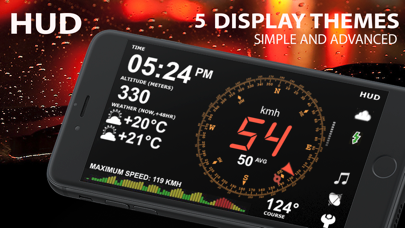
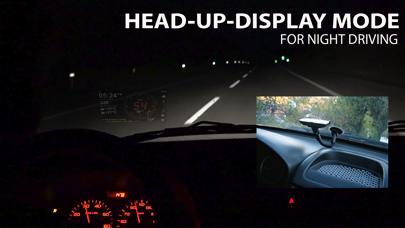
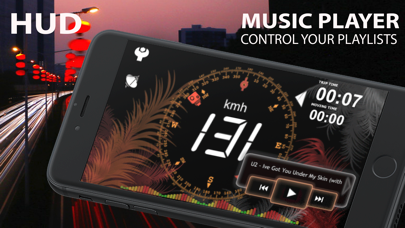
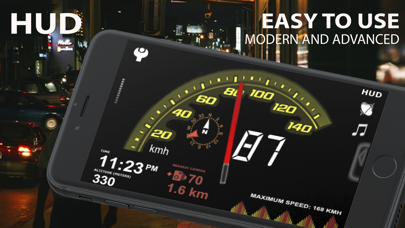
aSmartHUD is simple and clear vehicle digital dashboard featured by - HUD mode - SHORT-TERM WEATHER FORECAST - IPOD MUSIC PLAYLIST CONTROL - PHOTO CAMERA WITH IMAGE MARKING - ADJUSTABLE TRANSPARENCY APPLE MAPS SCREEN It visualizes your - current speed, - average speed, - current time, - elapsed trip time, - heading, - altitude, - trip elapsed time, - distance/time/direction to home location, - weather forecast for nearest 48 hours the with 3-hour time interval, - direct distance (kilometers, miles, nautical miles supported) to the starting point of your trip. - maximum reached speed, altitude and distance to start point, for the current trip and all the trips your ever did. Comparing with others HUD displays on the market - better look and more features for no price. Tapping the "HUD" icon mirrors all the text, so if you position the iPhone horizontally under your car's windscreen you can see perfectly readable half-transparent reflection of the picture displayed. We love this mode! We found it much more convenient compared to traditional car dashboards (especially on the roads of Western Europe, which are full of speed cameras and where you need to watch your speedometer all the time). And last but not the least - it just looks cool. Note: this mode works pretty well at night time and twilight, but on direct sunlight the screen brightness can be insufficient. - "aSmart HUD" can keep track on 4 speed limits, giving a warning (sound and visual) each time you crossing it. Normally, it's legal speed limits within cities, local roads and high-speed motorways. "Never exceed speed" is the speed you should not exceed under any conditions. For example, it can be a technical limit of your vehicle or the point where government can arrest your driving license. - You can skip/rewind/play/pause your current iPod music track, select the playlist or set the Shuffle or Repeat iPod mode. - Weather forecast time intervals and temperature units (C, F) are selectable in Preferences. - You can quickly take a photo of what's going on the road. Photo will be automatically saved into the Photos Album. The speedometer image, map and a some of other useful information will be placed over your photo. - Landscape and Portrait screen layouts support. - Three different compass styles, sound themes, colors, etc. - 4 functionally different display themes. - Speed history log chart. - "Location Info" - longitude and latitude, GPS measurement precision and some more data. - "Records" screen (left upper button on the "Location Info" screen), where you can see your maximum reached speed (during the current trip or all of your trips), maximum altitude and maximum distance from start. - Tap the speed indicator to switch into speed fullscreen mode. IMPORTANT: for more screenshots and details visit the http://atoll-ordenadores.com website Limitations - The precision is affected by the satellite signal quality. If unsure, use the program only for reference, don't rely on it for 100%. Application requires real A-GPS chip - so, no iPod and not-3G iPad supported. On iPad 3G application function only in "double pixel" mode. Thanks to everyone for your suggestions about additional functionality! THE BEST AND FASTEST WAY TO CONTACT US IS SENDING YOUR REQUESTS AND BUG REPORTS to support@atoll-ordenadores.com. WE ARE REALLY INTERESTED IN DIALOG, what is not possible when you leaving the bug-report as AppStore review.
새로운 소식
Simple and clear vehicle digital dashboard with HUD
상세 정보
- 개발사
- Atoll Ordenadores
- 주 카테고리
- Navigation
- 현재 버전
- 12.1
- 버전 출시일
- 2025-01-13
- 최초 출시일
- 2009-02-06
- 용량
- 7 MB
- 연령 등급
- 4+
- 가격
- USD 0.99
- 언어
- EN
- 번들 ID
- com.atoll-ordenadores.smhud
- 현재 버전 평점
- ★ 2.75 (8)
- 첫 수집
- 2026-05-28
메타데이터 갱신 2026-07-19
순위 히스토리
무료 기준 · 최대 90일 · 상위 5개 카테고리 표시 (Y축: 순위, 낮을수록 상위)
순위 히스토리 데이터가 없습니다
무료 순위
순위 없음
유료 순위
순위 없음
이 개발사의 다른 앱


유저 리뷰
GPS신호가 거의 안잡혀서야 어디 쓰겠나
아주 초기 버전에는 아무 문제 없었으나, 아이폰4 + 5.3 이후에는 계속 다운됩니다. 빨리 고쳐주세요.
운행중에 계속 다운되네요-_-
처음에는 잘 되다가 어느순간 버걱대더니 GPS signal을 못 잡아서 3번째 다시 설치했는데 여전히 먹통. 다른 앱들은 정상수신. iPhone4
GPS속도도 내비랑 일치하고 짱입니다 ^^ 단점이라면 야간만 가능하다는..ㅠㅠ근데 외부온도는 어떻게 설정하는건가요?
선팅지에 따라 다르겠지만 잘 보이네요 Gps랑 차랑 속도가 다른 것은 당연한것이죠 국산차는 10% 더 높죠 타이어 계산 없이 사이즈 쓰면 더 높죠
HUD 프로그램중에서 최고입니다. 참고로 편광필름을 자동차 유리에 붙이면 이중으로 보이는 문제가 해결된다고 합니다. 이중으로 보여지는 문제는 자동차 유리의 특성으로 인한 사항이기 때문에 편광필름을 이용하시면 더욱 좋아요~
변동(신규 진입·급상승) 감지된 앱에 한해 Apple RSS 최신 리뷰를 수집합니다.